Pinterest works more like a search engine than a social network. People type in what they want (“small bathroom storage ideas”, “printable meal planner”) and save the Pins that answer it. If your Pins use the words people actually search, they can keep getting found for months.
This guide shows you how to find those keywords with free tools, most of them built into Pinterest, and exactly where to put them: Pin titles, descriptions, alt text, boards and the image itself. Every limit and feature below comes from Pinterest’s own Help Center and creator guides.
Who this is for: bloggers, Etsy sellers and small businesses who already pin, or are about to start. If you haven’t set up your account yet, start with our guide to setting up a Pinterest business account the right way.
Why Pinterest SEO is worth your time
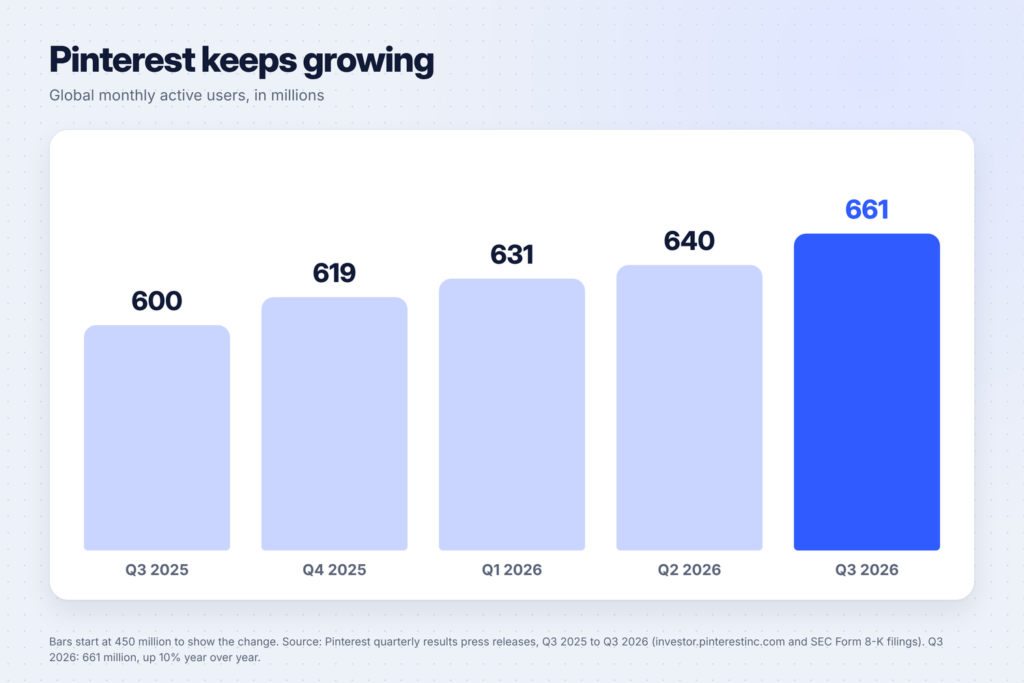
Pinterest is big and still growing. In its third-quarter 2026 results, Pinterest reported an all-time high of 661 million global monthly active users, up 10% from a year earlier.
Most of those people aren’t searching for a brand. Pinterest has said that 96% of top searches are unbranded, meaning people search for things like “fall outfits” rather than a company name (a figure from Pinterest’s own data). That’s good news for small accounts: you don’t need a famous name to show up, you need the right words.
Pinterest explains SEO in its creator’s guide to SEO as helping search engines, “or even Pinterest’s own search”, understand what your content is about “so they can show it to people who are looking for exactly that.”
What makes a good Pinterest keyword
A good keyword has three things:
- People search for it. You can see it in Pinterest’s search suggestions or in Pinterest Trends.
- It matches your content. Your Pin and the page it links to really deliver what the keyword promises.
- It’s specific. “Meal planner” is broad and crowded. “Printable weekly meal planner for families” tells Pinterest exactly who your Pin is for.
Think in three layers:
| Layer | Example | Use it for |
|---|---|---|
| Broad topic | meal planning | Board names, your profile |
| Main keyword | weekly meal planner printable | Pin title, first words of the description |
| Long-tail phrases | budget meal plan for family of 4, meal prep for beginners | Description, alt text, more Pins on the same post |
Pinterest’s board advice makes the same point about being specific: instead of a broad title like “Gift ideas”, try “Gifts for eco-friendly foodies”.
7 free ways to find keywords people actually search
1. Type into the Pinterest search bar
Start where your audience starts. Type your topic into Pinterest’s search bar slowly and write down the suggestions that appear. Pinterest’s search help article says you can type more terms or pick one of the suggestions. Those suggestions come from what people really search.
Try it with letters too: “meal plan a”, “meal plan b” and so on. Each letter brings up a new batch of phrases.
2. Use the guides under your search
After you search, Pinterest shows extra terms near the search bar. Pinterest calls them guides and says they’re designed to help you find what you’re looking for. Clicking one runs a new search with that term added. For “meal planning”, you might see words like “budget”, “healthy” or “printable”. Each one is a long-tail keyword you can write a Pin for.
Write down every guide that fits your content. Then click into it and look at the next set of guides. Two or three clicks deep, you’ll find the very specific phrases most pinners never target.
3. Check Pinterest Trends
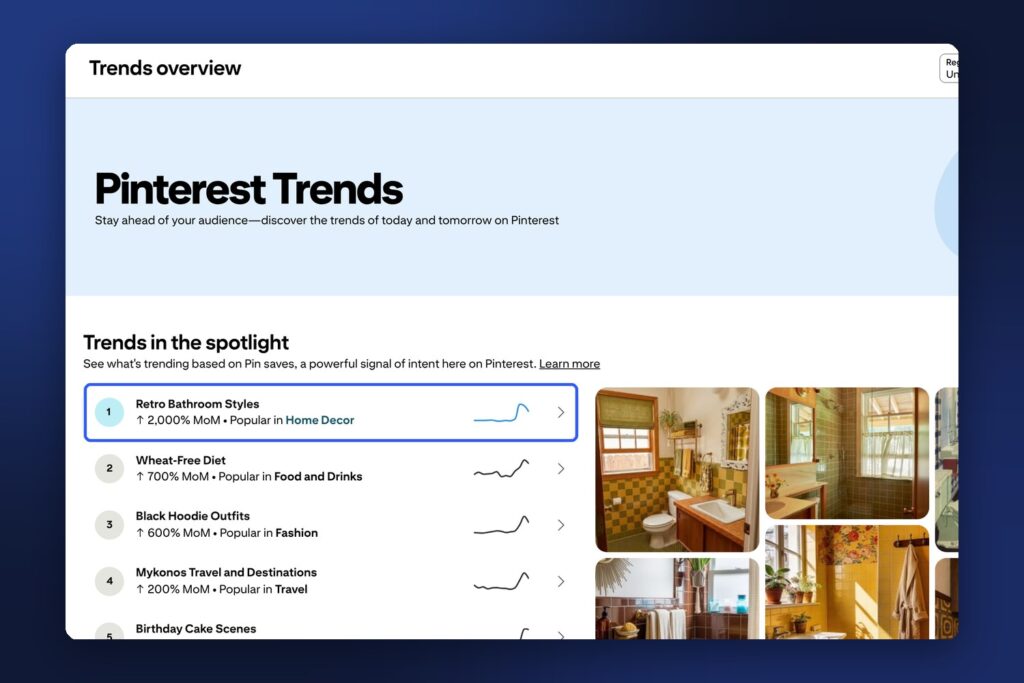
Pinterest Trends is Pinterest’s free keyword tool, and the closest thing it has to search volume. According to Pinterest’s Trends help article, it:
- shows up to the last two years of top search, save and shopping trends in different regions and countries
- lets you see popular keywords, whether a trend is seasonal, and its weekly, monthly and yearly change
- lets you compare up to four keywords on one graph
- shows the age and gender breakdown for each keyword, plus related trends and popular Pins
- shows business accounts the top trends among their own engaged users and followers over the past 90 days
The homepage also highlights trends based on Pin saves, which Pinterest calls “a powerful signal of intent”, and Moments: seasonal events like Christmas and Valentine’s Day that show when interest starts rising.
How to use it: search your main keyword, then add three close alternatives (for example “meal planner”, “meal plan template”, “weekly meal plan” and “meal prep plan”) and see which line is highest. Use the winner in your title and the others in your description.
4. Plan around the season
Pinterest users plan early. Trends shows when searches start to climb, so you can post before the peak, not during it. Look up a seasonal keyword like “Christmas printables” and note the month the line starts rising. That’s when your Pins should be live.
Our own Christmas printables post is a good example of content worth pinning well before December.
5. Look at the words on top Pins
Search your keyword and open the top Pins. Read their titles and the text on the images. You’re not copying them: you’re looking for the words that keep coming up. If eight of the top ten Pins say “printable”, that word belongs in your Pin too.
You can also filter search results by Pins, Boards, Profiles, Videos and Products, according to Pinterest’s search help. Filter by Boards to see how other people name boards on your topic.
6. Borrow keyword ideas from Pinterest Ads
If you have a business account and ever set up an ad, the keyword step in Pinterest Ads Manager suggests related keywords. Pinterest’s keyword targeting help article explains that you can search the keyword bar and add the suggestions you want. Even if you never run ads, those suggestions are worth adding to your keyword list.
7. Ask AI to brainstorm, then check every idea
Pinterest’s SEO guide suggests you can “prompt AI to give you keyword inspiration by describing your content and asking for some common search terms people use in your category.” Copy this prompt into ChatGPT, Claude or Gemini:
I'm creating Pinterest Pins for a blog post about [topic] for [audience].
List 25 search phrases people might type into Pinterest to find this content.
Group them into: broad topics, main keywords (2-4 words) and long-tail phrases (5+ words).
Use plain words people type, not marketing language.
Then check each phrase in the Pinterest search bar. Keep only the ones that appear as suggestions or guides, or show up in Pinterest Trends. AI tools guess; Pinterest’s own data tells you what people really search. If you’re choosing an AI tool, our comparison of ChatGPT, Claude and Gemini plans covers what the free plans can do.

Build a simple keyword list
Keep everything in one spreadsheet or note so you never start from zero. For each blog post or product, write:
| Column | Example |
|---|---|
| Post or product | 50 ChatGPT prompts for meal planning |
| Main keyword | meal planning prompts |
| Long-tail phrases | ChatGPT meal plan, budget meal plan, meal prep for beginners |
| Where you found them | Search suggestions, guides, Trends |
| Season | Peaks in January |
| Pins made | 3 |
One post can get several Pins, each aimed at a different long-tail phrase. For example, a post of ChatGPT prompts for meal planning can have one Pin for “budget meal plan”, one for “meal prep for beginners” and one for “picky eaters dinner ideas”.
Where to put your keywords
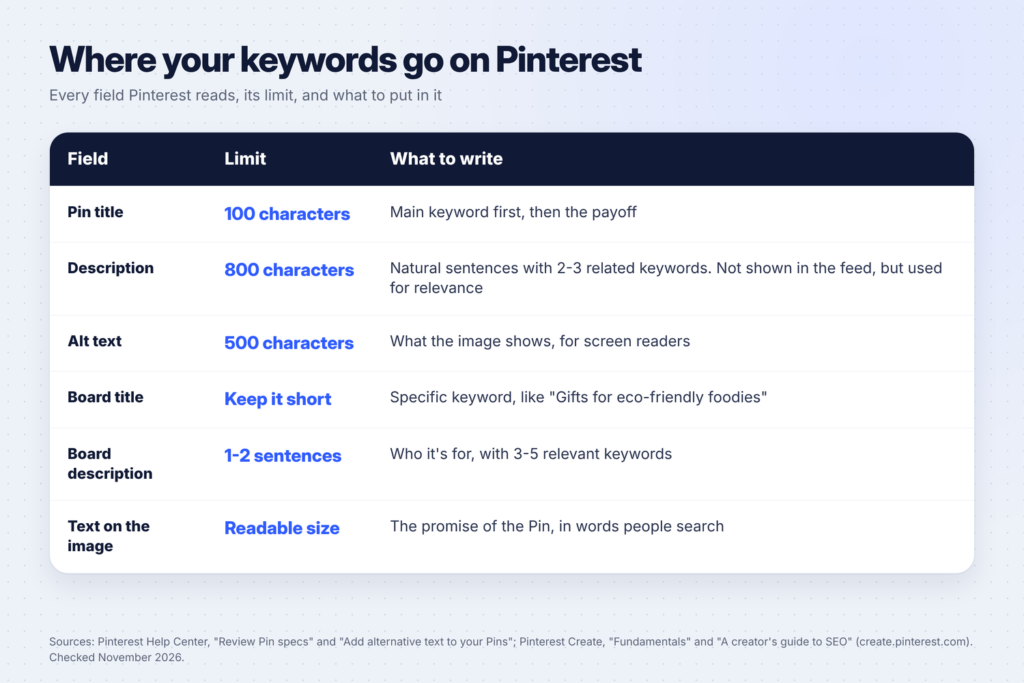
Pinterest’s creator SEO guide says to work keywords into “your titles, descriptions, image names and even your descriptive alt text.” Here’s how, with the limits from Pinterest’s Pin specs page.
Pin title (up to 100 characters)
Put your main keyword near the start. Pinterest’s specs say titles can be up to 100 characters. Long titles can get cut off on small screens, so the first few words matter most. A title like “Weekly Meal Planner Printable: Plan a Week of Dinners in 10 Minutes” puts the keyword first and the payoff second.
Description (up to 800 characters)
Pinterest says descriptions “do not appear when viewing the Pin in the home feed or search feed” but “are used by our algorithm to determine relevance for delivery”. So the description is for Pinterest’s search, not for show. Write one to three natural sentences that use your main keyword and two or three long-tail phrases. Pinterest’s own advice: “write like you would naturally and then look for opportunities to add keywords in after.”
Example:
Plan a week of family dinners in 10 minutes with this free printable weekly meal planner. Includes a budget grocery list, a meal prep checklist and ideas for picky eaters.
Alt text (up to 500 characters)
Pinterest’s alt text help article says alt text descriptions are read to people using screen readers. Describe what the image shows first, then the text on it. Natural keywords fit here because they describe the image honestly.
Boards
Boards show up in search too. Give each one a short, specific keyword title (“Meal Planning Printables”, not “Yum!”) and a one- or two-sentence description that says who it’s for. Pinterest’s fundamentals page suggests 3-5 relevant keywords in a board description.
The image and its file name
Put your keyword in the headline on the image itself, in words people search, and name the file with it too (weekly-meal-planner-printable.png). Pinterest’s SEO guide lists image names among the places to add keywords.
The page you link to
Your Pin should lead to a page that delivers what the keyword promises. If the Pin says “printable meal planner”, the page should have the printable. Our guide to starting a WordPress blog covers setting up the pages your Pins point to.
A full example, start to finish
Say you sell a printable budget planner on Etsy:
- Search bar: typing “budget planner” suggests phrases like “budget planner printable” and “budget planner ideas”.
- Guides: clicking through might add terms like “monthly”, “free” or “aesthetic”.
- Trends: you compare “budget planner”, “budget template”, “monthly budget” and “budget binder” and see which one is highest, and that searches climb in January.
- Keyword list: main keyword “monthly budget planner printable”; long-tail phrases “budget binder printables”, “paycheck budget template”, “budget planner for beginners”.
- Pins: three Pins, one per phrase, all linking to the same listing, scheduled from December.
- Pin 1 title: “Monthly Budget Planner Printable: Track Every Bill on One Page”.
If you’re still choosing what to sell, our list of 50 printable ideas that sell on Etsy is a good place to start.
Common Pinterest SEO mistakes
- Keyword stuffing. A description that’s just a list of keywords reads badly. Pinterest says keywords should be relevant and the tone should stay true to you.
- Clever titles instead of searchable ones. “Dinner, sorted!” is cute, but nobody searches it. “Easy weeknight dinner ideas” gets found.
- Vague board names. “My stuff” and “Ideas” tell Pinterest nothing.
- Skipping alt text and descriptions. Pinterest says descriptions are used to decide who sees your Pin. Leaving them blank wastes the field.
- Posting too late for the season. Check Trends and publish before the line starts climbing.
- Pins that don’t match the page. People who click and don’t find what the Pin promised leave quickly. Make the page deliver.
- One Pin per post, then nothing. A post with five long-tail phrases can have five Pins.
FAQ
What is Pinterest SEO?
Pinterest SEO means using the words people search for on Pinterest in your Pin titles, descriptions, alt text, boards and images, so Pinterest can show your Pins to people looking for exactly that.
How do I find keywords for Pinterest for free?
Use the Pinterest search bar suggestions, the guides under your search results and Pinterest Trends. Pinterest Trends shows popular keywords, weekly, monthly and yearly changes, seasonality and demographics, and lets you compare up to four keywords.
Does Pinterest show search volume?
Not as exact monthly numbers. Pinterest Trends shows how a keyword’s popularity changes over time, its weekly, monthly and yearly change, and how it compares with up to three others on a graph. That’s enough to choose between keywords.
How long can a Pin title and description be?
Pinterest’s Pin specs page lists up to 100 characters for a title and up to 800 for a description. Long titles can get cut off, so put the keyword first.
Should I use hashtags on Pinterest?
Pinterest’s current SEO guidance focuses on keywords in titles, descriptions, alt text and boards, not hashtags. A couple of relevant hashtags at the end of a description won’t hurt, but they’re no substitute for keywords in the text.
Keep going
Put your keywords to work. Set up your account properly with our Pinterest for beginners guide, find products worth promoting in 50 digital product ideas for beginners, and turn the same ideas into short videos with how to make faceless Reels with AI in 15 minutes.