
Every self-hosted WordPress blog needs a web host: the company whose servers store your site and show it to visitors. For a new blog, the choice is simpler than the ads make it look. You need a host that runs WordPress well, includes the basics (SSL, backups, a domain), and won’t triple in price when your first term ends.
This guide compares the entry plans new bloggers actually buy, using the prices and features each host publishes on its own pricing page. We also show you the one number most hosting reviews skip: what you’ll pay when the cheap first term renews.
Who this is for: beginners starting their first WordPress blog who want to choose hosting once and not regret it. If you haven’t decided on WordPress yet, our step-by-step guide to starting a WordPress blog explains the setup from start to finish.
A note on prices: all prices below were checked on each host’s website on 7 November 2026, during Black Friday sales, in US dollars and before tax. Hosting prices change often, so check the live price before you buy. Buildfloow may earn a commission if you buy through some links on this site, at no extra cost to you. It doesn’t change what we recommend.
What a new blogger actually needs from a host
You don’t need the most powerful plan. A brand-new blog gets very little traffic in its first months. What you do need:
- WordPress support. WordPress.org’s requirements page recommends PHP 8.3 or greater, MySQL 8.0 or greater (or MariaDB 10.11 or greater) and HTTPS support. Every host in this guide sells plans built for WordPress.
- A free SSL certificate, so your site loads over HTTPS. Browsers warn visitors about sites without it.
- Backups, so one bad plugin update can’t wipe out months of writing.
- A fair renewal price. This matters more than the intro price, because you’ll pay it for years.
- Enough storage and room to grow: 10 GB or more is plenty for a text-and-photo blog at the start.
- Helpful support and a money-back window, in case you change your mind.
Self-hosted WordPress vs WordPress.com
There are two kinds of WordPress, and they’re easy to mix up:
- WordPress.org software on a web host (Hostinger, SiteGround, DreamHost, Bluehost and others). You install free WordPress software on hosting you rent, and you control everything: themes, plugins, ads, affiliate links.
- WordPress.com, a hosted service run by Automattic. You don’t manage a server; WordPress.com does it for you. Its pricing page lists plugin support (“Install any of over 60,000 plugins”) on its paid plans, starting with Personal.
Both can run a successful blog. The difference is how much control you want and how much technical work you’re willing to do.
Entry WordPress plans compared
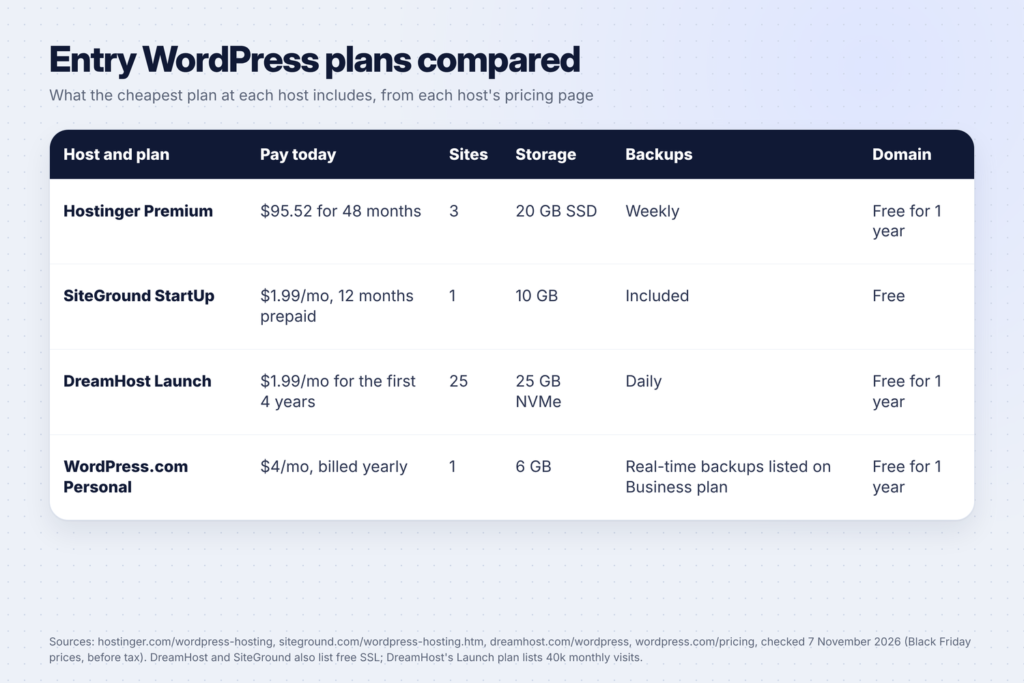
Here’s what the cheapest WordPress plan includes at each host, according to each host’s own pricing page:
| Host and plan | Intro price | Renews at | Intro term | What’s included |
|---|---|---|---|---|
| Hostinger Premium | $1.99/mo ($95.52 today) | $10.99/mo | 48 months | 3 websites, 20 GB SSD, weekly backups, free domain for 1 year |
| SiteGround StartUp | $1.99/mo | $17.99/mo | 12 months prepaid | 1 website, 10 GB, free domain, free SSL, CDN and backups |
| DreamHost Launch | $1.99/mo | $7.99/mo | First 4 years | 25 websites, 25 GB NVMe, 40k monthly visits, daily backups, free SSL, free domain for 1 year |
| WordPress.com Personal | $4/mo, billed yearly | $5/mo | 12 months | 6 GB storage, free domain for 1 year, plugins |
Hostinger and DreamHost both list a 30-day money-back guarantee on their pages, and WordPress.com advertises a “no-questions-asked refund policy”. Read each host’s refund terms for what’s covered before you buy.
The best hosts for new bloggers
Hostinger: best for a low price over a long term
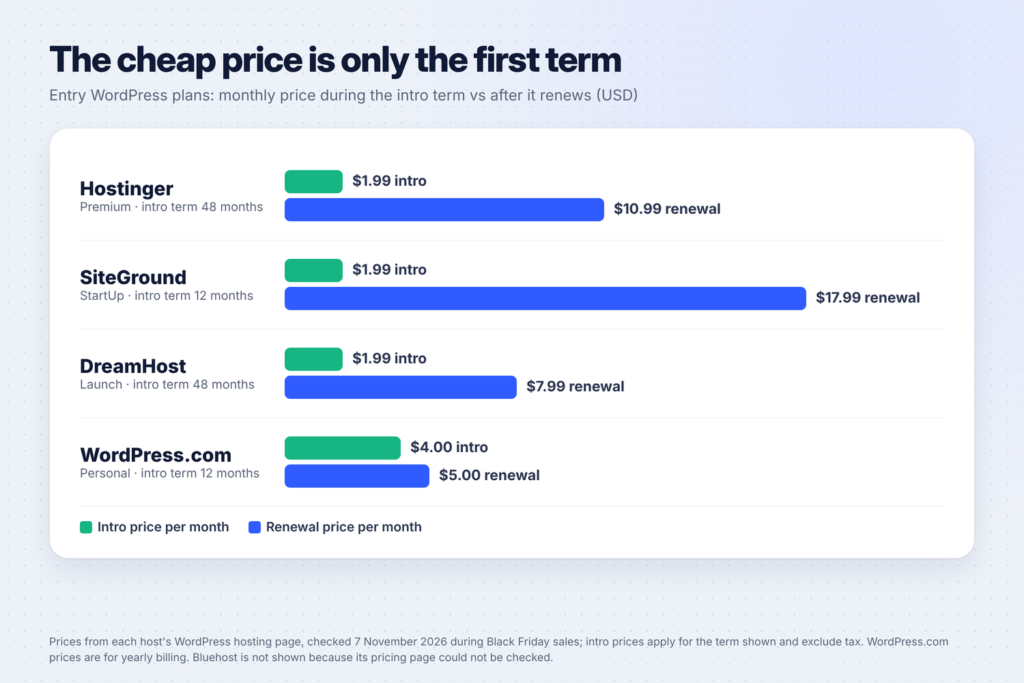
Hostinger’s Premium plan was $1.99 a month on a 48-month term when we checked, which meant paying $95.52 upfront, then $10.99 a month on renewal. It includes 3 websites, 20 GB of SSD storage, free weekly backups and a free domain for the first year.
Hostinger is also one of the hosts listed on WordPress.org’s recommended hosting page, which describes its managed WordPress hosting with a free domain, business email, built-in CDN, automated backups and free migrations.
Good for: bloggers who are sure they’ll keep going for a few years and want the lowest total cost. Watch out for: the long term. Four years upfront is a big commitment for a blog you haven’t started yet.
DreamHost: best renewal price
DreamHost’s Launch plan stood out for its renewal price. At $1.99 a month for the first 4 years and $7.99 a month after that, it renewed lower than any other self-hosted plan we checked. It lists 25 websites, 40k monthly visits, 25 GB of NVMe storage, daily automated backups, unlimited free SSL certificates and a free domain for one year.
Good for: bloggers who care about the long-term price and might start a second site later. Watch out for: email. DreamHost’s page says the WordPress Hosting plans include a three-month email trial, then email is billed separately.
SiteGround: best for hands-off WordPress tools
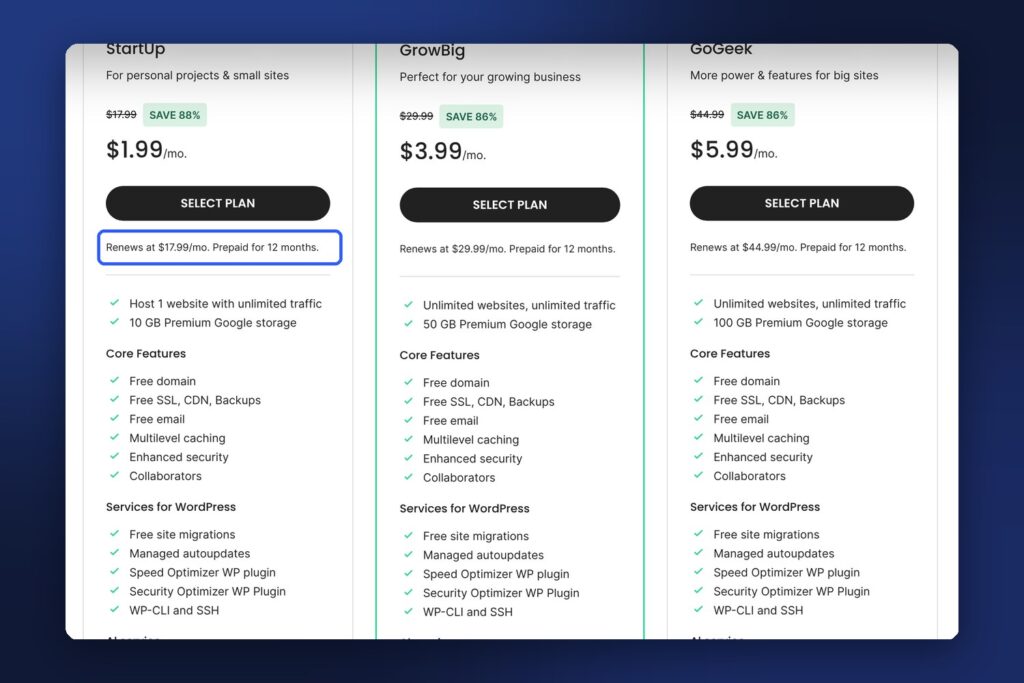
SiteGround’s StartUp plan was $1.99 a month, prepaid for 12 months, then $17.99 a month on renewal: the biggest jump of the plans we checked. In return, the plan includes free SSL, CDN and backups, a free domain, free email, free site migrations, managed automatic updates and SiteGround’s own speed and security plugins.
Good for: bloggers who want lots of WordPress tools handled for them and can budget for the renewal. Watch out for: the 1-website limit on StartUp and the renewal price after year one.
WordPress.com: best if you never want to manage hosting
WordPress.com’s Personal plan was $4 a month billed yearly, renewing at $5 a month, with 6 GB of storage and a free domain for the first year. Its pricing page lists plugin installs on Personal and higher plans. Higher plans (Premium at $8 a month and Business at $25 a month, billed yearly) add things like payment buttons, more storage, priority support and, on Business, real-time backups.
Good for: writers who want to focus on writing and never touch server settings. Watch out for: storage. 6 GB is less than the self-hosted plans above, and photo-heavy blogs fill it faster.
Bluehost: a long-time WordPress.org recommendation (check the live price)
Bluehost is described on WordPress.org’s hosting page as “WordPress.org’s longest running recommended host”, with WordPress pre-installed, a free domain name, email, SSL and a built-in CDN. We couldn’t verify Bluehost’s current prices: its pricing pages showed a security check that blocked our automated check in November 2026. If you’re considering Bluehost, look at the renewal price and term length on its live pricing page, and compare them with the table above.
How to read hosting prices without getting caught out
Hosting companies advertise the lowest number they can. Before you pay, check these five things:
- The renewal price. It’s usually in small text under the plan, like “Renews at $17.99/mo.” That’s what you’ll pay from your second term on.
- The term length. $1.99 a month often means paying for 1-4 years upfront. Hostinger’s 48-month Premium plan was $95.52 on the day.
- What’s free for only one year. Domains and email are often free for the first year, then charged separately.
- Tax. Prices on pricing pages usually exclude tax.
- Add-ons at checkout. Hosts often pre-tick extras. Untick anything you don’t need.
A quick way to compare: work out the cost of your first three years. For example, DreamHost Launch at $1.99 a month for 36 months is about $72, before tax, if you take the 4-year term. SiteGround StartUp is $23.88 for the first year, then $17.99 a month, so about $456 over three years if it renews at that rate. Your own numbers depend on the term you pick.

When your blog grows: the next plan up
You don’t need to buy a bigger plan on day one, but it helps to know what the upgrade costs. Here is the next plan at each host, from the same pricing pages:
| Next plan | Intro price | Renews at | What you gain |
|---|---|---|---|
| Hostinger Unlimited | $133.92 for 48 months (about $2.79/mo) | $16.99/mo | Unlimited websites, 50 GB NVMe storage, daily backups with easy restore |
| SiteGround GrowBig | $3.99/mo, 12 months prepaid | $29.99/mo | Unlimited websites, 50 GB storage, on-demand backups, staging |
| DreamHost WordPress Hosting Growth | $3.49/mo for the first 4 years | $8.99/mo | 50 websites, 200k monthly visits, 50 GB NVMe storage |
| WordPress.com Premium | $8/mo, billed yearly | $9/mo | 13 GB storage, payment buttons, video uploads |
Two signs it’s time to upgrade: your site feels slow even after you’ve compressed your images and removed plugins you don’t use, or you’re about to start a second site on a plan that allows only one. Staging, which SiteGround includes from GrowBig, is also worth having once your blog earns money: it lets you test a theme or plugin update on a copy of your site before it goes live.
Which one should you pick?
| If you… | Pick | Why |
|---|---|---|
| Want the lowest long-term price | DreamHost Launch | Lowest renewal price of the plans we checked |
| Will commit for several years | Hostinger Premium | Low price locked for 48 months |
| Want WordPress tools handled for you | SiteGround StartUp | Managed updates, speed and security plugins |
| Never want to manage hosting | WordPress.com Personal | No server to manage, plugins on paid plans |
Not sure yet? Pick the plan with the shortest term you can afford, so you’re not locked in for four years before your first post. Once you’ve published 20-30 posts and know you’ll keep going, a longer term often saves money.
Setting up your blog after you buy hosting
Once your hosting is ready:
- Install WordPress by following your host’s WordPress setup steps.
- Connect your domain and check that your site loads with HTTPS.
- Choose a simple, fast theme and set up the basic pages: About, Contact and Privacy Policy.
- Publish your first posts. Our guide to starting a WordPress blog walks through every step.
- Bring in your first readers. Pinterest is one of the best free traffic sources for new blogs: see Pinterest SEO: how to find keywords people actually search.
Need help writing? Our comparison of ChatGPT Plus, Claude Pro and Gemini covers which AI plan helps most with outlines and editing.
Common hosting mistakes new bloggers make
- Buying the biggest plan. A new blog doesn’t need unlimited sites or 100 GB of storage. Start small and upgrade when your traffic grows.
- Ignoring the renewal price. It’s the price you’ll pay for most of your blog’s life.
- Paying for four years before writing a word. Make sure you enjoy blogging first.
- Skipping backups. If your plan only has weekly backups, add a backup plugin too.
- Forgetting the domain renewal. A free domain for one year still needs paying for in year two.
- Choosing a host only because a blogger promised it’s “the best”. Many hosting reviews earn commissions (ours included, on some links). Check the host’s own pricing page, as we did here.
FAQ
What is the cheapest web hosting for a new blog?
Of the plans we checked on 7 November 2026, Hostinger Premium, SiteGround StartUp and DreamHost Launch all started at $1.99 a month during Black Friday sales. DreamHost Launch had the lowest renewal price, at $7.99 a month after its first four years.
Is free hosting good enough for a blog?
Free plans can work for practice, but they usually limit what you can do with plugins, ads and your own domain. If you plan to earn money from your blog, paid hosting with your own domain gives you full control.
Do I need a domain name with my hosting?
Yes. All four hosts in this guide list a free domain with their entry plans, for the first year in most cases. Check how much the domain renews for in year two.
Can I switch hosts later?
Yes. SiteGround lists free site migrations on its plans, and WordPress.org’s hosting page says Hostinger offers free unlimited migrations, so moving your blog later doesn’t mean starting over. It’s easiest to move while your blog is small.
Is WordPress.com the same as WordPress.org?
No. WordPress.org is free software you install on your own hosting. WordPress.com is a hosted service where WordPress.com runs the hosting for you. Both use WordPress, but WordPress.com manages the technical side for you.
Keep going
Once your hosting is set up, follow our WordPress blog setup guide, learn how to get readers from Pinterest, and find ways to earn from your blog in 50 digital product ideas for beginners.