
There are two kinds of places to sell a video course. Marketplaces like Udemy and Skillshare bring you students but keep a big share of the money and set the rules. Course platforms like Teachable and Kajabi give you control and most of the revenue, but you have to bring every student yourself.
Neither is better. They suit different stages. A first course with no audience behind it often does better on a marketplace. A course sold to an email list or a social following earns far more on your own platform.
Below are 10 platforms, what each one pays and who it suits. Fees and prices change often, so I’ve linked to the official pages where I could and dated anything that moves. Check the current numbers before you sign up.
Marketplaces: they bring the students
1. Udemy
Udemy is the biggest course marketplace, with a huge catalog in tech, business, design and personal development. You set a list price, but Udemy runs frequent sales, so many courses sell for much less than the list price.
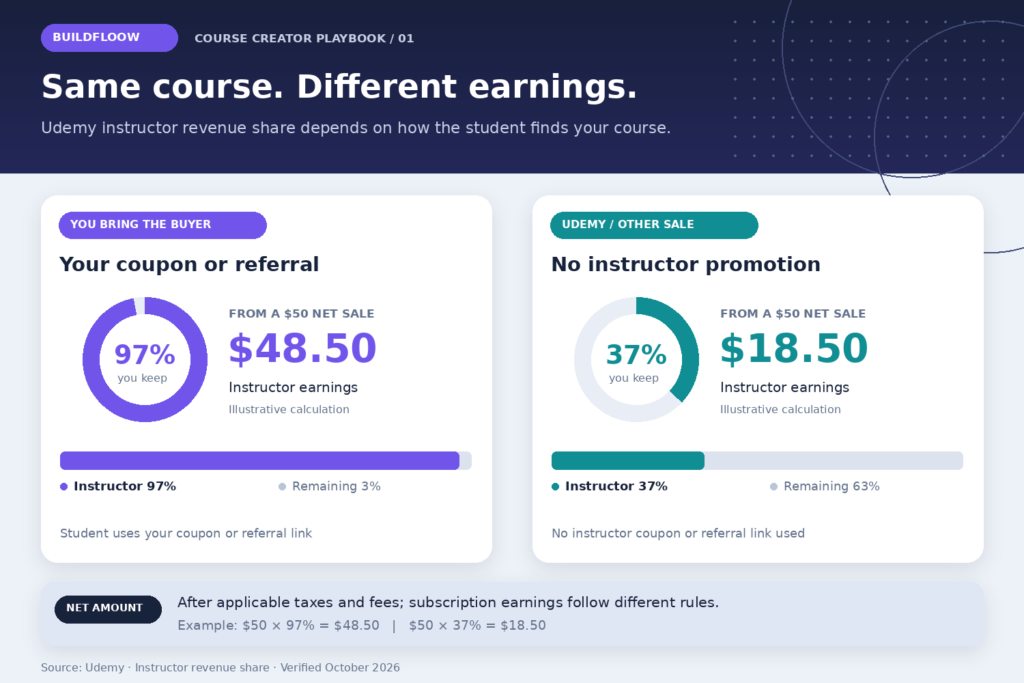
The revenue split depends on who found the student. According to Udemy’s instructor revenue share page, you keep 97% of the net amount when a student buys through your own coupon or referral link, and 37% when Udemy brings the sale. That gap matters. Instructors who promote their own coupons to an audience earn far more per sale.
Best for: a first course on a skill people search for, like Excel, Python or Canva.
2. Skillshare
Skillshare works on subscriptions. Students pay a membership fee and watch any class. Teachers are paid from a monthly Teacher Fund based on how many minutes of their classes members watch. According to Skillshare’s help center, as of July 2026 you need at least 50 followers and a minimum amount of qualifying watch time each month to be paid.
Best for: short, creative and practical classes, such as illustration, photography, Procreate or productivity. Many short classes tend to do better here than one long course.
3. LinkedIn Learning
LinkedIn Learning doesn’t let anyone upload a course. You apply to become an instructor, and LinkedIn decides which topics it wants. If accepted, you work with their production team. It’s selective, but it puts your name in front of professionals and companies.
Best for: experienced professionals in business, tech and creative fields who want credibility as much as income.
4. Domestika
Domestika focuses on creative skills like illustration, design, crafts and photography, with polished, studio-quality classes. Teachers usually apply and are selected, and the platform has a large audience in Spanish and English.
Best for: artists and designers with a strong portfolio.
Course platforms: you bring the students
These platforms host your course, take payments and give you a student list. You keep most of the revenue, but nobody will find your course unless you send them there.
5. Teachable
Teachable is one of the oldest course platforms and is easy for beginners. As of April 2026, Teachery’s pricing comparison listed its cheapest paid plan at $39 a month with a 5% transaction fee, dropping to 0% on higher plans.
Best for: a first course on your own platform, especially if you’ll sell to an existing audience.
6. Thinkific
Thinkific is similar to Teachable, with strong course-building tools such as quizzes, certificates and communities. The same April 2026 comparison listed its cheapest paid plan at $49 a month with no transaction fees.
Best for: course creators planning several courses and a student community.
7. Kajabi
Kajabi is an all-in-one platform: courses, website, email marketing, sales funnels and community in one place. It costs more than the others, with plans listed from $89 a month in April 2026, but it can replace several other tools.
Best for: creators who already make sales and want everything in one place.
8. Podia
Podia keeps things simple. It lets you sell courses, digital downloads, webinars and memberships from one storefront. Its starter plan is cheaper than most, with a transaction fee on the lowest tier.
Best for: creators who want to sell a course alongside PDFs and templates.
Simple storefronts and live cohorts
9. Gumroad and Stan Store
Gumroad and Stan Store weren’t built only for courses, but both let you sell video lessons alongside other digital products. Gumroad takes a cut of each sale rather than charging a monthly fee, which suits beginners. Stan Store is built for selling from a link in your Instagram or TikTok bio and charges a monthly subscription.
Best for: a short mini-course sold to a social media audience.
10. Maven
Maven hosts live, cohort-based courses, where a group of students go through the material together over a few weeks with live sessions. Cohort courses can charge much more than recorded ones, often several hundred dollars, because students get direct access to the instructor.
Best for: experts with real professional experience who enjoy teaching live.
Quick comparison
| Platform | Type | Who brings students | How you’re paid |
|---|---|---|---|
| Udemy | Marketplace | Udemy or you | 37% or 97% of net, depending on source |
| Skillshare | Subscription marketplace | Skillshare | Share of Teacher Fund by minutes watched |
| LinkedIn Learning | Curated marketplace | Set by agreement | |
| Domestika | Curated marketplace | Domestika | Set by agreement |
| Teachable | Course platform | You | Your price, minus plan and fees |
| Thinkific | Course platform | You | Your price, minus plan |
| Kajabi | All-in-one | You | Your price, minus plan |
| Podia | Course and products | You | Your price, minus plan and fees |
| Gumroad / Stan Store | Storefront | You | Your price, minus fees or plan |
| Maven | Live cohorts | Mostly you | Your price, minus Maven’s share |
Which one should you start with?
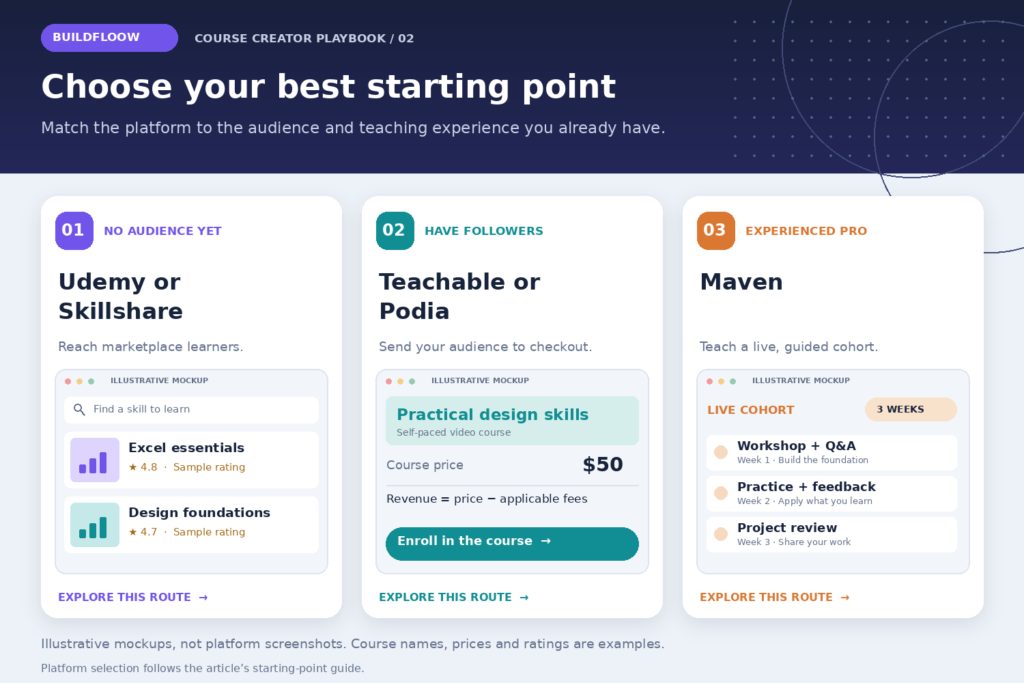
You have no audience yet: start on Udemy or Skillshare. You’ll earn less per student, but you’ll learn what people want and collect reviews. Use the course to build a following, then move your best students to your own platform later.
You have 1,000 or more followers or email subscribers: start on Teachable, Thinkific or Podia. You’ll keep most of the money, and every buyer joins your own list.
You’re an experienced professional: look at Maven or LinkedIn Learning. Your experience is what students pay for, and those platforms let you charge for it.
A common plan is to do both. Put a short beginner course on Udemy to attract students, then sell an advanced course on your own platform to the ones who want more.
Making the course itself
You can plan and script a course with AI in a few days. The outline, the scripts, the quizzes and the worksheets can all be drafted with ChatGPT or Claude, and then you record.
If you’d rather not appear on camera, you can record your screen with a voiceover, or use an AI avatar. Tools like HeyGen can create an on-screen presenter from your script.
If you’re not ready for video at all, start with a PDF guide on the same topic. It’s quicker to make and tells you whether people will pay.
FAQ
Can I sell the same course on Udemy and my own platform?
Generally yes, but read each platform’s terms first, especially on pricing and exclusivity. Many instructors make a shorter version for Udemy and keep the full version on their own site.
How long should my first course be?
Shorter than you think. One to two hours of focused video that gets students to one result is better than ten hours that wanders. You can always add a second course later.
Do I need expensive equipment?
No. A decent USB microphone matters more than the camera. Most people will forgive average video, but bad audio makes them stop watching.
More ideas
To sell your course without paying for ads, start with free channels like Pinterest, YouTube and your own email list.