Starting a blog is still one of the best ways to build something you own online. Social media accounts can be suspended, and algorithms change overnight. A blog on your own domain is yours: your words, your readers, your email list, and every product or affiliate link you choose to add.
The good news is that you don’t need to code. WordPress handles the technical side, and most of the setup is clicking through settings. The hard part is making good choices at the start so you don’t have to fix them later.
This guide walks you through every step in order: choosing a niche and a name, domain and hosting, installing WordPress, the settings most beginners miss, themes, plugins, essential pages, your first posts, and how to get your first readers.
Who this is for: complete beginners who want a blog that can grow into a real business. Once your blog is live, our guide to setting up a Pinterest business account shows you how to bring in your first visitors.
Why WordPress?
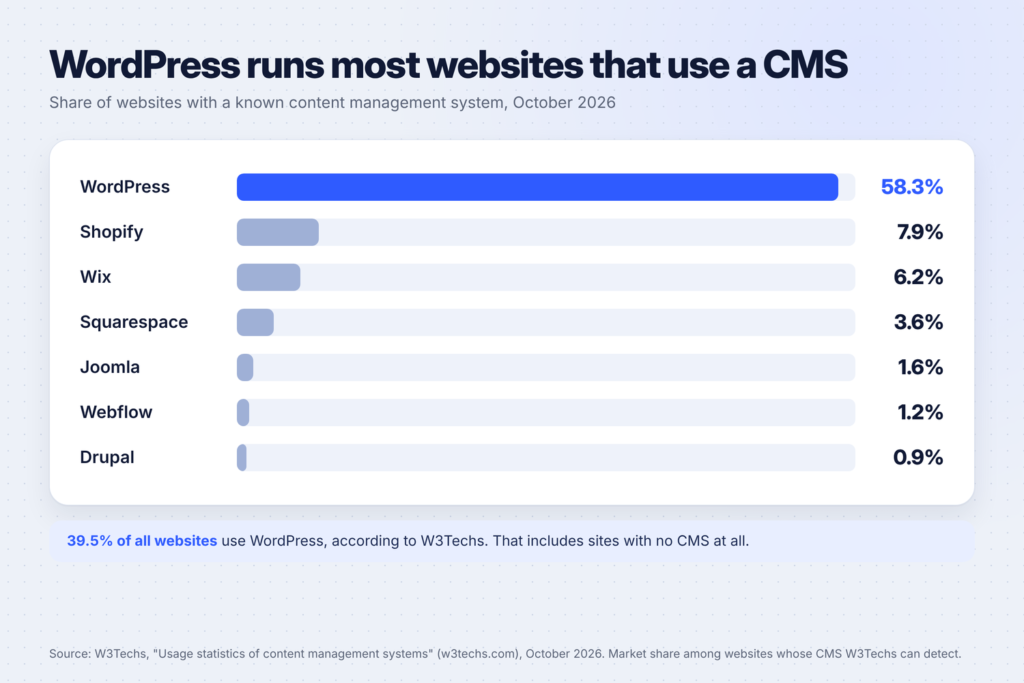
WordPress is the most widely used way to build a website. According to W3Techs, WordPress is used by 39.5% of all websites, and holds 58.3% of the market among websites whose content management system it can detect. Shopify is a distant second at 7.9%, followed by Wix at 6.2%.
That popularity matters for a beginner. It means:
- Help is everywhere. Almost any question you have has already been answered in a forum, tutorial or video.
- Plugins exist for nearly everything, from SEO to contact forms to email sign-ups.
- You can move hosts if you outgrow yours, because WordPress runs on most hosting companies.
- You own your content. You can export it, back it up and take it with you.
WordPress.com vs WordPress.org: which one?
This confuses almost everyone at first. Both run the same WordPress software. WordPress.com’s own support article on the difference between WordPress.com and WordPress.org explains that the main difference is hosting:
| WordPress.com | WordPress.org (self-hosted) | |
|---|---|---|
| Hosting | Included, managed for you | You choose and pay a hosting company |
| Updates, backups, security | Handled for you | You (or your host) handle them |
| Plugins and themes | Depend on your plan | Any you want |
| Support | Forums, plus staff support on paid plans | Community forums and your host’s support |
Which should you choose? If you want full control, the widest choice of themes and plugins, and the freedom to monetize however you like, self-hosted WordPress (WordPress.org) is the usual choice for blogs that are meant to make money. That’s what this guide covers. If you’d rather have someone else manage everything, WordPress.com is a simpler start.

Step 1: Choose your niche and your blog’s name
Your niche is the topic your blog covers and the people it helps. A good niche is specific enough that readers know what to expect, and broad enough that you can write 100 posts about it.
Ask yourself:
- Who is it for? “Busy parents who want healthy dinners” is clearer than “food.”
- What problems will you solve? List 20 questions your readers ask. If you can’t think of 20, the niche may be too narrow.
- How could it earn money later? Affiliate products, your own digital products, services or sponsorships all need an audience with a clear need.
- Would you enjoy writing about it in a year? Consistency matters more than anything else in blogging.
For the name, choose something short, easy to spell, and not tied to a single topic you might outgrow. Check that the .com domain is available and that the matching name is free on Pinterest and Instagram before you commit.
Here’s a prompt to brainstorm with ChatGPT or Claude:
I want to start a blog about [topic] for [audience].
1. Suggest 5 narrower niche angles with a clear reader and problem.
2. For each, list 20 blog post ideas people actually search for.
3. Suggest 10 short, brandable blog names that aren't tied to one subtopic.
4. Point out any angle that looks too crowded or too small.
Don't invent search volumes or income numbers.
Then check the domain names yourself. AI can’t see which domains are available.
Step 2: Get a domain and hosting
You need two things:
- A domain name: your address, like buildfloow.com. You buy it from a domain registrar (many hosts sell them too) and renew it every year.
- Hosting: the server where your WordPress site lives. You pay a hosting company monthly or yearly.
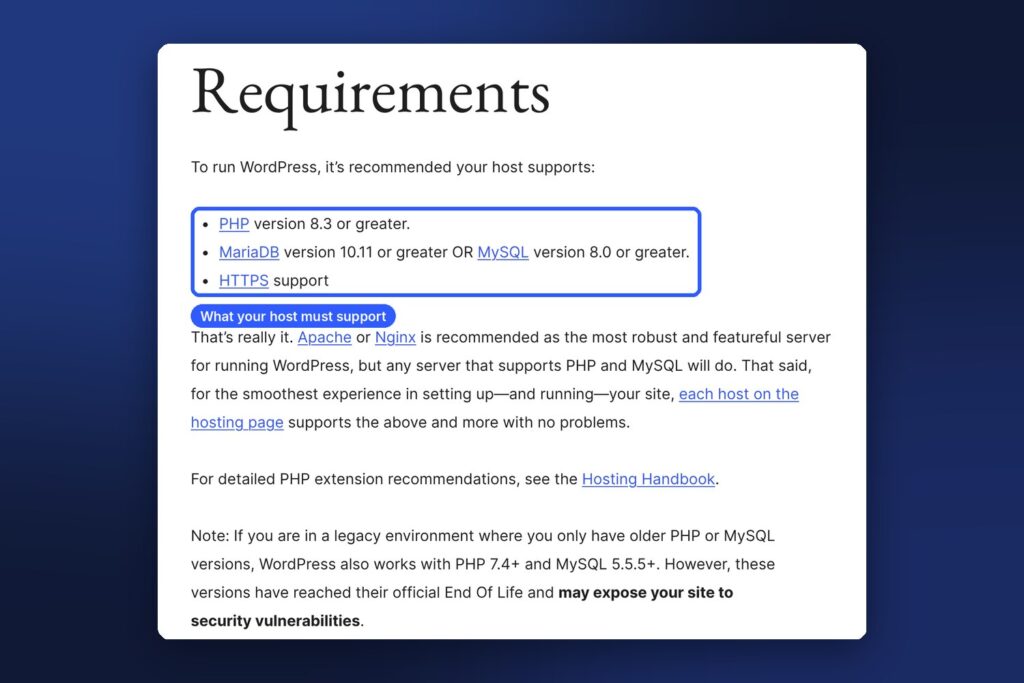
WordPress.org lists its hosting requirements: PHP version 8.3 or greater, MariaDB 10.11 or greater or MySQL 8.0 or greater, and HTTPS support. Any reputable host that advertises WordPress hosting will meet these, but it’s worth checking. WordPress.org also keeps a list of recommended hosts.
When comparing hosts, look for:
- One-click WordPress installation, so you don’t have to install it by hand.
- Free SSL (HTTPS) included.
- Automatic daily backups you can restore yourself.
- Good support that answers quickly, ideally around the clock.
- The renewal price, not only the first-year discount. Many hosts offer a low first term and a higher price when you renew.
A basic shared hosting plan is enough for a new blog. You can upgrade when your traffic grows.
Step 3: Install WordPress
Most hosts install WordPress for you, either during sign-up or with a one-click installer in your hosting dashboard. You’ll choose:
- Your site title (you can change it later).
- An admin username. Avoid “admin,” which is easy to guess.
- A strong password, saved in a password manager.
- An admin email address you check regularly.
When it’s done, log in at yourdomain.com/wp-admin. This is your WordPress dashboard, where you’ll do everything else.
Step 4: Change these settings first
These settings take ten minutes and save you trouble later:
- Settings → General: set your site title, tagline and, importantly, your timezone. Scheduled posts go live based on this setting.
- Settings → Permalinks: choose “Post name,” so your post addresses look like yourdomain.com/how-to-start-a-blog/ instead of a string of numbers. Do this before you publish, because changing it later breaks links.
- Settings → Reading: make sure “Discourage search engines from indexing this site” is unchecked once you’re ready to be found.
- Settings → Discussion: decide whether you want comments. If you do, turn on comment moderation so spam doesn’t appear automatically.
- Delete the sample content: WordPress adds a “Hello world!” post, a sample page and a sample comment. Remove them.
- Users → Profile: set the name you want shown on your posts, and add a short bio.
Step 5: Choose a theme
Your theme controls how your blog looks. For a new blog, choose one that is:
- Fast and lightweight. Slow sites lose readers.
- Mobile-friendly. Most readers will visit on their phones.
- Well maintained, with recent updates and good reviews in the WordPress theme directory.
- Simple. Clean typography and plenty of white space make posts easy to read.
Don’t spend days on design. You can change your theme later. Content matters far more at the start.
Step 6: Install a few essential plugins
Plugins add features. Each one also adds code to maintain, so install only what you need. A good starting set:
| What it does | Why you need it |
|---|---|
| SEO plugin | Set titles, descriptions and sitemaps for search engines |
| Caching | Makes your pages load faster |
| Spam protection | Blocks spam comments and form submissions |
| Backups | Lets you restore your site if something breaks (if your host doesn’t already back up daily) |
| Contact form | Lets readers and brands reach you |
| Email sign-up | Builds your email list from day one |
Install plugins only from the WordPress plugin directory or trusted developers, keep them updated, and delete any you stop using.
Step 7: Create your essential pages
Before you promote your blog, add these pages:
- About: who you are, who the blog is for and what readers will get. This builds trust.
- Contact: a simple form or an email address.
- Privacy policy: WordPress includes a privacy policy page template under Settings → Privacy to help you start. Adapt it to what your site actually collects, and get advice if you’re unsure what the law requires where you live.
- Affiliate disclosure: if you plan to use affiliate links, explain this clearly. Many affiliate programs require it.
Step 8: Write your first posts

Your first posts set the tone for your blog. Google’s guidance on creating helpful, reliable, people-first content says content should be created primarily for people, not to manipulate search rankings. Its SEO Starter Guide makes the same point: content that people find useful matters more than most technical tricks.
In practice, that means:
- Answer one specific question per post. “How to start a blog” is one post. “Best blog themes” is another.
- Show your experience. Screenshots, examples, mistakes you made and what worked.
- Use clear headings so readers can scan.
- Link to your other posts where they help the reader, and to trustworthy sources for facts.
- Write a title and description that say exactly what the post delivers.
Aim to publish 10 to 15 good posts in your first couple of months. That gives new visitors a reason to stay and click around.
Using AI to help: AI tools can help you outline, research and edit. Use them as an assistant, not a replacement for your own knowledge. A prompt that works well:
I'm writing a blog post for [audience] about [topic].
1. List the questions a reader would have, in a logical order.
2. Suggest a structure with H2 headings.
3. Point out where I should add a personal example or a screenshot.
4. List facts I need to verify with a source before publishing.
Don't write the post. Help me plan it.
Step 9: Get your first readers

A new blog won’t get traffic on its own. Start with these:
- Google Search Console: add your site to Google Search Console and submit your sitemap (your SEO plugin creates one). It shows how Google sees your site and which searches bring visitors.
- Pinterest: Pinterest works like a visual search engine, and Pins can send visitors for months. Follow our guide on Pinterest for beginners to set it up properly.
- An email list: add a sign-up form from day one. Email is the one channel no platform can take away from you.
- Video: turning posts into short videos brings a new audience. See our faceless YouTube video ideas if you’d rather not be on camera.
Search traffic takes time, often months, for a new site. Keep publishing while you promote.
Mistakes to avoid
- Spending weeks on design before writing anything.
- Installing dozens of plugins. More plugins mean more updates and more things that can break.
- Changing your permalink structure after you’ve published posts.
- Writing about everything. A clear niche is easier to grow.
- Forgetting backups until something goes wrong.
- Copying content from other sites. It’s unfair to the original author and it won’t help you rank.
FAQ
How much does it cost to start a WordPress blog?
The WordPress software is free. You’ll pay for a domain name (yearly) and hosting (monthly or yearly). Prices vary by host and change often, so compare the renewal prices, not just the first-year offer. Many themes and plugins have free versions that are enough to start.
Can I start a blog for free?
You can start on a free platform, but you’ll usually have a subdomain, limited features and less control over ads and monetization. If you’re serious about earning from your blog, a self-hosted WordPress site on your own domain is worth the small cost.
How long does it take to set up?
The technical setup (domain, hosting, WordPress, settings, theme and plugins) can be done in an afternoon. Writing your first good posts takes longer, and that’s where your time should go.
How do bloggers make money?
Common ways include affiliate links, display ads once you have enough traffic, your own digital products, services and sponsored posts. Most bloggers combine several. None of them work without readers, so focus on helpful content first.
Do I need to know how to code?
No. WordPress, a good theme and a few plugins let you build and run a blog without writing code.
Keep going
Once your blog is live, set up Pinterest the right way to bring in visitors. For ideas on products you can sell to your readers, see 50 printable ideas that sell on Etsy and 25 Canva templates you can sell. For help writing and planning content faster, read 15 side hustles you can do with ChatGPT.