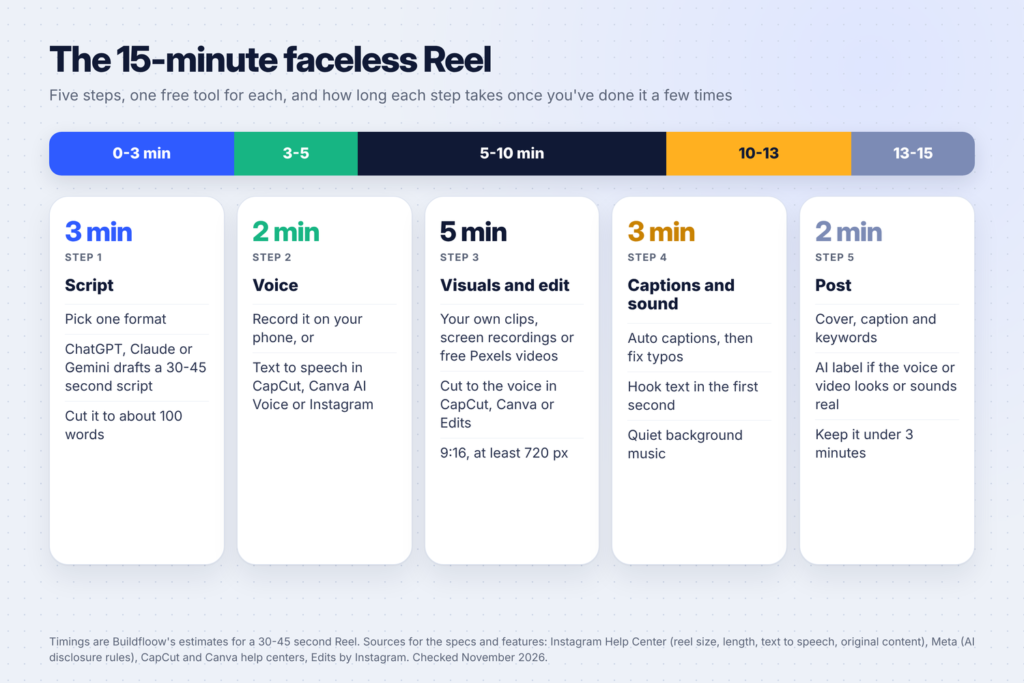
Faceless Reels let you grow an Instagram account without ever showing your face: a voice, some footage and on-screen text do the work. With free AI tools, one Reel can take about 15 minutes once you’ve made a few.
This guide walks you through the whole process, step by step: picking a format, writing the script with AI, adding a voice, editing in CapCut, Canva or Instagram’s Edits app, captions and music, and posting it the right way. Every spec and rule below comes from Instagram’s, Meta’s or the tool’s own help pages, so you won’t lose reach over a problem you could have avoided.
Who this is for: beginners who want to post short videos for a side hustle, a small business or a new niche account, without filming themselves. If you’d rather start on YouTube, see our list of 50 faceless YouTube video ideas by niche.
What you need (all free to start)
You don’t need a camera, a studio or paid software. Here’s the full kit:
| Job | Free tool | What it does |
|---|---|---|
| Script | ChatGPT, Claude or Gemini | Drafts a 30-45 second script and hook ideas |
| Voice | Your phone’s mic, CapCut text to speech, Canva AI Voice or Instagram’s text to speech | Turns the script into narration |
| Footage | Your own clips, screen recordings, free Pexels videos | The visuals under the voice |
| Editing | CapCut, Canva or Edits by Instagram | Cuts the clips to the voice, adds text |
| Captions | Auto captions in any of the three editors | Adds on-screen subtitles |
| Posting | Cover, caption, AI label |
Not sure which AI chat tool to use? Our comparison of ChatGPT Plus vs Claude Pro vs Gemini covers what each free and paid plan does. For this workflow, any free plan is enough.
Step 1: Pick one format (1 minute)
Faceless Reels that work usually follow one of a few simple formats. Pick one and stick with it for your first 10 videos, so you get faster each time.
- Voiceover over b-roll. Calm footage (hands typing, a coffee cup, a city street) with a voice explaining one idea. Great for tips, money, productivity and wellness.
- Text-on-screen list. No voice at all, just “3 apps that save me 5 hours a week” with one point per screen and music underneath. The fastest format to make.
- Screen-recording tutorial. Record your phone or computer screen while you show how to do something, like setting up a Canva template. Easy to make original, because the recording is yours.
- Before and after. A messy desk then a tidy one, a plain page then a finished design. Works well for design, home and craft niches.
- Quote or story. A short story or a lesson told over moody footage. Popular, but it’s also the format most copied, so add your own angle.
Formats 3 and 4 are the easiest to keep original. That matters more than most beginners think (see Step 7).
Step 2: Write the script with AI (2 minutes)
Most faceless Reels that keep viewers have a hook in the first second, one clear idea, and a reason to stay to the end. Short scripts make that easier. For a 30-45 second Reel, aim for about 80-110 words.
Copy this prompt into ChatGPT, Claude or Gemini and fill in the brackets:
Write a script for a 35-second faceless Instagram Reel about [topic] for [audience].
Format: [voiceover over b-roll / text-on-screen list / screen-recording tutorial].
Rules:
- First line is a hook under 10 words that names the problem or the payoff.
- One idea only, with 3 short steps or points.
- About 90 words, plain spoken English, short sentences.
- End with one line that tells viewers what to do next (save, follow or try it).
Then give me:
- 3 alternative hooks
- The on-screen text for each point (max 6 words each)
- A list of 6 b-roll shots I could film or find for free
- A 2-sentence Instagram caption with 3 keywords people search for
Read the script out loud once. If you trip over a line, shorten it. Check any fact, number or claim the AI wrote before you use it: AI tools can make things up, and a wrong fact in a Reel can’t be edited after you post it.
Tip: ask for 5 scripts at once on the same topic. Writing in batches is where most of the time saving comes from.

Step 3: Add a voice (2 minutes)
You have two choices: your own voice or an AI voice.
Your own voice is free, sounds the most natural and makes the Reel clearly yours. You can still stay faceless. Record it on your phone in a quiet room, with your mouth a hand’s width from the mic. A closet full of clothes is a surprisingly good recording booth. Instagram’s Edits app also has a Voice tool that lets you record a voiceover while you follow an on-screen script, according to Instagram’s Edits help article.
An AI voice is faster if you don’t like your recording or want to make many Reels a day. Three free options:
- CapCut text to speech. Add your script as a text layer, select it and choose text to speech, then pick a voice and apply it to the timeline. CapCut’s text to speech help article covers what to check if it doesn’t work, such as an unsupported language or no text layer selected.
- Canva AI Voice. Canva’s AI voice help article says you can open it from Elements, then Audio, then Generate AI Voice (or from the Apps tab), type your script, choose a language and voice, and the track lands on your design’s audio timeline. On Canva Free, AI tools draw from a limited monthly allowance, according to Canva’s AI usage article.
- Instagram’s own text to speech. Instagram’s help center says you can add text and text to speech when editing a reel in the app (on phones and tablets, not on computers).
Whichever you choose, listen to the whole voiceover once. AI voices sometimes mispronounce brand names and numbers. Spell them the way they sound (“Canva” can stay, but “$7.99” may read better as “under eight dollars”).
Step 4: Get your visuals (1 minute)
Your footage should match the words. When the voice says “open your budget sheet”, show a budget sheet. Three free sources:
- Your own clips. Your hands, your desk, your screen, your city. Ten minutes of filming on a weekend gives you b-roll for weeks.
- Screen recordings. Every phone and computer can record its screen. For tutorials, this is the whole video.
- Free stock video. Pexels’ license page says its photos and videos are free to use and attribution isn’t required, but you can’t imply that people in the footage endorse your product. Search for vertical (portrait) videos so you don’t have to crop.
Mix sources. A Reel made only of stock clips looks like a hundred other Reels, while one shot of your own screen or desk makes it feel real.
Step 5: Edit it (4 minutes)
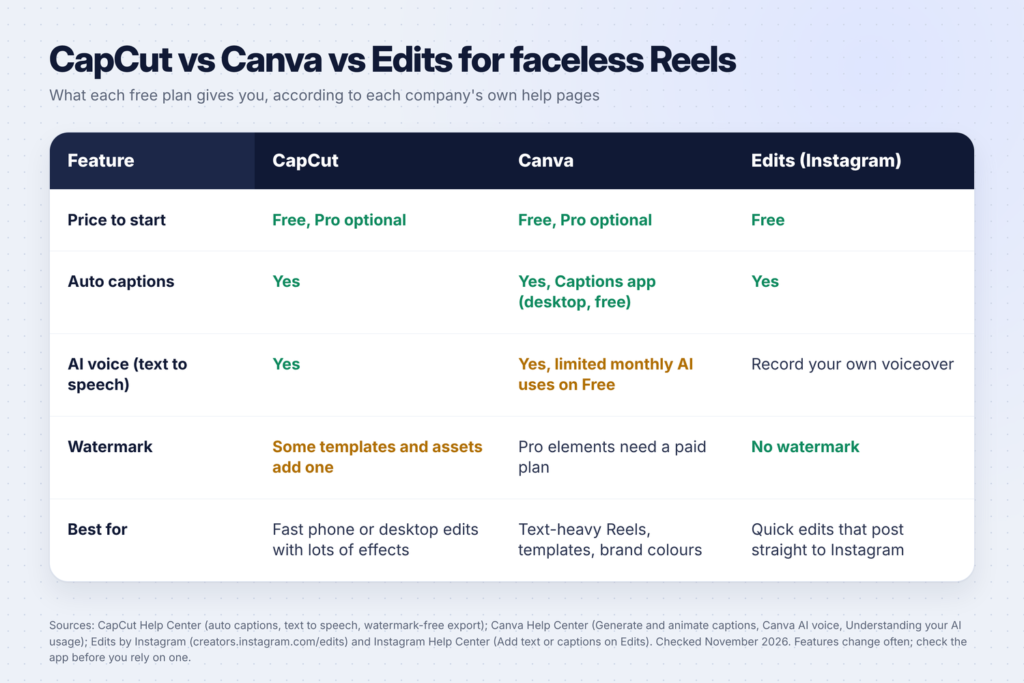
Now put the voice and visuals together. Any of these three free editors works, so pick the one you already know.
In CapCut:
- Start a new project and add your clips in order.
- Add the voiceover (or the text layer you’ll turn into speech).
- Trim each clip so it changes with each new sentence. A new shot every 2-3 seconds keeps the Reel moving.
- Add your hook as on-screen text in the first second.
- Export in 1080p. CapCut’s watermark help article says some templates and assets add a watermark on the free version, and suggests removing the ending clip and swapping watermarked elements for free ones.
In Canva:
- Create a design using the Instagram Reel size (vertical 9:16).
- Drop your clips onto the timeline, one page per scene, or use a Reel template you edit.
- Add your AI voice or upload your own recording.
- Use Canva’s text styles for the hook and each point. Our 30 Canva tips post has shortcuts that speed this part up.
- Download as MP4.
In Edits by Instagram:
- Log in with your Instagram account and start a project.
- Add your clips and trim them on the timeline.
- Use the Voice tool to record your voiceover, or import one.
- Add text, then export or share straight to Instagram. Instagram’s Edits page says exports have no watermark.
Size check: Instagram’s Reel size help article says Reels can have an aspect ratio between 1.91:1 and 9:16, a minimum frame rate of 30 FPS and a minimum resolution of 720 pixels. A vertical 1080 x 1920 video (9:16) fits that and fills the phone screen. The recommended cover photo size is 420 x 654 pixels.
Step 6: Add captions and sound (3 minutes)
Captions help anyone watching with the sound off, and they make your Reel easier to follow for everyone.
Captions: all three editors can make them for you.
- CapCut’s auto captions help article says captions come from speech recognition, so background noise, accents and fast speech can cause mistakes. If you see lots of errors, mute the music, regenerate and then fix the rest by hand.
- Canva’s captions help article says you can generate and animate captions on desktop even without a paid plan: go to Text, then Captions, pick a style and select Generate captions.
- Instagram’s Edits captions article says you can generate captions for voiceovers and choose the language, style and transcription settings.
Always read every caption before you export. One misspelled word in a big caption is the first thing viewers notice.
Music: keep it quiet under the voice, around a quarter of the voice volume. Two rules from Instagram’s audio help article:
- Licensed audio from Instagram’s library must be credited to the artist and include the track name. It’s attributed automatically when you add it in the app.
- Tracks can be muted later if Instagram’s agreements with rights holders change, though your Reel stays up.
Instagram says the library may not be available for every account type or region, and its boosting help article says Reels with licensed music can’t be boosted. Meta’s Sound Collection has royalty-free music and sound effects you can download instead (Meta). If you plan to promote a Reel later, use music from there.
Step 7: Keep it original so Instagram recommends it
This is the step most faceless guides skip. Instagram’s original content guidelines say it encourages original content “to get the best reach and distribution”, and that “simply stitching together clips or adding a watermark does not qualify as materially edited content.”
In practice, that means:
- Don’t repost other creators’ Reels with new text on top. If you want to share someone’s video, Instagram recommends reposting it or sharing it to your story, so the creator gets credit.
- Write your own script and record or generate your own voice.
- Add something only you can add: your screen, your hands, your example, your opinion.
- Avoid watermarks from other apps, like a logo from a template or an editor’s end card.
Instagram also lets creators check their Account Status to see whether their content is eligible to be recommended to people who don’t follow them.
Step 8: Post it the right way (2 minutes)
You’re almost done. Before you tap Share:
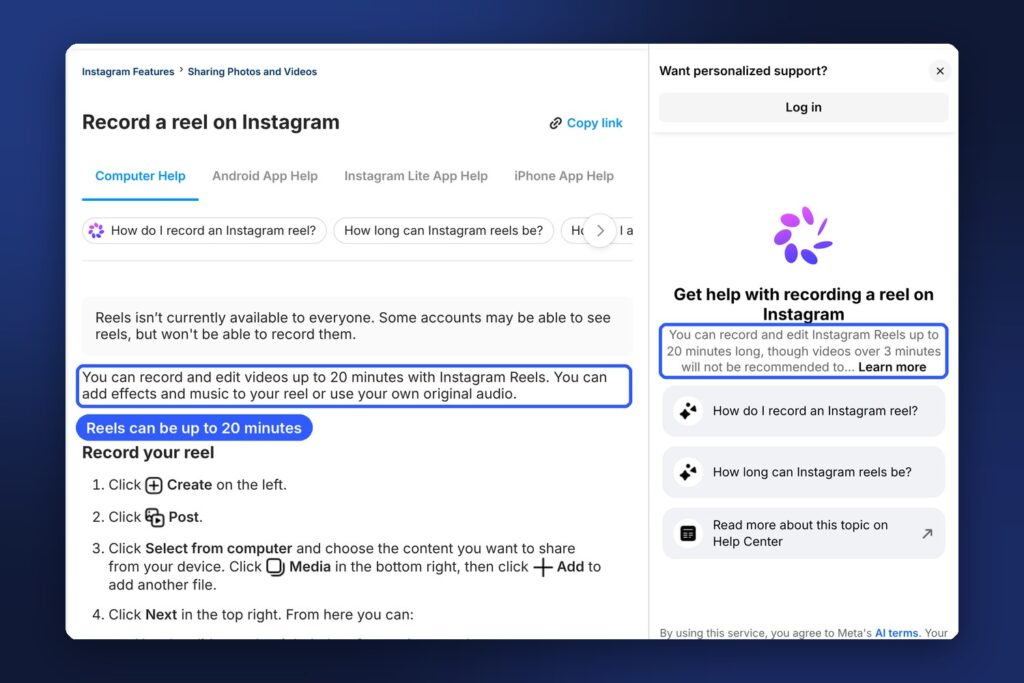
- Check the length. Instagram’s help article on recording reels says reels can be up to 20 minutes, but reels over 3 minutes won’t be recommended to new audiences. For faceless tips, 20-45 seconds is plenty.
- Pick a cover with your hook as large text. It shows on your profile grid.
- Write a short caption with words people search for, like “budget tips for students” rather than “my thoughts on money”. The keywords from your AI prompt in Step 2 are a good start.
- Add the AI label when you need to. Meta says people must use its AI disclosure and label tool when they post content with “a photorealistic video or realistic-sounding audio that was digitally created or altered”, and that it may apply penalties if they don’t (Meta, February 2026). If your AI voice sounds like a real person, or your footage is realistic AI video, turn the label on. Meta’s labeling page explains that these labels show as “AI info”.
- Post at a regular time. A steady schedule is easier to keep than a perfect one.
How to make 5 Reels in an hour (batching)
The 15-minute time is for a single Reel once you know the steps. The real speed comes from doing each step for several Reels at once:
| Block | Time | What you do |
|---|---|---|
| Scripts | 10 min | One AI prompt asking for 5 scripts on one topic, then edit them |
| Voice | 10 min | Record or generate all 5 voiceovers |
| Footage | 15 min | Film or download b-roll for all 5 |
| Editing | 20 min | Edit all 5 in the same template |
| Posting | 5 min | Schedule them across the week |
Save your first finished Reel as a template (same fonts, caption style and colours) so every new one starts 80% done. If you’re building a brand around your account, our guide to making a logo with AI for free helps you set those colours and fonts.
Faceless Reel ideas to start with
Stuck on topics? These work well without a face:
- 3 free tools for [job or hobby] (screen recordings of each tool)
- How I plan my week in 5 minutes (screen recording of your planner)
- One Canva trick most people miss (screen recording)
- Before and after: a plain printable vs the finished design
- What I’d do if I started [niche] today, as a 3-step list
- Cheap meal prep for the week (hands and ingredients, no face). Our ChatGPT prompts for meal planning give you weeks of scripts.
If you sell digital products, every product can become 3-5 Reels: how it’s made, how it’s used, a before and after, and a buyer’s question answered. See our list of 50 digital product ideas for beginners for ideas.
Common mistakes to avoid
- A slow start. If the first second is a logo or “Hey guys”, viewers scroll. Start with the hook.
- Too much text on screen. Six words per point is plenty. Put the details in the caption.
- Unchecked AI facts. Check every number and claim before you record.
- Music louder than the voice. Turn it down until the voice is easy to follow on phone speakers.
- Reposting others’ videos. It may reach fewer people, and it’s not your content to use.
- Skipping the AI label on realistic AI voices or video. Meta may apply penalties.
- Giving up after five Reels. Treat your first 20 as practice. You’ll get faster and better with each one.
FAQ
Can I make faceless Reels for free?
Yes. ChatGPT, Claude and Gemini have free plans for scripts, and CapCut, Canva and Edits by Instagram all have free versions with auto captions. Free Pexels videos or your own footage cover the visuals. Some features, like certain CapCut templates and Canva Pro elements, need a paid plan.
How long should a faceless Reel be?
For tips and lists, 20-45 seconds is a good target. Instagram allows reels up to 20 minutes, but says reels over 3 minutes won’t be recommended to new audiences.
Do I have to label Reels that use an AI voice?
If the voice sounds realistic, yes. Meta requires people to use its AI disclosure tool for photorealistic video or realistic-sounding audio that was digitally created or altered, and may apply penalties if they don’t.
What size should a Reel be?
Instagram accepts aspect ratios between 1.91:1 and 9:16 with a minimum resolution of 720 pixels and at least 30 FPS. A vertical 1080 x 1920 video fills the screen.
Can I use music from Instagram in a business account’s Reels?
Instagram says the audio library may not be available for every account type or region, and Reels with licensed music can’t be boosted. Meta’s Sound Collection offers royalty-free music you can use instead.
Keep going
Put your Reels to work. Learn how to promote the same content on Pinterest with our Pinterest for beginners guide, find more video topics in 50 faceless YouTube video ideas by niche, and see how short videos can earn in how to make money with Claude and YouTube Shorts.