You’ve made a digital product: a planner, a template, an e-book or a short course. Now you need somewhere to sell it. Stan Store, Gumroad, Payhip and Etsy are four of the most popular choices for beginners, and they work in very different ways. One is a marketplace full of shoppers, two are stores you send your own audience to, and one is built around your Instagram or TikTok link in bio.
This guide compares all four on what matters when you’re starting out: fees (with the real numbers from each platform’s own pages), who brings the buyers, what each platform is good at, and which one fits your situation.
Who this is for: beginners choosing where to sell their first digital product. Still deciding what to make? Start with our list of 50 digital product ideas for beginners.
A note on fees: all fees were checked on each platform’s site on 10 November 2026, for a seller in the US. Fees vary by country and change over time, so check before you set your prices.
The quick answer
- No audience yet? Start on Etsy. Shoppers are already searching there, so you can make sales without followers.
- Have a small audience and want no monthly cost? Use Payhip’s free plan (5% per sale) or Gumroad (10% + $0.50 per sale).
- Selling from Instagram or TikTok, with steady sales? Stan Store has a monthly fee ($29 on Creator) but no Stan transaction fee, which works out cheaper once you sell regularly.
Many sellers use two: Etsy for discovery, plus a store of their own for followers and email subscribers.
Fees at a glance
| Platform | Monthly cost | Per-sale fees (US) | Who finds the buyer |
|---|---|---|---|
| Etsy | $0 | $0.20 listing fee, 6.5% transaction fee, 3% + $0.25 payment processing | Etsy’s own marketplace search |
| Gumroad | $0 | 10% + $0.50 on direct sales, plus card processing (2.9% + $0.30); 30% on Discover marketplace sales | Mostly you |
| Payhip | Free, $29 (Plus) or $99 (Pro) | 5%, 2% or 0% transaction fee, plus Stripe or PayPal fees | You |
| Stan Store | $29 (Creator) or $99 (Creator Pro) | No Stan transaction fee; payment processing fees still apply | You |
Sources: Etsy’s Fees & Payments Policy and US sell page, Gumroad’s pricing page and fees help article, Payhip’s pricing page, Stan’s pricing guide and Stripe’s pricing page.
What you’d actually pay: a worked example
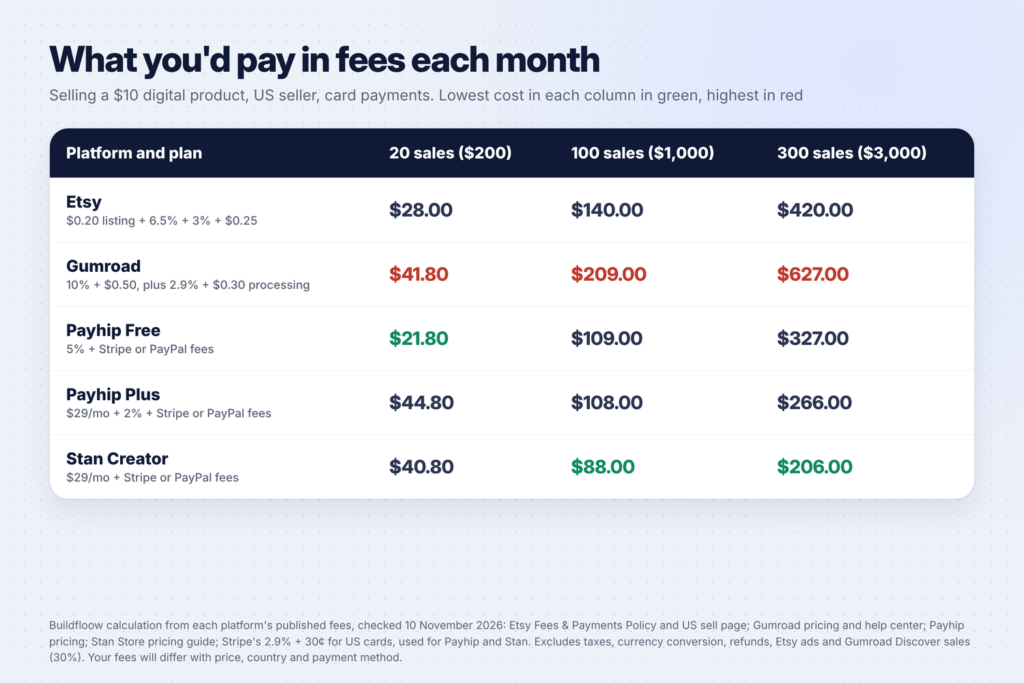
Percentages are hard to compare, so we worked out the monthly fees for a $10 product at three sales levels, for a US seller paid by card. For Payhip and Stan we used Stripe’s standard rate of 2.9% + 30¢ for US cards.
| Monthly sales | Etsy | Gumroad | Payhip Free | Payhip Plus | Stan Creator |
|---|---|---|---|---|---|
| 20 sales ($200) | $28.00 | $41.80 | $21.80 | $44.80 | $40.80 |
| 100 sales ($1,000) | $140.00 | $209.00 | $109.00 | $108.00 | $88.00 |
| 300 sales ($3,000) | $420.00 | $627.00 | $327.00 | $266.00 | $206.00 |
What this shows:
- At low sales, a free plan wins. At 20 sales a month, Payhip’s free plan costs least, and Stan’s $29 monthly fee makes it one of the most expensive options.
- Once sales are steady, flat fees win. At 100 sales or more, Stan’s monthly plan works out cheapest, and Payhip Plus overtakes Payhip Free.
- Etsy’s fees sit in the middle, but they buy you something the others don’t: shoppers who are already searching.
- Gumroad is the most expensive on direct sales in this example, because card processing is charged on top of its 10% + $0.50.
This leaves out taxes, refunds, currency conversion, Etsy ads and Gumroad Discover sales. Your numbers will change with your price and country, so run your own with the formulas in the table above.
Etsy: best for finding buyers without an audience
Etsy is a marketplace: people come to Etsy to search and buy. That’s its biggest advantage for beginners. You don’t need followers to make your first sale, as long as your listings show up when people search.
Fees: Etsy’s policy lists a $0.20 listing fee, a 6.5% transaction fee and, for US sellers using Etsy Payments, payment processing of 3% + $0.25. Listings stay active for four months or until they sell. A 2.5% currency conversion fee applies if your listing currency differs from your payment account currency.
Good for: printables, planners, wall art, templates and anything people search for by name. Our guide to starting an Etsy digital download shop with AI walks through setup step by step, and our list of 50 printable ideas that sell on Etsy has product ideas.
Watch out for: competition. You’re next to thousands of similar listings, and buyers can compare prices in seconds. Your shop also lives inside Etsy, so your reviews and ranking stay there if you leave.
Gumroad: best for simple sales with no monthly fee
Gumroad lets you set up a product page in minutes and share the link anywhere. There’s no monthly fee. Its pricing page lists 10% + $0.50 per sale through your profile or direct links, and 30% when new customers find you through its Discover marketplace.
Its fees help article adds two details: the 10% + $0.50 doesn’t include credit card processing (2.9% + $0.30) or PayPal fees, while the 30% Discover fee includes all processing. Once your paid sales in a calendar month reach $20,000, new direct sales that month drop to 5% + $0.50.
Gumroad also says that since January 1, 2025, it acts as a merchant of record, handling sales tax collection and remittance worldwide.
Good for: creators who sell occasionally and want the simplest setup. Watch out for: fees on low-priced products. On a $5 product, the fixed $0.50 plus processing takes a big share.
Payhip: best value for your own store
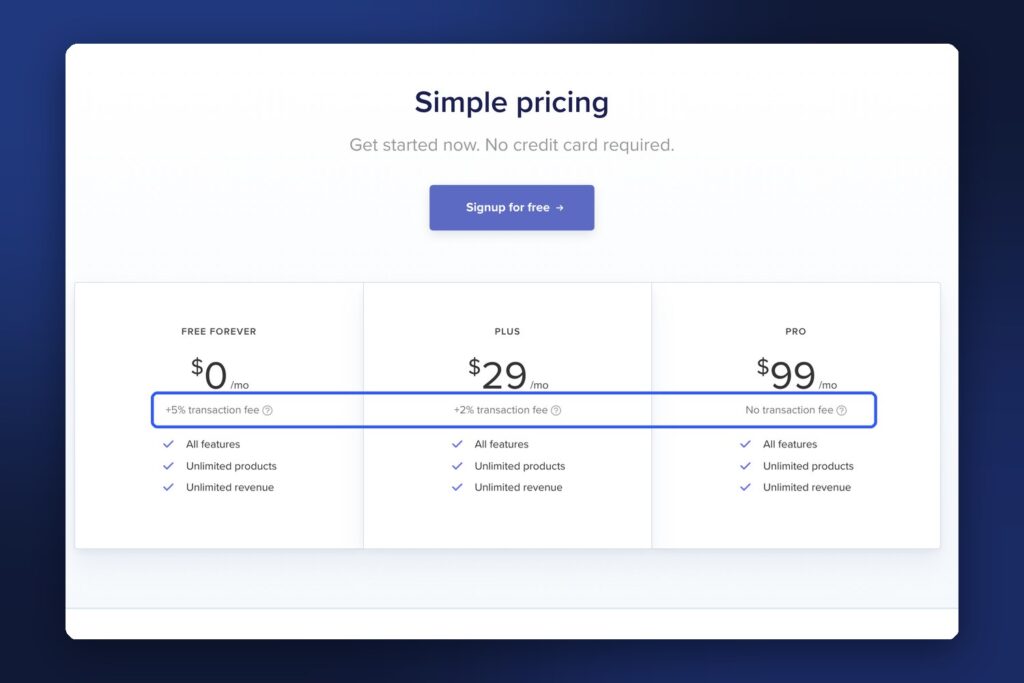
Payhip gives you a full store with your own branding, and every plan has the same features. Its pricing page lists:
- Free forever: $0 a month + 5% transaction fee
- Plus: $29 a month + 2% transaction fee
- Pro: $99 a month, no transaction fee
All plans list unlimited products and unlimited revenue. Payhip notes that PayPal and Stripe still charge their standard rates on every plan, and that it automatically collects and remits EU/UK VAT and US/Canadian sales tax on digital sales.
Good for: sellers building their own brand who want to start free and upgrade later. Payhip also supports courses, coaching, memberships and physical products, according to its site. Watch out for: you bring the traffic. Payhip doesn’t send you shoppers the way Etsy does.
Stan Store: best for selling from your link in bio

Stan is built for creators who sell to their social media followers. Your Stan page sits in your Instagram or TikTok bio and holds your products, bookings and email sign-ups in one place.
Pricing: Stan’s pricing guide lists the Creator plan at $29 a month ($300 a year) and Creator Pro at $99 a month ($948 a year), with zero Stan transaction fees and a 14-day free trial. Payment processor fees still apply.
Features: the guide lists calendar and booking tools, an online course builder, and email collection on Creator. Creator Pro adds email automation, upsells and order bumps, payment plans and pixel tracking.
Good for: creators with an engaged audience who sell regularly. Watch out for: the monthly fee when sales are slow. At 20 sales a month of a $10 product, our example shows Stan costing more than Etsy or Payhip’s free plan.
What each platform handles for you
Fees aren’t the only cost. Some platforms take care of jobs you’d otherwise have to do yourself:
| Job | Etsy | Gumroad | Payhip | Stan Store |
|---|---|---|---|---|
| Brings you shoppers | Yes, through Etsy search | Only through Discover (30% fee) | No | No |
| Sales tax and VAT | Check Etsy’s tax rules for your country | Handles it as merchant of record (since 2025) | Collects and remits EU/UK VAT and US/Canadian sales tax on digital sales | Check Stan’s terms |
| Courses or bookings | No | Memberships and courses | Courses, coaching, memberships | Courses, calendar bookings |
Taxes are easy to overlook. Gumroad’s pricing page says it has acted as a merchant of record since January 1, 2025, managing sales tax collection and remittance worldwide, and Payhip’s pricing page says it automatically handles EU/UK VAT and US/Canadian sales tax. That can save you a lot of paperwork if you sell to buyers in many countries.
Can you switch platforms later?
Yes. Your products are files you own, so you can move them. What’s harder to move is everything around them: your reviews (Etsy reviews stay on Etsy), your shop’s search ranking, and any links you’ve shared. A few habits make switching easier:
- Keep your original files and listing text in a folder of your own, not only on the platform.
- Collect customer emails where the platform allows it, so you can tell buyers where you’ve moved.
- Use one link you control (your own domain or link-in-bio page) in social profiles, so you only update it in one place.
How to choose
Answer three questions:
- Do people already know you? If not, Etsy’s built-in shoppers matter more than low fees. If you have followers or an email list, your own store keeps more of each sale and gives you your customers’ details.
- How many sales do you expect a month? For a $10 product, Payhip’s free plan costs less than Stan’s Creator plan below about 60 sales a month; above that, the flat monthly fee wins. Run the numbers for your own price.
- What are you selling? Printables and templates fit Etsy’s search-driven shoppers. Courses, coaching and memberships fit Payhip or Stan.
| Your situation | Best fit |
|---|---|
| First product, no audience | Etsy |
| Small audience, occasional sales | Payhip Free or Gumroad |
| Growing brand, want your own store | Payhip |
| Active Instagram or TikTok, steady sales | Stan Store |
| Want both discovery and your own customers | Etsy plus Payhip or Stan |
Getting traffic to your store
Except for Etsy, these platforms don’t bring you buyers, so plan where they’ll come from:
- Pinterest: pins keep sending visitors for months. Our guide to Pinterest SEO and keywords shows how to get found.
- Short videos: a Reel showing your product in use can link to your store. See how to make faceless Reels with AI in 15 minutes.
- A blog: posts that answer your buyers’ questions can link to your products. Our guide to starting a WordPress blog covers the setup.
- Email: collect emails from day one, so you can tell people when you launch something new.
Common mistakes when choosing a platform
- Choosing on fees alone. The cheapest platform is no help if nobody visits your store.
- Paying a monthly fee before your first sale. Start on a free plan or a free trial, then upgrade when sales justify it.
- Pricing too low. Fixed per-sale fees hit cheap products hardest. Bundles help.
- Forgetting payment processing. Stripe and PayPal fees apply on Payhip and Stan, and card processing is added on top of Gumroad’s fee.
- Using copyrighted or licensed content you can’t resell. Check the license for any fonts, graphics or templates you use. Our guide to Etsy products you can make in Canva explains Canva’s rules.
FAQ
Which is cheapest: Stan Store, Gumroad, Payhip or Etsy?
It depends on how much you sell. In our example with a $10 product, Payhip’s free plan was cheapest at 20 sales a month, and Stan’s Creator plan was cheapest at 100 and 300 sales a month. Gumroad cost the most on direct sales because card processing is added to its 10% + $0.50.
Can I sell on Etsy and my own store at the same time?
Yes. Many sellers use Etsy to reach new buyers and a store like Payhip or Stan for followers and repeat customers. Keep your prices consistent so buyers don’t feel misled.
Does Gumroad charge a monthly fee?
No. Gumroad’s pricing page says there are no monthly charges. It takes 10% + $0.50 per direct sale, plus card processing, and 30% on sales through its Discover marketplace.
Is Payhip really free?
Payhip’s free plan has no monthly fee and includes all features, but it charges a 5% transaction fee on each sale, plus Stripe or PayPal fees.
Does Stan Store have a free trial?
Yes. Stan’s pricing guide mentions a 14-day free trial. After that, the Creator plan is $29 a month or $300 a year.
Keep going
Ready to sell? Pick a product from 50 digital product ideas for beginners, make it in Canva with our 30 Canva tips, and set up Pinterest for your business to bring buyers to your store.