You don’t need a laptop to start a side hustle. The apps on your phone can now write, edit video, design graphics, caption Reels and run a small shop. Add a free AI chat app, and a lot of work that used to need a desk now fits into a commute or a lunch break.
This list covers 15 AI side hustles you can realistically run from your phone, what each one involves, which apps to use and where to find your first customers. No income promises: what you earn depends on your skills, your time and the clients you find. Most entries also say where to find your first customers.
Who this is for: anyone who wants to earn extra money but doesn’t have a laptop, or doesn’t want to be stuck at one. If you’re a student, see our list of 20 AI side hustles for college students.
Why a phone is enough to start
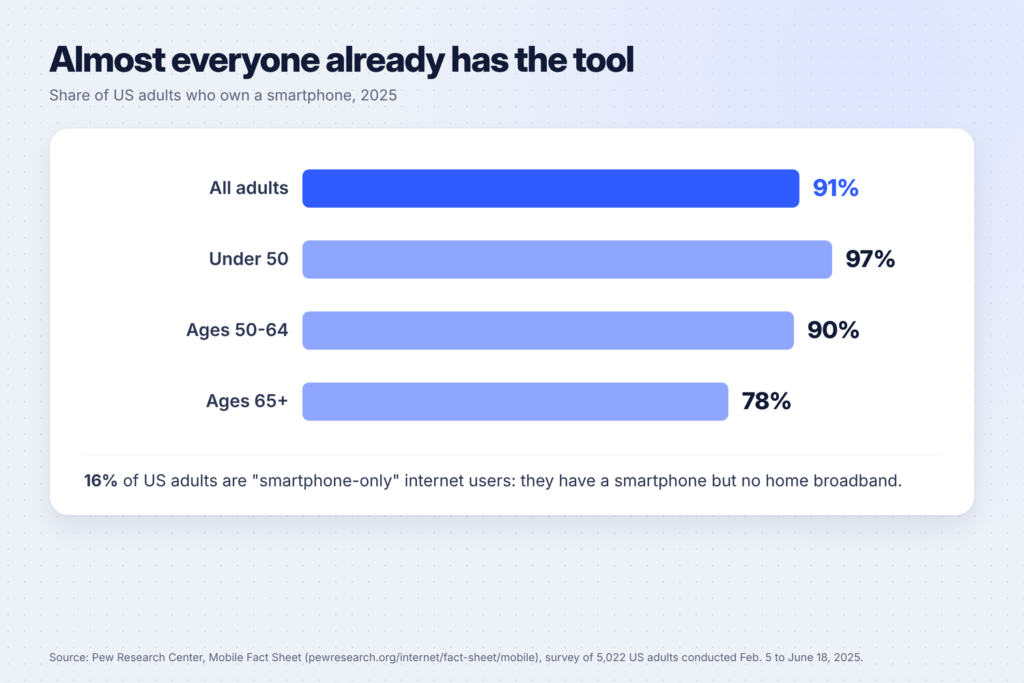
Most people already own the tool. According to the Pew Research Center’s mobile fact sheet, 91% of US adults own a smartphone, and 16% are “smartphone-only” internet users with no home broadband. The apps have caught up too:
- Canva has apps for iPhone, iPad and Android. Canva’s mobile app help shows tabs for creating designs, browsing templates and finding your saved work.
- CapCut edits video on your phone, and its auto captions tool generates subtitles from speech.
- ChatGPT, Claude and Gemini all have free plans and phone apps for writing, planning and research.
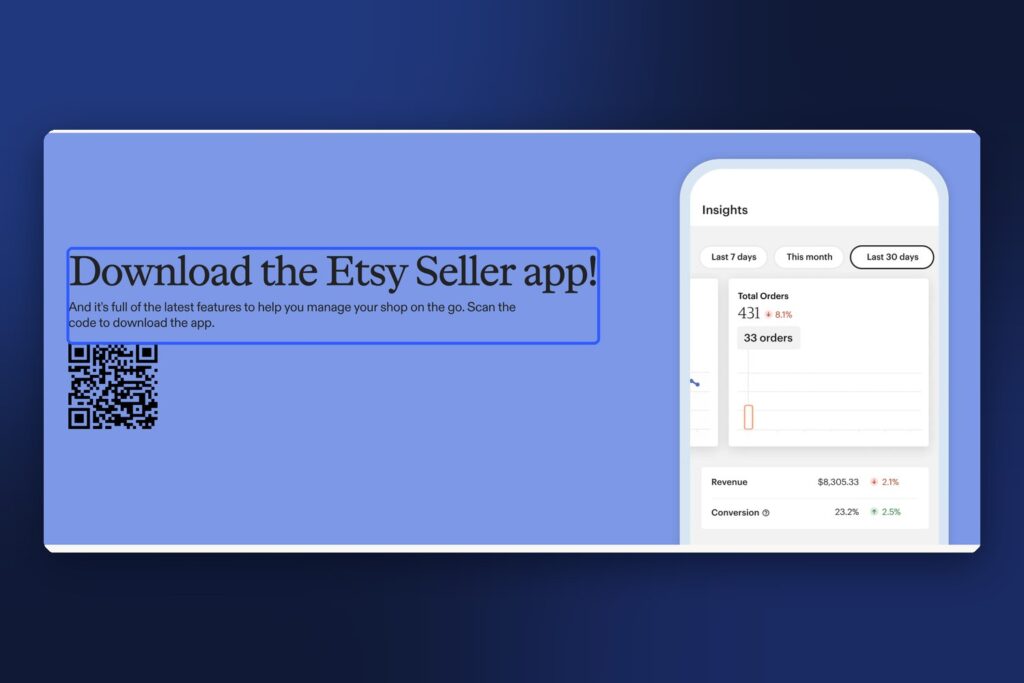
- The Etsy Seller app lets you manage listings, orders and messages, according to Etsy’s Seller app page. Etsy says you need a desktop web browser to open your shop in the first place, so borrow a computer for that one step.
A few honest limits: long documents, detailed spreadsheets and big design files are easier on a computer. Pick hustles where short, focused tasks are the norm.
Before you start: three ground rules
- Keep your phone work professional. Use a separate email, a clear profile photo or logo, and a short portfolio you can share as a link. Our guide to building a portfolio website in an hour shows free ways to make one.
- Use AI as a helper, not the whole job. Clients pay for your judgement, your taste and your reliability. Check every fact AI writes before you send it.
- Know the platform fees. Fiverr’s Help Center says sellers earn 80% of each order, including extras and tips. Upwork’s pricing guide says its freelancer fee varies from 0% to 15% per contract.
Content and video (1-5)

1. Short-form video editor
Creators, coaches and small businesses post Reels, TikToks and Shorts every week, and many don’t have time to edit them. You take their raw clips, cut them to the best moments, add captions and music, and send back finished videos.
Phone apps: CapCut for editing and auto captions; Instagram’s Edits app is another free option. AI’s part: auto captions, cutting long clips into short ones, writing hooks. First customers: local businesses with active Instagram accounts, and creators who post long videos but few short ones.
2. Faceless Reels or TikTok account
Build your own account on a topic you know: budget recipes, study tips, home organizing. A faceless format means you never have to show your face. Our step-by-step guide to making faceless Reels with AI in 15 minutes covers the full workflow, including Instagram’s rules on original content and AI labels.
How it earns: usually indirectly at first, by sending followers to your products, affiliate links or services. It takes consistency before it earns anything.
3. Captions and subtitles for creators
Many videos need accurate captions for viewers watching with the sound off. AI tools create a first draft in seconds; your job is to fix names, numbers and timing so they’re right. CapCut’s own guidance notes that auto captions still need a human check for names, numbers, brands and noisy audio.
Good for: detail-oriented people. First customers: podcasters and YouTubers who post clips.
4. UGC creator (user-generated content)
Brands pay creators to film short, natural-looking videos of their product: unboxings, reviews, how-tos. You film on your phone, edit in CapCut and deliver the files. You don’t need a big following, because the brand posts the video itself.
AI’s part: scripts and shot lists. Watch out for: clear contracts on usage rights and payment before you film.
5. Social media manager for local businesses
Cafes, salons and shops often know they should post more but don’t have time. You plan a month of posts, write captions with AI’s help, design graphics in Canva and schedule them from your phone.
First customers: businesses near you with quiet or out-of-date accounts. Offer a simple monthly package (for example, 12 posts a month) so pricing is easy.
Design and digital products (6-9)
6. Canva social media templates
Design template packs (Instagram posts for real estate agents, quote cards for coaches) and sell them as Canva template links. Canva’s mobile app lets you build and edit designs from your phone. Our list of 25 Canva templates you can sell explains Canva’s licence rules first.
7. Printables on Etsy
Planners, checklists and wall art are popular digital downloads. Design them in Canva on your phone and manage the shop from the Etsy Seller app once it’s set up. See 50 printable ideas that sell on Etsy for ideas, and compare where to sell in our Stan Store vs Gumroad vs Payhip vs Etsy guide.
8. Pinterest pin designer
Bloggers and online shops need a steady flow of Pinterest pins. You design them in Canva, write keyword-rich titles and descriptions, and hand them over (or schedule them). Our guide to Pinterest SEO covers the keyword side, which is where most clients need help.
9. Prompt packs and mini guides
If you’ve found AI prompts that solve a specific problem (meal planning, budgeting, studying), package them into a short PDF guide. Write it with AI’s help, design it in Canva and sell it as a digital download. Make sure every prompt actually works and adds real value: buyers can tell the difference.
Writing and admin (10-13)
10. Proofreading and editing
Many people need a second pair of eyes on blog posts, emails, product descriptions and resumes. AI grammar tools catch the basics; your value is the human judgement on top. Short documents are easy to handle on a phone.
First customers: small business owners and bloggers. Fiverr has a proofreading category where you can list a service.
11. Resume and LinkedIn profile rewrites
Use AI to draft, then tailor the wording to each person’s experience and target job. It’s quick work per client, and word of mouth spreads fast. Never invent experience or qualifications for someone.
12. Virtual assistant (inbox, calendar and research)
Coaches and small business owners hand off email sorting, appointment booking and simple research. Much of it is done in email and calendar apps you already have on your phone. AI helps you draft replies and summarize long threads.
Tip: offer three or four specific tasks (“inbox and calendar management for coaches”) rather than “anything”.
13. Product descriptions for online shops
Shop owners on Etsy, Shopify and Amazon need clear, searchable product descriptions. AI drafts quickly; you check facts, add the shop’s tone of voice and make sure each description answers buyers’ questions.

Local and in-person (14-15)
14. Product photos for small businesses
Your phone camera is good enough for simple product photos for local bakeries, boutiques and craft sellers. Shoot in natural light against a plain background, then edit in your phone’s photo app or Canva. Note that Canva’s Background Remover is a paid feature, so price that in.
15. Local listing and review management
Many local businesses have incomplete Google Business Profiles or unanswered reviews. You update their details and photos, and draft polite replies to reviews with AI’s help, for the owner to approve before posting. It’s a small monthly service that suits phone work well.
Which hustle fits you?
| If you like… | Try | Main phone apps |
|---|---|---|
| Video | Short-form editing, captions, UGC, faceless account | CapCut, Edits, Instagram |
| Design | Canva templates, printables, Pinterest pins | Canva, Etsy Seller |
| Writing | Proofreading, resumes, product descriptions, prompt packs | ChatGPT, Claude or Gemini, Google Docs |
| Organizing | Virtual assistant, social media management | Email, calendar, Canva |
| Meeting people | Product photos, local listings | Camera, Canva |
How to get your first client from your phone
- Pick one hustle and one type of customer. “Captions for fitness creators” is easier to sell than “video services”.
- Make three samples. Edit a free stock video, design a sample template, rewrite a sample product description. Label them as samples.
- Put them in one link. A free portfolio site, a Canva website or a pinned Instagram post.
- Message 10 people a day. Short, specific and helpful: “I noticed your Reels don’t have captions. Here’s one I captioned as an example, free to use.”
- Ask for a review or referral after every job.
If you want more ideas for using AI tools in your work, our comparison of ChatGPT Plus, Claude Pro and Gemini explains what the free and paid plans include.
A simple weekly routine (5 hours, all on your phone)
A phone side hustle works best in short, regular sessions. Here’s a realistic week for someone starting with one hustle:
| Day | Time | What you do |
|---|---|---|
| Monday | 45 min | Plan the week: which clients, which tasks, what to post |
| Tuesday | 1 hour | Client work (edit, design or write) |
| Wednesday | 45 min | Outreach: message 10 potential clients with a sample |
| Thursday | 1 hour | Client work |
| Friday | 45 min | Create one portfolio sample or post about your work |
| Weekend | 45 min | Invoices, replies and a quick review of what worked |
Keep notes in a single app: a list of leads, your prices and templates for common messages. Ask AI to help you write the templates once (“Write a short, friendly message offering caption editing to a fitness creator”), then personalize each one before you send it.
Track two numbers every week: how many people you contacted and how many said yes. After a month you’ll know whether to change your offer, your price or your target customer.
Mistakes to avoid
- Selling AI output as-is. Clients notice generic work. Edit, check and personalize everything.
- Underpricing to win clients. Very low prices attract demanding clients. Start fair and raise prices as reviews come in.
- Ignoring platform rules. Fiverr, Etsy and Instagram all have rules on what you can sell and how. Read them before you start.
- Skipping contracts. For UGC and ongoing work, agree on scope, deadlines, usage rights and payment in writing.
- Doing everything at once. One hustle done well beats five half-started ones.
FAQ
Can you really make money with just a phone?
Yes, for many kinds of work: video editing, social media management, design with Canva, proofreading and more. Earnings depend on your skills, time and clients, and some tasks are easier on a computer.
What is the easiest phone side hustle to start?
Social media help for local businesses and caption editing are among the simplest, because you can start with apps you already have and find customers nearby or through people you know.
Do I need to pay for AI tools?
No. ChatGPT, Claude and Gemini have free plans, and Canva and CapCut have free versions. Upgrade only when a paid feature saves you real time on paid work.
How much does Fiverr take from each order?
Fiverr’s Help Center says sellers earn 80% of each order, including extras and tips, so Fiverr keeps 20%.
Can I run an Etsy shop from my phone?
Mostly, yes. The Etsy Seller app lets you manage listings, orders and messages, but Etsy says you need a desktop web browser to open the shop in the first place.
Keep going
Ready to start? Pick a format from 50 digital product ideas for beginners, learn faster design with our 30 Canva tips, and see more options in 25 AI side hustles for stay-at-home moms.