When people think about selling Canva templates, they usually think of Instagram posts. There are a lot of those for sale, and a lot of competition. But Canva is used for far more than social media: resumes, wedding invitations, pitch decks, worksheets, price lists, ebooks and websites.
Each of those is a template someone would happily buy instead of designing from scratch, and many of them are much less crowded than social media packs.
Below are 25 Canva templates you can sell that have nothing to do with social media posts, grouped by who buys them. You’ll also see Canva’s rules for selling templates (they matter more than most sellers realize), how to deliver your templates, and how to package them so buyers can actually use them.
Who this is for: anyone who’s comfortable in Canva and wants to turn that skill into digital products. If you’re brand new to selling online, our guide on how to start an Etsy digital download shop with AI walks you through opening a shop first.
Why Canva templates are worth selling
The best thing about selling Canva templates is that your buyers already use Canva. TechCrunch reported in February 2026 that Canva had more than 265 million monthly active users and over 31 million paid users in 2025, according to the company. That’s a huge number of people who know how to open a template, change the text and download the result.
A template saves the buyer time and gives them a design that looks professional. They don’t have to know about layouts, font pairing or margins. They just fill in their own details.
For you, a template is made once and sold many times. Templates also work well with AI tools: ChatGPT or Claude can draft the sample text, plan the pages and write the listing, while you focus on the design.
Canva’s rules for selling templates
Before you design anything to sell, read Canva’s help article on using Canva to design products for sale. Here’s what it says, in short:
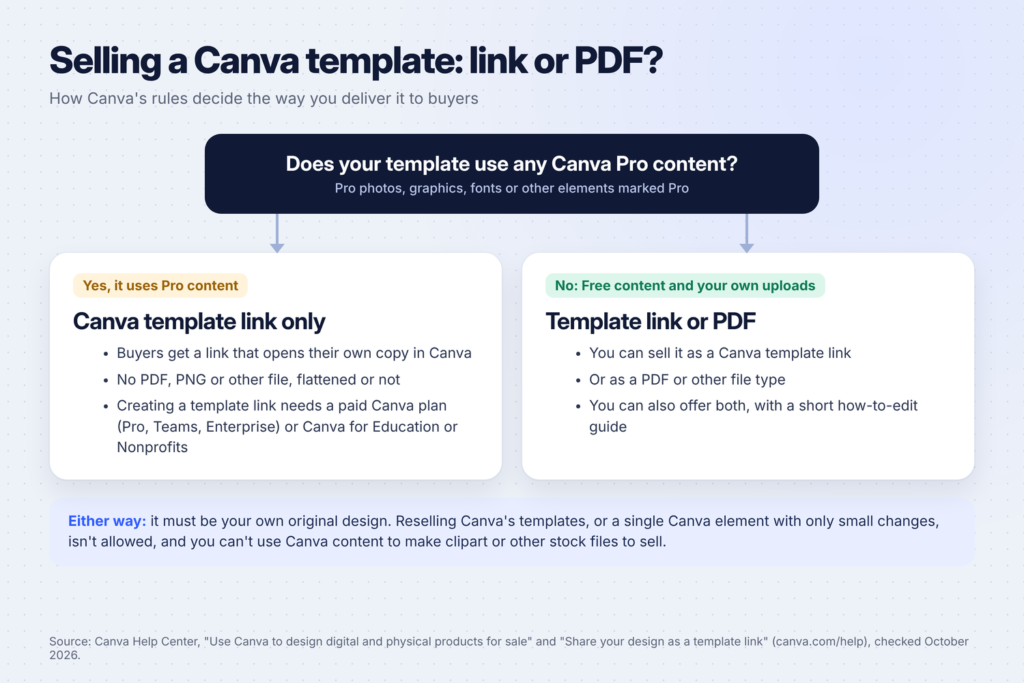
- Only original designs. You can sell templates you design, using a combination of Canva elements and your own design work. You can’t resell Canva’s own templates, or sell a single Canva element with only small changes such as a new color, a filter or a border.
- Templates are allowed. Canva’s Content License Agreement lets you use both Free and Pro content in templates you sell, under conditions.
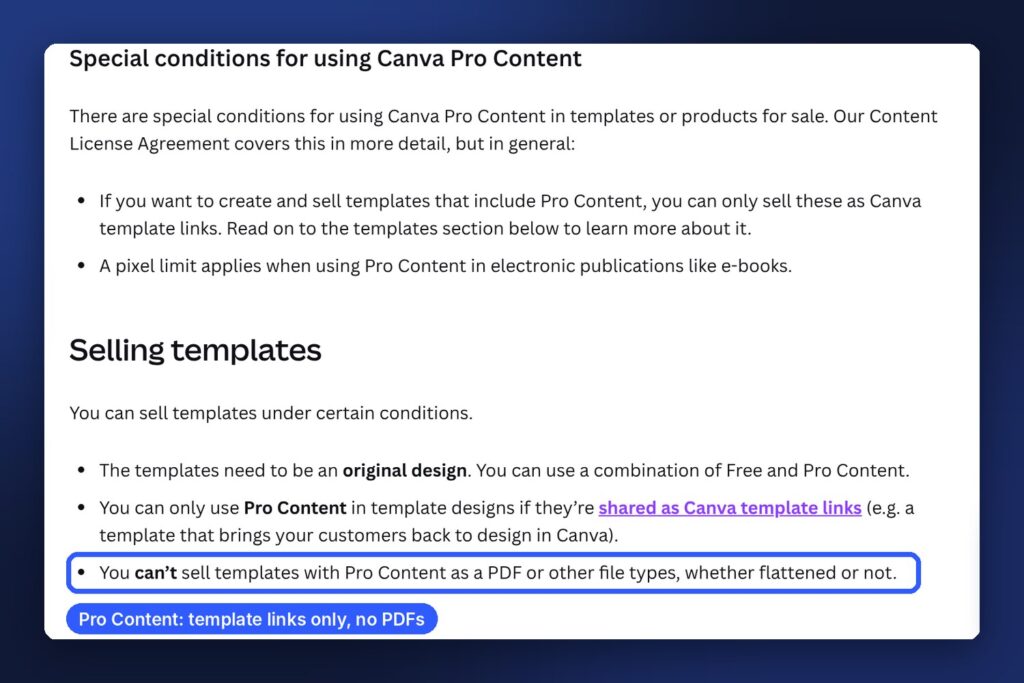
- Pro content means template links only. If your template includes any Canva Pro content, you can only sell it as a Canva template link, which opens a copy in the buyer’s own Canva account. You can’t sell it as a PDF or other file, flattened or not.
- Free content and your own uploads give you a choice. Canva’s example is a seller who makes wedding invitation templates with only Free content and their own photos. They can sell those as PDFs or as Canva template links.
- No stock content. You can’t use Canva content to make and sell clipart or other stock files.
To create a template link, open your design, select Share, then Template link (under “See all” if you don’t see it). Canva’s help article on sharing a design as a template link says this option is only available on Canva Pro, Teams, Enterprise, Education and Nonprofits plans. It also warns that hidden pages or cropped content in your design can become visible to anyone who copies it, so clean up your file first.
Business and brand templates (1-7)
Small business owners are some of the best template buyers. They need to look professional, they don’t have time to design, and they see a template as a business expense.
1. Media kit
Influencers, podcasters and bloggers send media kits to brands. A 3 to 5 page template with an about section, audience stats, rates and past partnerships is a useful product. Make one style for creators and a simpler one for local businesses.
2. Brand style guide
A template where a small business records its logo versions, colors, fonts and tone of voice. Freelance designers buy these too, to hand over to their clients.
3. Pitch deck
Founders need a clean pitch deck. Build 12 to 15 slides that follow the usual order: problem, solution, market, product, business model, traction, team and ask. Use sample text that explains what goes on each slide.
4. Service menu and price list
Hairdressers, nail techs, cleaners, photographers and bakers all need a price list. Make a printable version and a vertical version that fits a phone screen, in a few styles.
5. Client welcome packet
Coaches, designers and agencies send new clients a welcome guide that covers what happens next, how to get in touch, timelines and policies. It’s a polished product, and service businesses see the value quickly.
6. Proposal and quote template
A proposal template with a cover page, project scope, timeline, pricing table and terms. Freelancers who send proposals every week will use it again and again.
7. Real estate marketing kit
Real estate agents use open house flyers, “just listed” and “just sold” flyers, listing presentations and buyer guides. Bundle them into one kit with matching designs, and keep property details as placeholders.

Marketing and content templates (8-12)
These templates help business owners and creators make content that isn’t a social media post.
8. Lead magnet and ebook template
Many businesses offer a free guide in exchange for an email address. A 10 to 20 page ebook template with a cover, contents page, chapter pages, checklists and a closing call to action saves them days of design work.
9. Workbook template
Course creators and coaches use workbooks with prompts, fill-in boxes and exercises. Build pages that are easy to fill in on paper and on a tablet.
10. Webinar and presentation slides
A slide deck designed for teaching: title slides, agenda, big-number slides, quote slides and a final call to action. Make a few color themes so buyers can match their brand.
11. Canva website template
Canva lets you build simple websites. A one-page site template for a photographer, a wedding, a portfolio or a small café is a product few sellers offer. Show it working in your listing photos.
12. Flyers and brochures for local businesses
Gyms, cleaners, tutors and restaurants still hand out flyers and brochures. Pick one industry and make a set (flyer, brochure, business card) that matches.
Career templates (13-15)
Job seekers are motivated buyers, and a good-looking resume is easy to understand as a product.
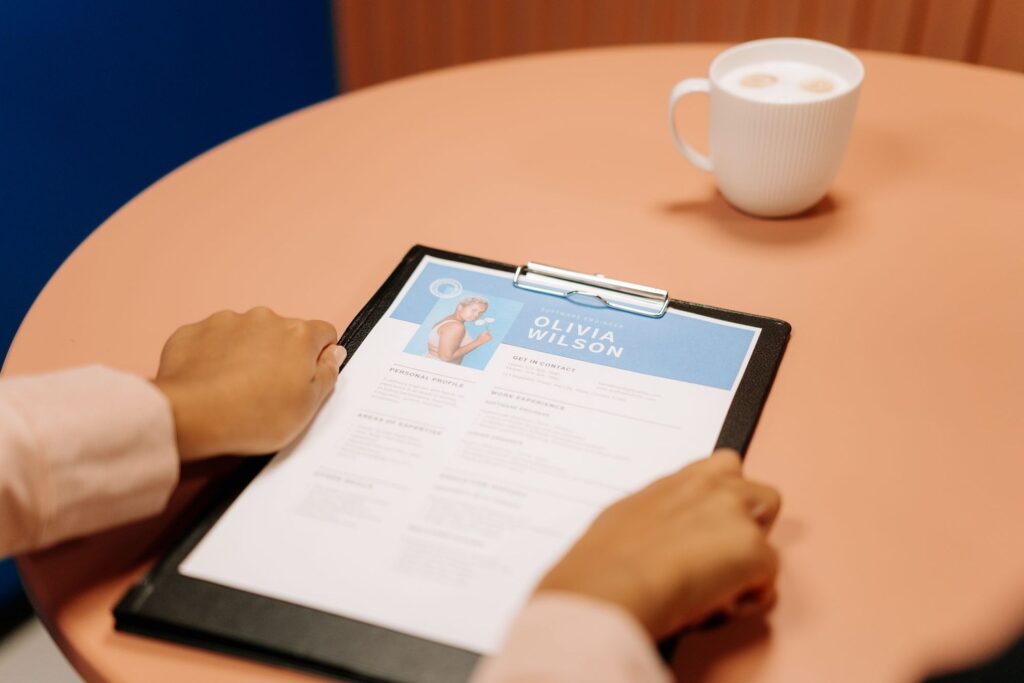
13. Resume template
Offer a clean resume in one and two-page versions, with a matching cover letter. Keep the design simple, because many companies run resumes through applicant tracking systems that struggle with complex layouts. Suggest that buyers keep a plain text version too.
14. Portfolio template
Designers, writers, photographers and architects need a portfolio to send with applications. A template with project pages, a short case study layout and a contact page works for many fields.
15. Professional bio and one-pager
Speakers, consultants and job seekers often need a one-page summary of who they are and what they do. It’s a small product that works well as an add-on to a resume bundle.
Wedding and event templates (16-20)
Event templates are a natural fit for Canva, because buyers only need to change names, dates and places.
16. Wedding invitation suite
Invitation, RSVP card, details card and save-the-date in one matching set. Canva’s own help article uses wedding invitations as its example of a template, so you’re on safe ground.
17. Seating chart
An editable seating chart for different numbers of guests and tables, sized to print as a large poster. Include instructions for printing it at a local print shop.
18. Event program and order of service
Programs for weddings, christenings, graduations and memorial services. Write gentle, respectful sample text for memorial programs, and keep the designs simple.
19. Baby shower and birthday invitations
Pick narrow themes (“woodland baby shower,” “50th birthday dinner”) and make a matching set: invitation, welcome sign, thank-you card.
20. Menu template
Menus for weddings and dinner parties, and simple menus for cafés and food trucks. A café menu can be a recurring sale if the buyer updates prices often.
Education templates (21-23)
Teachers and homeschooling parents create a lot of materials. Templates save them hours.
21. Classroom newsletter template
A weekly or monthly newsletter for parents, with sections for upcoming dates, what the class is learning and reminders. Make it easy to update every week.
22. Worksheet templates
Not finished worksheets, but layouts teachers can fill in: vocabulary pages, reading response sheets, exit tickets and graphic organizers. Teachers add their own content to your design.
23. Certificates and awards
End-of-year awards, reading certificates and course completion certificates for teachers, coaches and course creators. Include an editable name field and a version with a space for a signature.
Home and personal templates (24-25)
24. Recipe book template
People want to collect family recipes into one book. A template with a cover, contents page, recipe pages and photo pages makes a great gift, especially before the holidays.
25. Family yearbook or photo book template
A template for turning a year of family photos into a printed book, with layouts for each month, milestones and favorite moments. It’s popular as a gift for grandparents.
How to package a template so buyers love it
A template is only as good as how easy it is to use. Clear instructions save you a lot of confused messages, and save buyers a lot of frustration.
- Deliver a PDF with your template link inside. On Etsy, buyers download files, so the usual way to sell a Canva template is a PDF that contains your template link and instructions. Etsy’s help page on managing digital listings allows up to five files per listing, each up to 20MB.
- Write short instructions. Explain how to open the link, how to change text, colors and photos, how to download for print or screen, and where to print large items. Screenshots of each step help.
- Check the free account experience. If your template uses only Free content, buyers on a free Canva account can edit everything. If it uses Pro content, say clearly in your listing that some elements need Canva Pro.
- Use placeholder text that teaches. “Write two sentences about your experience here” is more helpful than lorem ipsum.
- Show the template in use. Listing photos should show finished examples, every page, and what the buyer gets.
- Disclose AI use. If you used AI to create any part of the product, Etsy’s article on its stance on AI creations says you must say so in the listing description.
Here’s a prompt you can use with ChatGPT or Claude to write your instructions page:
I'm selling a Canva template: [what it is, e.g. a 5-page media kit for creators].
It's delivered as a Canva template link inside a PDF.
Write a one-page "How to use your template" guide for a beginner:
1. How to open the link and make a copy
2. How to change text, colors, fonts and photos
3. How to download it for print and for sharing online
4. Three tips to get the best result
Use short steps and plain English. Don't mention features you aren't sure exist in Canva.
Then check every step yourself in Canva before you use it.
Where to sell Canva templates
Etsy is the most common starting point because buyers already search there for templates. Etsy’s fees policy lists a $0.20 listing fee and a 6.5% transaction fee, plus payment processing fees. Read Etsy’s rules on what you can sell: digital items must be made or designed by you.
Your own website lets you keep more of each sale, but you’ll need to bring your own traffic. Pinterest is a good fit for this, because people save template ideas for later.
Other marketplaces for design assets exist too. Read each one’s rules on Canva templates before you upload, since some have their own requirements.
Many sellers start on Etsy, learn which templates sell, and then add their own site later.
FAQ
Is it legal to sell Canva templates?
Yes, if they’re your own original designs and you follow Canva’s Content License Agreement. You can’t resell Canva’s templates or sell Canva elements on their own with minimal changes.
Do I need Canva Pro to sell templates?
To create a template link, yes. Canva says template links are only available on Pro, Teams, Enterprise, Education and Nonprofits plans. If your template uses only Free content and your own uploads, you can also sell it as a PDF.
Can my buyers use a free Canva account?
Yes, if your template only uses Free content. If you used Pro elements, buyers on a free account may see a watermark or need to swap those elements. Say this clearly in your listing.
Can I use AI to make Canva templates?
Yes. AI can help you plan pages, write sample text and draft your listing. If you use AI to create part of a product you sell on Etsy, you must disclose it in the listing.
What sells better: Canva templates or printables?
They suit different buyers. Printables are finished products people print and use. Templates are for buyers who want to customize a design with their own details. Many shops sell both. For printable ideas, see our list of 50 printable ideas that sell on Etsy.
Keep going
For more template ideas, read 15 Notion and Canva templates you can make with AI and sell online and 15 side hustles you can do with Canva. To open your shop, follow how to start an Etsy digital download shop with AI, and for faster listings and sample text, see 15 side hustles you can do with ChatGPT.