A portfolio website does one job: it shows people what you can do and makes it easy for them to hire you. It doesn’t need to be big or clever. A clean single page with your best work, a short bio and a way to contact you beats a ten-page site you never finish.
With today’s AI tools and free website builders, you can build that page in about an hour. This guide shows you how: what to put on it, AI prompts for the writing, which builder to choose (with prices from each company’s own pages), and how to publish it so people can actually find it.
Who this is for: freelancers, designers, writers, photographers, students and anyone selling a skill who needs a simple online portfolio fast. If you’re still deciding what to offer, see our list of 20 AI side hustles for college students.
A note on prices: all prices and limits were checked on each company’s site on 11 November 2026, in US dollars, before tax.
What a good portfolio site needs
Before you open any tool, know what goes on the page. A strong one-page portfolio has six parts:
- A clear headline. Who you are and what you do, in one line: “Brand designer for small food businesses”, not “Welcome to my website”.
- Your best 3-6 pieces of work. Quality beats quantity. Each piece gets an image and one or two lines on the problem, what you did and the result.
- A short bio. Three or four sentences: what you do, who you do it for and why someone should trust you.
- Proof. A client quote, a result (“cut the client’s design time in half”), or a well-known name you’ve worked with, if you have permission to mention it.
- A call to action. “Email me”, “Book a call” or “See my rates”. One clear next step.
- Contact details. An email address or a simple contact form, plus links to the one or two profiles that matter in your field.
That’s it. You can add more pages later.
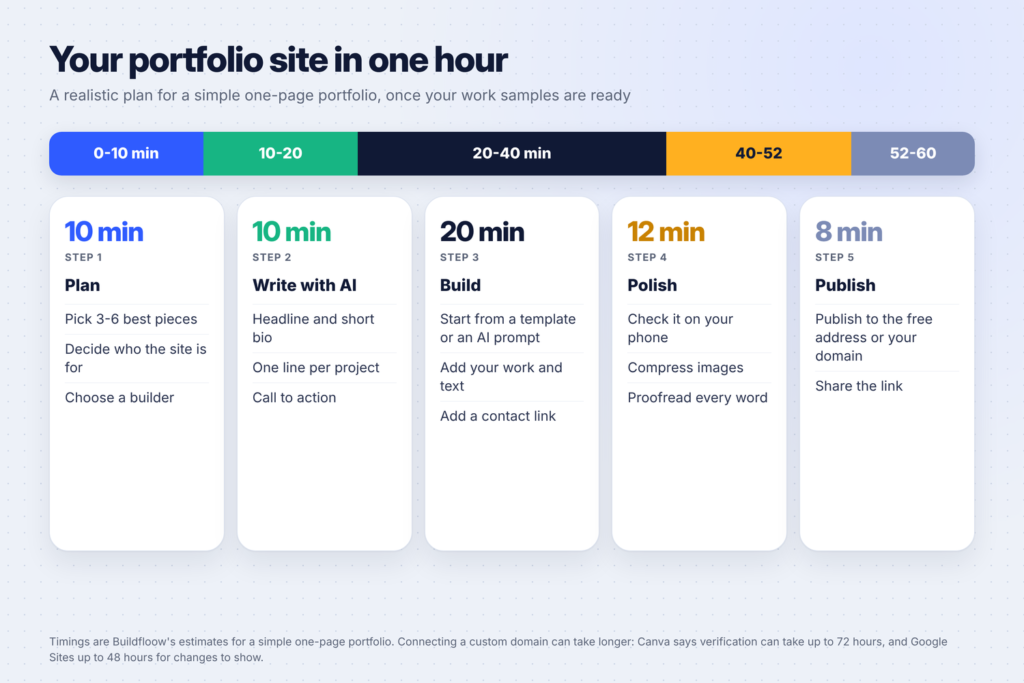
Step 1: Choose your work and your audience (10 minutes)
Pick the 3-6 pieces you’re proudest of that show the work you want more of. If you want logo projects, lead with logos, even if most of your past work was social media graphics.
Then answer one question: who is this site for? A site aimed at “small bakeries that need branding” is easier to write and more convincing than one aimed at “anyone”.
No client work yet? Make it. Create two or three sample projects for imaginary clients and label them honestly as personal or concept projects. Our guide on how to make a logo with AI for free is a good way to create a branding sample.

Step 2: Write the words with AI (10 minutes)
The writing is where most people get stuck, and where AI helps most. Copy this prompt into ChatGPT, Claude or Gemini and fill in the brackets:
I'm building a one-page portfolio website.
I am a [your role] who helps [who you help] with [what you do].
My best projects are:
1. [project, what you did, result]
2. [project, what you did, result]
3. [project, what you did, result]
Write:
- 3 headline options (under 10 words each)
- a 3-4 sentence bio in a friendly, confident tone (first person)
- a 1-2 sentence description for each project: the problem, what I did, the result
- 3 call-to-action button texts
Use plain words. Don't exaggerate or invent results.
Then edit the result so it sounds like you. Remove anything you can’t back up. If a sentence sounds like nobody would say it out loud, rewrite it. Our comparison of the best AI writing tools for bloggers covers which tools are best at editing.
Step 3: Choose a website builder
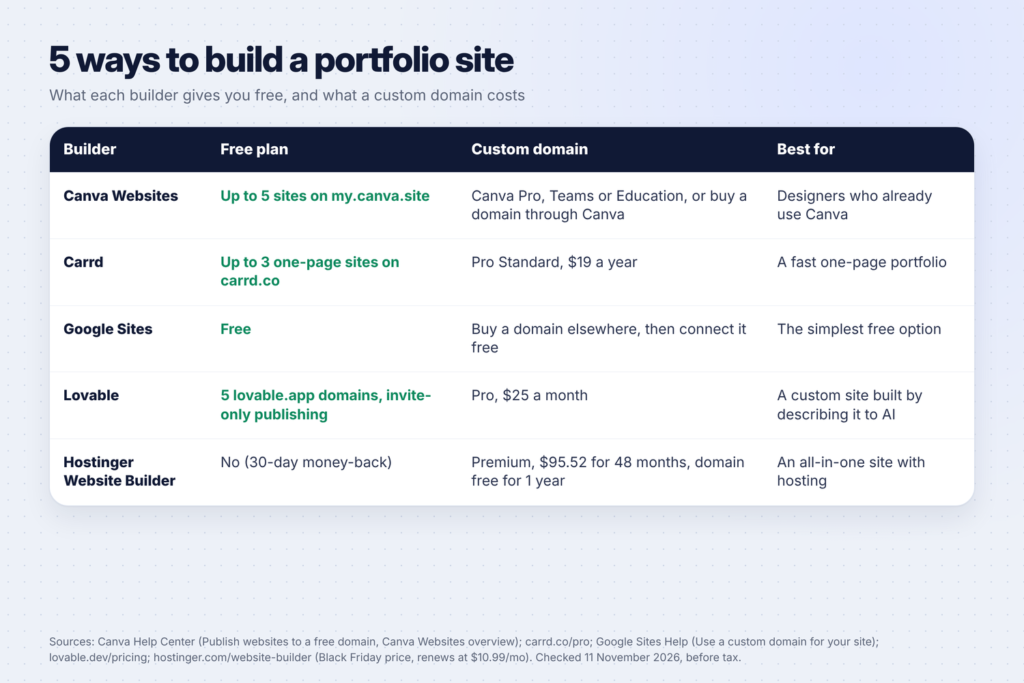
You have more free options than ever. Here are five good choices, with what each company’s own pages say:
Canva Websites: best if you already design in Canva
Canva lets you turn a design into a website. Its help article on publishing websites to a free domain explains that you can publish Website designs to a free my.canva.site address, and its Canva Websites overview says free users can publish up to five sites there. To use your own domain, Canva’s article on using your own domains says you need Canva Pro, Teams or Education, or you can buy a domain through Canva. Verification can take up to 72 hours after you connect a domain.
Good for: designers and creators who already know Canva and want full visual control. Our 30 Canva tips will speed up the build.
Carrd: best for a fast one-page site
Carrd is built for simple one-page sites. Its Pro page lists plans from $9 a year (Pro Lite) and $19 a year, with custom domains on the $19 plan and above, and a free 7-day trial of Pro features with no card required. Pro also removes the “Made with Carrd” branding and adds forms, analytics and more sites; publishing more than three sites needs a Pro plan.
Good for: the cheapest route to a portfolio on your own domain.
Google Sites: best simple free option
Google Sites is free with a Google account. If you want your own domain, Google’s custom domain help explains how to connect one you’ve bought elsewhere: only the site’s owner can do it, the site must be public, and changes can take up to 48 hours to show.
Good for: students and anyone who wants a free, plain portfolio with no learning curve.
Lovable: best for a custom site built with AI
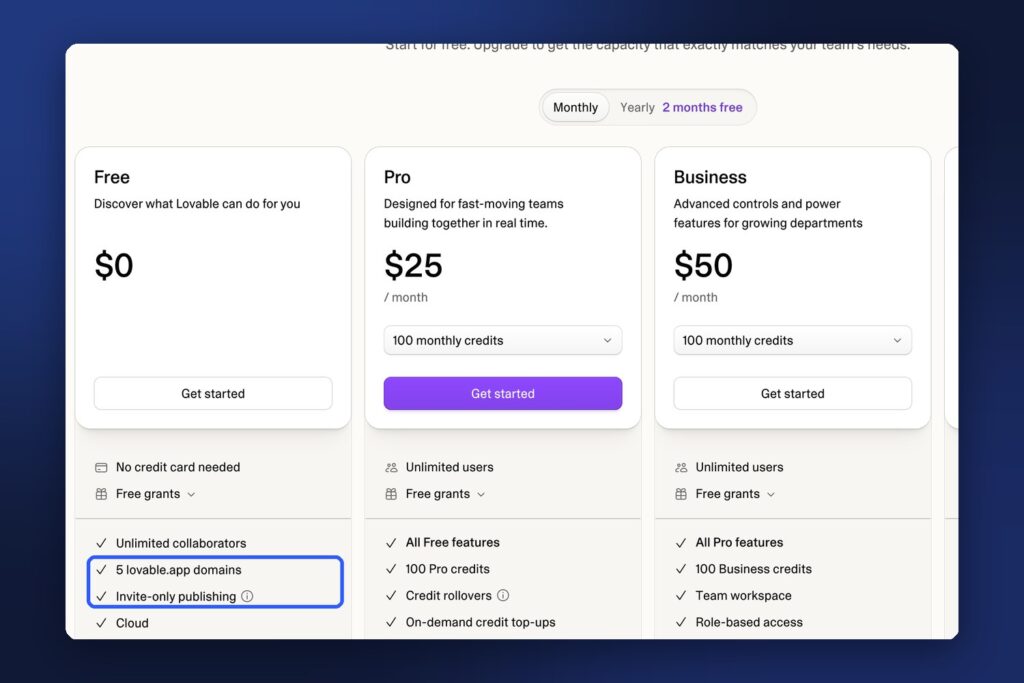
Lovable builds a site from a description: you tell it what you want and it writes the code. Its pricing page lists a free plan with 5 lovable.app domains and invite-only publishing, and Pro at $25 a month with 100 monthly credits, custom domains and the option to remove the Lovable badge.
Good for: people who want a more unusual design than a template allows. See our list of 12 ways to make money with Lovable if you want to offer sites like this as a service.
Hostinger Website Builder: best all-in-one paid option
Hostinger’s website builder page lists its Premium plan, described as made for launching a first website “from portfolios and resumes to blogs and link-in-bio pages”, at $1.99 a month during its Black Friday sale: $95.52 for 48 months, renewing at $10.99 a month. It includes up to 3 websites, a free custom domain for the first year, 900+ templates and a 30-day money-back guarantee.
Good for: people who want hosting, a domain and a builder in one place. Compare it with other hosts in our guide to the best web hosting for new bloggers.
Step 4: Build the page (20 minutes)
The steps are similar in every builder:
- Start from a template (or, in Lovable, a prompt). Pick a simple layout with a big headline, a work grid and a contact section.
- Replace the text with what you wrote in Step 2.
- Add your work. Use the same size and style for every project image so the grid looks tidy.
- Add a contact button that opens your email or a form.
- Add one or two profile links (LinkedIn, Behance, Dribbble, Instagram or GitHub, whichever your clients use).
For Lovable, a prompt like this gets you a strong first version:
Build a one-page portfolio website for [name], a [role] for [audience].
Sections: hero with headline "[headline]" and a "[call to action]" button,
a grid of [number] projects with image, title and one-line description,
a short About section, client quotes, and a contact section with an email button.
Style: clean, lots of white space, [colour] accent, modern sans-serif font,
fully responsive on mobile.
Then ask for specific changes (“make the project grid two columns on mobile”) rather than starting over.
Step 5: Polish (12 minutes)
Before you publish:
- Check it on your phone. Many visitors will see it there first.
- Compress your images so the page loads quickly. Resize very large photos before you upload them, because they can slow a page down.
- Proofread every word. One typo on a portfolio undermines “attention to detail”.
- Click every link and button. Especially your contact button.
- Add a page title and description in the builder’s SEO or settings panel, using your name and what you do.
Step 6: Publish and share (8 minutes)
Publish to the free address first (my.canva.site, carrd.co, Google Sites, lovable.app or your builder’s default). You can connect a custom domain later. Then:
- Add the link to your email signature, LinkedIn and social profiles.
- Send it to two or three people you trust and ask: “What do you think I do, and who for?” If they can’t answer, sharpen your headline.
- Share one project as a post or Reel. Our guide to making faceless Reels with AI shows how to turn a project into a short video.
What to show, by profession
The structure stays the same, but what counts as “work” changes by field:
| If you’re a… | Show | Add this proof |
|---|---|---|
| Graphic or brand designer | Logos, brand sets and before-and-after redesigns | The client’s goal and how the design met it |
| Writer or copywriter | 3-5 short excerpts with links to the full pieces | Where it was published, or a client quote |
| Photographer | One tight gallery per style (portraits, products, events) | Client names you have permission to use |
| Video editor | A 60-second showreel plus 2-3 full projects | Views or results, if the client shares them |
| Virtual assistant or admin | Case studies of tasks you handled and the time saved | A short testimonial |
| Student or career changer | Class, volunteer or personal projects, clearly labelled | What you learned and what you’d do next |
Keep each project short. A visitor should understand what you did in five seconds and find the details if they want them.
Do you need your own domain?
Not on day one. A free address works for getting started and sharing with friends and first clients. A custom domain (yourname.com) looks more professional and stays yours if you change builders, so it’s worth it once you’re sending the link to paying clients.
If you buy one, choose your own name or a simple brand name, avoid hyphens and numbers, and note the renewal price: several builders include a domain free for the first year only.
Common portfolio mistakes
- Too much work. Six great pieces beat 30 average ones.
- No context. An image alone doesn’t tell clients what you did. Add one line per project.
- A vague headline. “Creative professional” tells visitors nothing.
- No clear next step. Every visitor should know how to contact you within seconds.
- AI text left unedited. It can sound generic and may invent details. Make every claim true.
- Never updating it. Swap in better work as you finish it.
FAQ
Can I build a portfolio website for free?
Yes. Canva Websites, Carrd, Google Sites and Lovable all let you publish a site on a free address. You’ll pay only if you want your own domain or extra features.
What is the best website builder for a portfolio?
It depends on you. Canva suits people who already design in Canva, Carrd is fast and cheap for a one-page site, Google Sites is the simplest free option, Lovable builds custom designs from a prompt, and Hostinger bundles hosting, a domain and a builder.
How many projects should a portfolio include?
Three to six of your best pieces is usually enough. Lead with the type of work you want more of.
Can I use AI to write my portfolio?
Yes, for drafts. Give the AI your real projects and results, then edit the text so it sounds like you and every claim is accurate.
How long does it take to connect a custom domain?
It varies by builder. Canva says verification can take up to 72 hours, and Google says custom domain changes in Google Sites can take up to 48 hours to show.
Keep going
Once your portfolio is live, start getting clients. Find ideas in 15 side hustles you can do with Canva and 15 side hustles you can do with ChatGPT, and set up Pinterest for your business to bring visitors to your work.