AI writing tools can save bloggers hours: turning a rough idea into an outline, untangling a messy paragraph, catching typos before you hit publish. They can also hurt a blog if you use them to churn out pages nobody needs. The difference is which tool you pick for which job, and how you use it.
This guide compares the AI writing tools bloggers actually use (ChatGPT, Claude, Gemini, Grammarly and Jasper), what each costs according to its own pricing page, what each is good at, and a simple workflow that keeps your posts helpful and your own.
Who this is for: bloggers who want to write faster without publishing generic AI content. If you haven’t started your blog yet, begin with our guide to starting a WordPress blog.
A note on prices: all prices were checked on each company’s site on 8 November 2026, for one person in the US, before tax. Buildfloow may earn a commission from some links on this site, at no extra cost to you. It doesn’t change our recommendations.
The quick answer
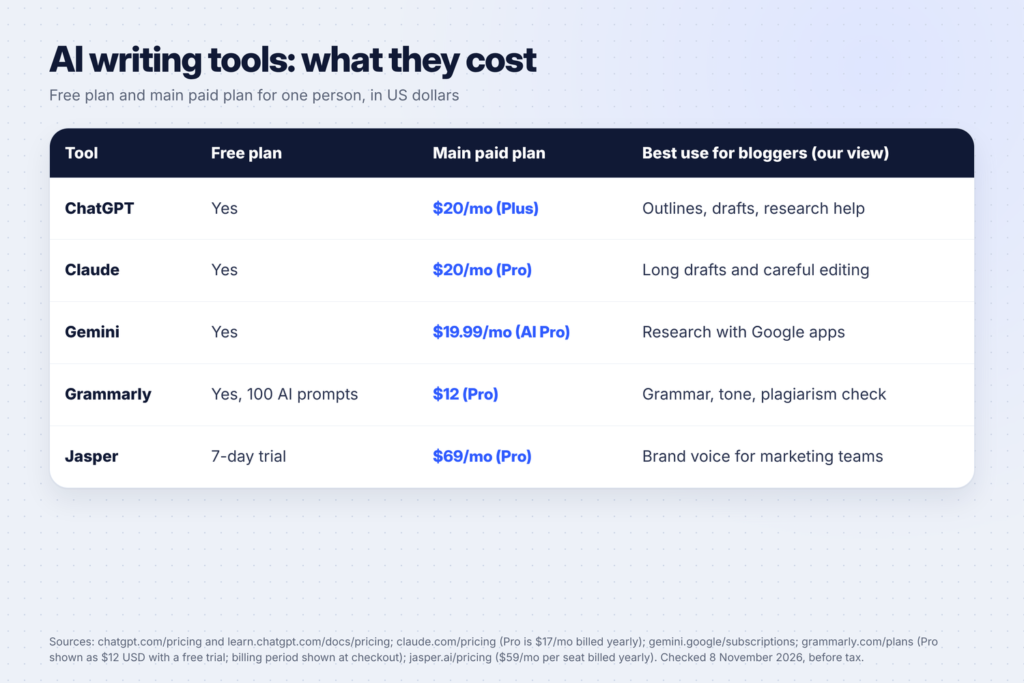
- Best all-round writing assistant: ChatGPT or Claude, both $20 a month for their main plans, both with free plans to start.
- Best for grammar, tone and a final check: Grammarly, with a free plan and a Pro plan.
- Best if you already live in Google Docs and Gmail: Gemini, through Google AI Pro at $19.99 a month.
- Best for marketing teams with a strict brand voice: Jasper, from $59 a month per seat billed yearly.
Most solo bloggers only need two of these: one AI chat tool for planning and drafting, and one editing tool for the final polish. Many can start with the free plans of both.
How we compared these tools
We looked at each tool the way a solo blogger would use it, not the way a large marketing team would. For each one we checked:
- Price for one person: the free plan, the main paid plan and how billing works, taken from the company’s own pricing page rather than a review site.
- Fit for blogging tasks: ideas, outlines, drafts, editing, grammar and plagiarism checks.
- Limits that affect writers: usage caps, prompt allowances and trial lengths.
- Who it’s really built for: a solo writer, or a team that needs shared brand settings.
We didn’t rank the tools by “writing quality” alone, because that depends on the prompt, your notes and how much you edit. Your own test with the same post in two free plans will tell you more than any ranking.
What AI writing tools are good at (and what they aren’t)
Before comparing tools, it helps to know where AI saves time on a blog and where it doesn’t.
Good uses:
- Brainstorming post ideas and angles for a topic you know
- Turning your notes into an outline
- Rewriting a clumsy paragraph in plain English
- Writing first drafts of meta descriptions, Pinterest descriptions and email subject lines
- Checking grammar, spelling and tone
- Summarizing a long source document so you can find the part you need
Bad uses:
- Publishing drafts without checking the facts (AI tools can state wrong numbers confidently)
- Writing about things you have no experience of
- Producing dozens of similar pages to rank for every keyword variation
That last point matters for traffic. Google’s guidance on AI-generated content says its ranking systems aim to reward “original, high-quality content” and that “appropriate use of AI or automation is not against our guidelines”. But its spam policies list “using generative AI tools or other similar tools to generate many pages without adding value for users” as an example of scaled content abuse.
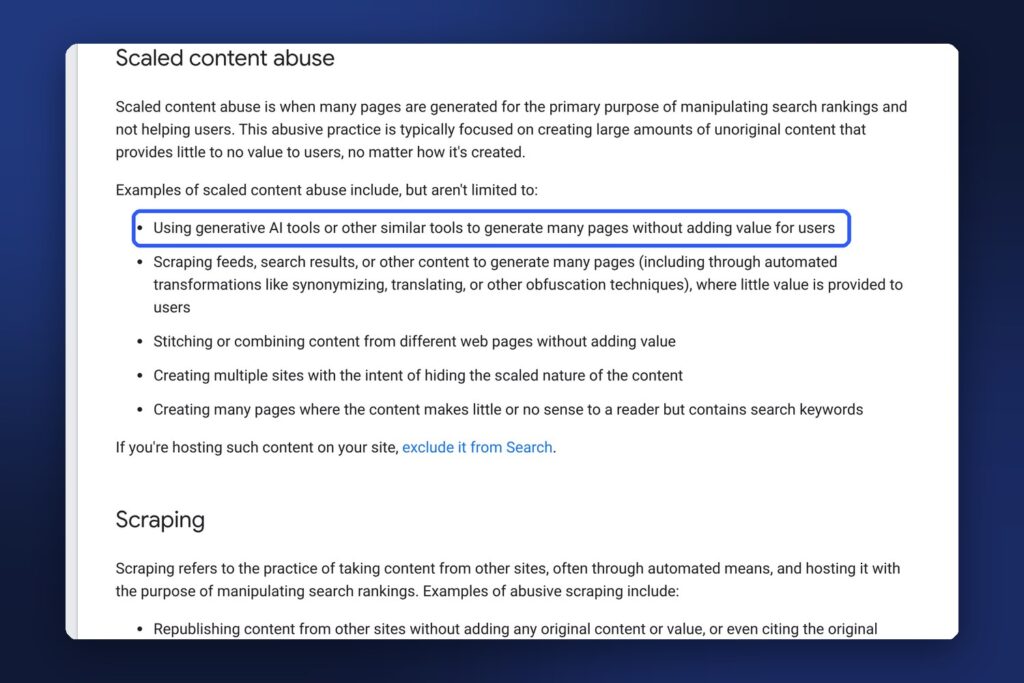
In short: AI is fine as a tool. Publishing AI output nobody needed is the problem.
The best AI writing tools for bloggers
1. ChatGPT: best for brainstorming and first drafts
OpenAI’s pricing page lists four plans for individuals: Free, Go, Plus and Pro. Its pricing docs give the prices: $0, $8, $20 and Pro from $100 a month ($100, $200 or $500).
For bloggers, Plus at $20 a month is the main plan. The pricing page lists projects, scheduled tasks and custom GPTs on Plus, plus expanded deep research and memory. Projects are useful for a blog: keep your style notes, audience description and past outlines in one place so every new chat starts with your context. OpenAI notes the cheaper Go plan “may include ads”.
Good for: generating ideas, outlines, first drafts and social captions quickly. Watch out for: a generic tone if you don’t give it your own notes and examples.
2. Claude: best for long drafts and careful editing
Anthropic’s Claude pricing page lists a free plan and Pro at $17 a month with an annual subscription ($200 billed up front) or $20 billed monthly. Pro adds more usage than Free, Projects, more Claude models and Claude in Chrome and Microsoft 365, according to the page.
Many writers use Claude for editing because you can paste in a long draft and ask for specific changes: “shorten this section by a third”, “make this sound less formal”, “list every claim that needs a source”. Projects let you keep a style guide and examples of your writing in one place.
Good for: editing long posts, restructuring drafts and keeping a consistent voice. Watch out for: usage limits on Free, which reset every five hours and every week according to the pricing page.
3. Gemini: best if you work in Google apps
Google’s Gemini subscriptions page lists a free plan with a Google Account, Google AI Plus at $4.99 a month, Google AI Pro at $19.99 a month and Google AI Ultra from $99.99 a month.
Gemini works with your Google Account, so if you already draft in Google Docs and keep your notes in Drive, it’s the easiest to try without signing up somewhere new.
Good for: bloggers who live in Google Workspace and want AI help without switching apps. Our full comparison of ChatGPT Plus vs Claude Pro vs Gemini goes deeper on what each $20 plan includes.
4. Grammarly: best for the final edit
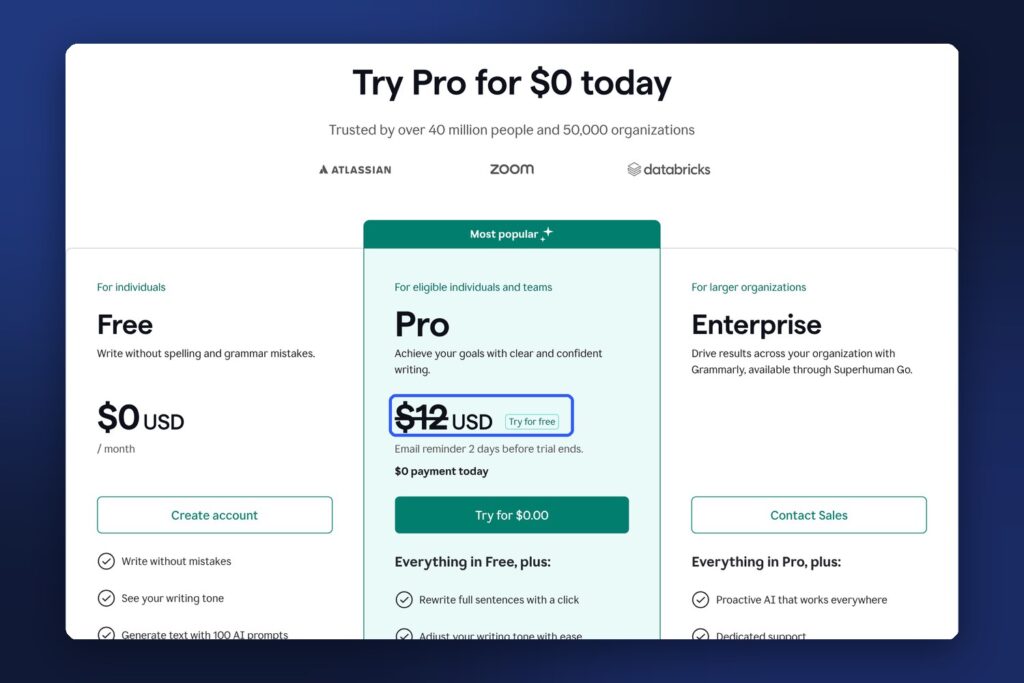
Grammarly is different from the three chat tools above: it works where you write and checks your text as you go. Its plans page lists:
- Free: spelling and grammar fixes, your writing tone and 100 AI prompts a month.
- Pro: $12 USD, with a free trial. It adds full-sentence rewrites, tone adjustments, unlimited personalized suggestions, plagiarism and AI-text detection, and 2,000 AI prompts a month.
Check the billing period at checkout, because the plans page shows the price without one.
The plagiarism checker is useful for bloggers who work with freelance writers or AI drafts: it flags text that matches pages already online, so you can rewrite or cite it.
Good for: catching mistakes before you publish and tightening sentences. Watch out for: accepting every suggestion. Grammarly’s style fixes can flatten a personal voice.
5. Jasper: best for teams with a brand voice
Jasper is built for marketing teams. Its pricing page lists Pro at $59 a month per seat billed yearly, or $69 billed monthly, with a free 7-day trial. Pro includes one seat, 2 Brand Voices, 5 Knowledge assets and 3 Audiences, plus agents for core marketing workflows. A Business plan has custom pricing.
Brand Voices are Jasper’s main selling point: you teach it how your brand writes, and it keeps that style across blog posts, emails and ads. Jasper also lists a plagiarism checker add-on powered by Copyscape.
Good for: small businesses and teams producing a lot of on-brand marketing content. Watch out for: the price. For a solo blogger, ChatGPT or Claude at $20 a month covers most of the same writing tasks.
Which tool for which blogging task
| Task | Best tool | Why |
|---|---|---|
| Brainstorm post ideas | ChatGPT, Claude or Gemini | Fast lists of angles you can pick from |
| Outline a post | ChatGPT or Claude | Turns notes into a clear structure |
| Rewrite a messy section | Claude | Handles long text and specific edits well |
| Check grammar and tone | Grammarly | Works as you type, flags mistakes in place |
| Check for accidental copying | Grammarly Pro or Jasper’s plagiarism add-on | Compares your text with pages online |
| Write in a fixed brand voice at scale | Jasper | Brand Voices and Knowledge assets |
| Meta descriptions and Pinterest descriptions | Any chat tool | Short, structured text with a clear brief |
A simple AI writing workflow for bloggers

Here’s a workflow that uses AI where it helps and keeps the parts that make your blog worth reading:
- You choose the topic and angle. Start from what you know, what your readers ask and what people search. Our Pinterest SEO guide shows how to find search phrases people actually use.
- You collect the facts. Find primary sources (official pages, studies, the company’s own help center) and save the links.
- AI builds the outline. Give it your notes and sources, not just a topic.
- You write (or heavily edit) the draft. Add your experience, examples, screenshots and opinions. That’s what no AI tool can add for you.
- AI edits. Ask it to cut repetition, simplify sentences and point out any claim without a source.
- Grammarly (or similar) does the final check.
- You fact-check every number against your sources before publishing.
Copy this prompt for step 3:
I'm writing a blog post for [audience] about [topic].
My angle: [what makes this post different].
Here are my notes and sources: [paste them].
Create an outline with H2 and H3 headings, the key point for each section,
and a list of any facts I still need to verify. Don't invent statistics.
And this one for step 5:
Edit this draft for clarity. Keep my voice and all facts as they are.
Shorten long sentences, remove repetition, and list any sentence that
makes a claim without a source. Don't add new information.
[paste draft]
How to keep AI writing sounding like you
- Give it examples of your writing. Paste two or three of your best paragraphs into a Project and ask it to match the tone.
- Ban the clichés. Tell it to avoid phrases like “in today’s fast-paced world” and “game-changer”.
- Add what only you know. Your results, mistakes, screenshots and opinions make a post worth reading.
- Read it out loud. If a sentence sounds like nobody would say it, rewrite it.
- Edit in your own words last. The final pass should always be yours.
Common mistakes bloggers make with AI tools
- Paying for three tools at once. Start with free plans and upgrade the one you use every day.
- Publishing without fact-checking. AI tools can make up statistics and quotes. Check every number.
- Using AI to mass-produce pages. Google’s spam policies call out generating many pages without adding value.
- Pasting private data. Don’t paste client contracts, passwords or other people’s personal details into an AI tool.
- Letting AI choose the topic. Your readers’ real questions are a better guide than a list of AI ideas.
FAQ
What is the best free AI writing tool for bloggers?
ChatGPT, Claude and Gemini all have free plans that handle brainstorming and outlines, and Grammarly’s free plan covers spelling and grammar with 100 AI prompts a month. A free chat tool plus free Grammarly is enough for many new bloggers.
Is it OK to use AI to write blog posts?
Google says appropriate use of AI isn’t against its guidelines and that it rewards high-quality content however it’s produced. Its spam policies do target using AI to generate many pages without adding value. Use AI to help you write, and make sure every post adds something useful.
Is Jasper worth it for a solo blogger?
Usually not at first. Jasper Pro is $59 a month per seat billed yearly. Its strengths, such as Brand Voices and team features, matter most for businesses producing a lot of on-brand content. A $20 ChatGPT or Claude plan covers most solo blogging tasks.
Does Grammarly have AI writing features?
Yes. Grammarly’s plans page lists 100 AI prompts a month on Free and 2,000 on Pro, plus full-sentence rewrites, tone adjustments and AI-text detection on Pro.
Which is better for blog writing, ChatGPT or Claude?
Both cost $20 a month for their main plans. Many writers prefer ChatGPT for quick ideas and Claude for editing long drafts. Try both free plans with the same post and keep the one whose edits you accept most often.
Keep going
Put your writing tools to work. Set up your blog with our guide to the best web hosting for new bloggers, compare ChatGPT Plus, Claude Pro and Gemini in more depth, and see how writers earn with AI in 15 side hustles you can do with Claude.