If you use AI every day, the free plans start to feel tight. You hit message limits in the middle of work, the best models are locked, and the useful extras sit behind a paywall. So the question becomes: which $20 subscription is actually worth it?
ChatGPT Plus, Claude Pro and Google AI Pro (which includes Gemini) cost almost exactly the same, but they’re built for different kinds of people. This guide compares what each one costs and includes, using each company’s own pricing pages, and then helps you pick based on how you actually work.
Who this is for: anyone deciding which AI subscription to pay for, or whether to pay for one at all. If you already use Claude and keep running out of messages, read our guide on making your Claude limit last before you upgrade.
The prices at a glance
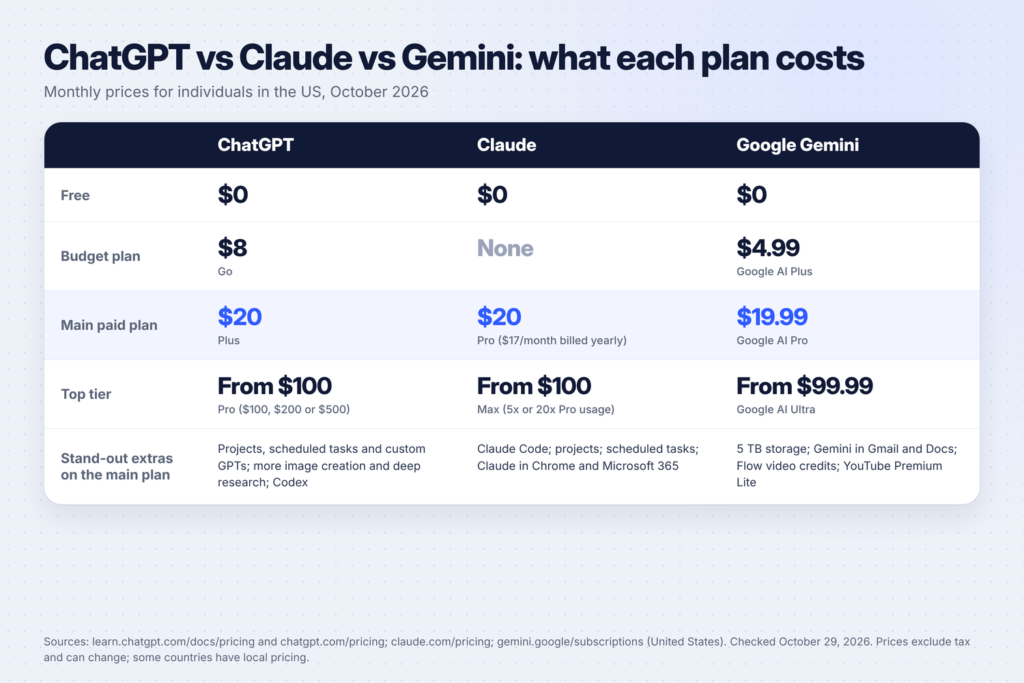
All three have a free plan, a main paid plan at about $20 a month, and a much more expensive top tier. Here’s what each company lists for individuals in the US:
| Plan | ChatGPT | Claude | Google (Gemini) |
|---|---|---|---|
| Free | $0 | $0 | $0 |
| Budget | Go, $8/month | No budget plan | Google AI Plus, $4.99/month |
| Main paid plan | Plus, $20/month | Pro, $20/month ($17/month billed yearly) | Google AI Pro, $19.99/month |
| Top tier | Pro, from $100/month ($100, $200 or $500) | Max, from $100/month (5x or 20x Pro usage) | Google AI Ultra, from $99.99/month |
Sources: OpenAI’s ChatGPT pricing and plans page, Anthropic’s Claude pricing page and Google’s Gemini subscriptions page, all checked in October 2026. Prices can change, may not include tax, and differ in some countries, so check the live page before you subscribe.
The headline is simple: at the $20 level, price isn’t the deciding factor. What you get for it is.
First: what the free plans already give you
Before paying, it’s worth knowing how much you get for nothing. Each company’s pricing page lists:
- ChatGPT Free: text chats with GPT-6 (OpenAI says they’re unlimited, subject to abuse guardrails), plus limited uploads, image creation, voice chats, deep research, memory and Codex access.
- Claude Free: chat on web, desktop and mobile, web search, creating files and running code, memory across conversations, connecting your apps and tools, Artifacts, and Claude Design, Slides and Docs.
- Gemini Free (with a Google account): Google’s Flash-Lite model, image generation and editing, Deep Research, Gemini Live, Canvas, Gems, limited access to Google Flow, and 15 GB of storage.
For occasional use, that’s a lot. The paid plans mostly buy you more usage, better models, and a handful of extra features.
ChatGPT Plus ($20/month): the all-rounder
According to OpenAI’s plans page, ChatGPT Plus adds, on top of the cheaper Go plan:
- Advanced reasoning models
- Expanded messages and uploads
- More complex and accurate image creation
- Expanded deep research
- Expanded memory and context
- Projects, scheduled tasks and custom GPTs
- Expanded Codex usage for coding
- Early access to new features
Who it suits: people who want one tool that does a bit of everything. Writing, research, images, voice chats and custom GPTs are all in one app, which makes it a common choice for small business owners, students and content creators. If you make a lot of images, Plus is the only one of the three where image creation is a central part of the plan description.
Worth knowing: OpenAI’s ChatGPT Go plan sits in between free and Plus at $8 a month in the US. If you mainly want longer conversations and more uploads, Go may be enough. OpenAI’s pricing page notes that Go may include ads.
For ways to turn it into income, see our list of side hustles you can do with ChatGPT.
Claude Pro ($20/month): for writing, thinking and coding
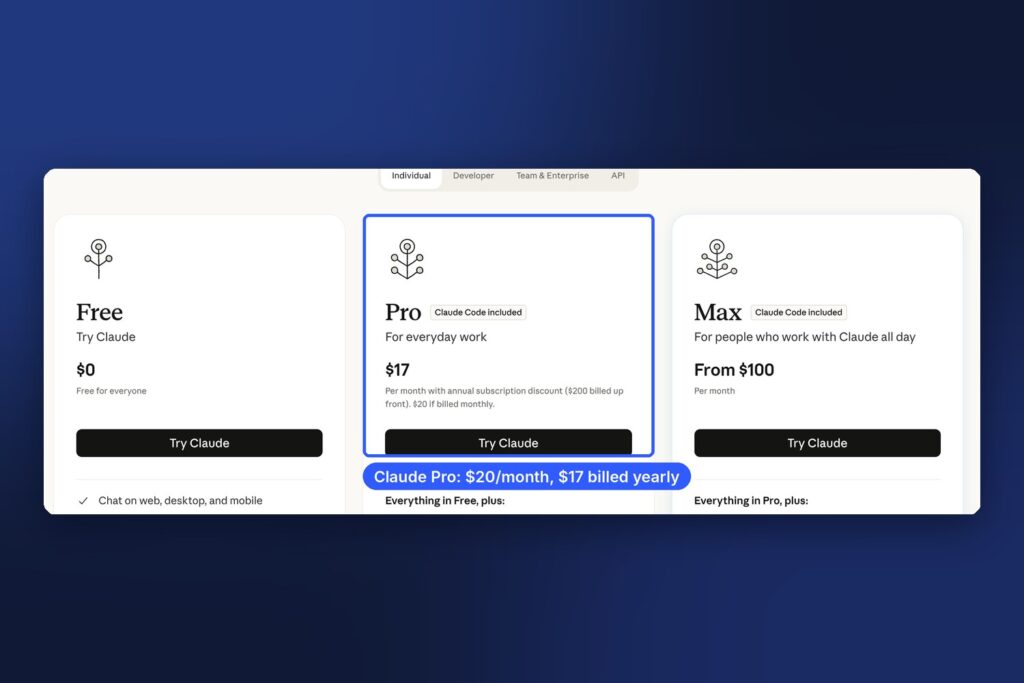
Anthropic’s pricing page lists Claude Pro at $20 a month, or $17 a month if you pay $200 for a year up front. On top of the free plan, Pro includes:
- More usage
- Handing off and scheduling tasks
- Claude Code, Anthropic’s coding tool
- Projects
- More Claude models
- Claude in Chrome and Microsoft 365
- Claude Dashboards (in beta) and Claude Science
Who it suits: people who write a lot, work through long documents, or want to build things. Claude Code is included in Pro, which makes it the natural pick if you want an AI that can work in your files and build tools for you. We use it for real projects on Buildfloow, from a Claude Code job search system to connecting Claude Code to WhatsApp.
Worth knowing: Claude has no cheaper middle plan. Your choice is Free, Pro or Max. Usage limits apply on every plan, and heavy users can run into them. Our guide on stopping your Claude limit from running out shows how to stretch it.
For ideas on what to do with it, see 15 side hustles you can do with Claude.
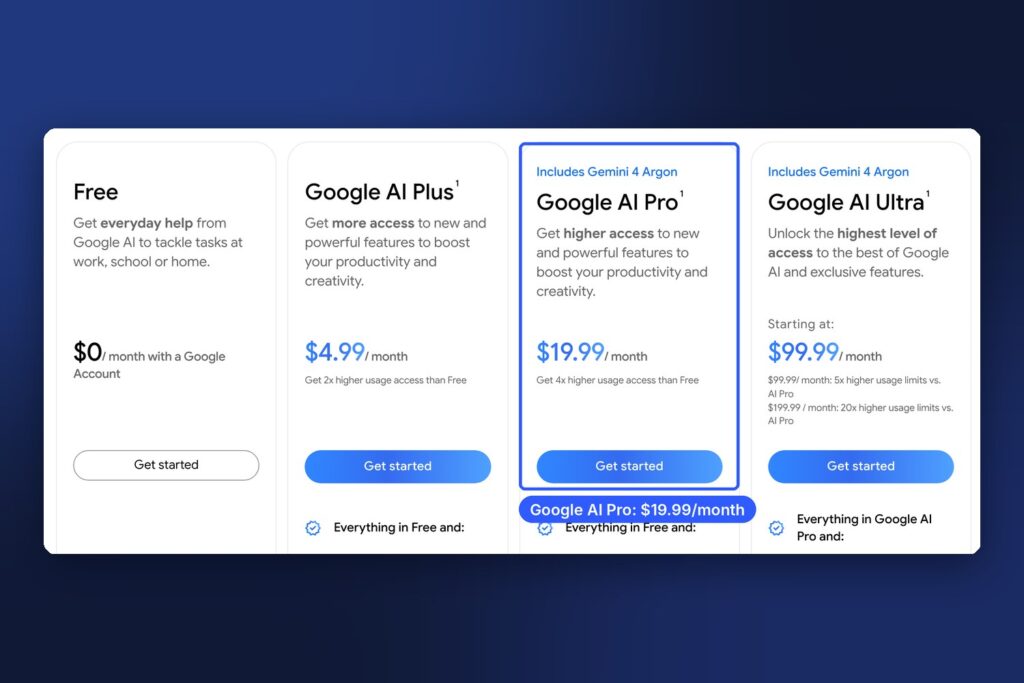
Google AI Pro ($19.99/month): the best value if you live in Google
Google sells Gemini as part of its Google AI plans. According to Google’s subscriptions page, Google AI Pro at $19.99 a month includes:
- Access to Gemini 4 Argon and Google’s Pro and Flash models in the Gemini app, with 4x higher usage limits than free
- Video generation and Daily Brief
- 1,000 Google Flow credits for its AI creative studio
- Gemini in Gmail, Docs, Vids and other Google apps
- Gemini in Chrome
- Google Home Premium (Standard plan)
- YouTube Premium Lite (most videos ad-free)
- 5 TB of cloud storage across Gmail, Drive and Photos
Who it suits: people who already use Gmail, Google Docs and Google Drive every day. The extras are what make it stand out. If you already pay for extra Google storage or YouTube Premium Lite, Google AI Pro may effectively cost you less than the others.
Worth knowing: Google also has a cheaper Google AI Plus plan at $4.99 a month with 2x the free usage limits and 400 GB of storage. Feature availability varies by country, so check the page for where you live.
Which one should you choose?
There’s no single winner. It depends on what you do most:
| If you mostly… | Start with |
|---|---|
| Want one tool for writing, images, voice and research | ChatGPT Plus |
| Write long pieces, analyze documents or want to build tools with code | Claude Pro |
| Live in Gmail, Docs and Drive, or want extra storage | Google AI Pro |
| Use AI a few times a week | A free plan, or a budget plan (ChatGPT Go, Google AI Plus) |
| Hit limits every day on the $20 plan | The top tier of the tool you already rely on |

What about the $100+ plans?
All three companies sell a top tier for heavy users:
- ChatGPT Pro starts at $100 a month, with plans at $100, $200 or $500. OpenAI lists Pro reasoning, longer Codex and ChatGPT Work sessions, unlimited and faster image creation, and maximum deep research, memory and context.
- Claude Max starts at $100 a month. You choose 5x or 20x more usage than Pro, with higher output limits, early access to advanced features, priority access at busy times, and monthly API credits.
- Google AI Ultra starts at $99.99 a month (5x the AI Pro usage limits), or $199.99 for 20x, plus Google’s most advanced features first.
These make sense if AI is a core part of your job and the $20 plan’s limits cost you real time every week. For most people starting out, they’re overkill. Begin with the $20 plan and upgrade only when you keep hitting the ceiling.
A better way to decide: test with your real work
Feature lists only tell you so much. The best way to choose is to run the same real tasks through the free versions of each tool for a few days. Here’s a simple test:
- Pick three tasks you actually do every week. For example, a client email, summarizing a long PDF, and planning a blog post.
- Use the same prompt in each tool. Keep it identical so the comparison is fair.
- Score the answers: was it accurate, did it need heavy editing, did it understand what you meant?
- Notice what slowed you down. Hitting limits, missing features, or switching apps.
- Subscribe to the winner for one month, then reassess.
A prompt you can use for the test:
I'm going to give you a task I do every week for my work.
Task: [describe the task]
Here's the material: [paste text or attach the file]
Do the task, then tell me:
1. Anything you were unsure about or had to assume.
2. What extra information would make your answer better.
Keep the result ready to use without heavy editing.
Most people find that one tool fits their work better within a week. And because these are monthly subscriptions (with the exception of Claude’s yearly discount), you can switch later.
Can you use more than one?
Yes, and many people do. A common setup is one paid plan for your main work and the free versions of the others as a second opinion. For example, you might pay for Claude Pro to write and build, then ask ChatGPT’s free plan for image ideas, and use Gemini’s free plan inside Google Docs.
Using two tools also helps you check facts. If two AI tools give different answers to the same factual question, that’s a sign to verify it with an original source before you rely on it. That’s a good habit whichever tool you choose, because all of them can make mistakes.
Money-saving tips
- Start on free. All three free plans are capable enough to test with.
- Try the budget plans (ChatGPT Go or Google AI Plus) if you mostly need more messages, not more features.
- Pay yearly only when you’re sure. Claude Pro is cheaper billed yearly ($17 a month instead of $20), but you pay $200 up front.
- Count what you already pay for. Google AI Pro includes storage and YouTube Premium Lite, which might replace other subscriptions.
- Don’t stack all three. Unless AI is central to your business, one paid plan plus the free versions of the others covers most needs.
FAQ
Is ChatGPT Plus worth $20 a month?
If you use ChatGPT most days and keep hitting free-plan limits, usually yes. If you only use it occasionally, the free plan or the $8 Go plan may be enough.
Is Claude Pro better than ChatGPT Plus?
It depends on your work. Claude Pro includes Claude Code and is popular for writing and long documents. ChatGPT Plus is broader, with strong image creation and custom GPTs. Test both with your own tasks.
What’s included with Google AI Pro besides Gemini?
According to Google, Google AI Pro includes 5 TB of cloud storage, Gemini in Gmail, Docs and other Google apps, Google Flow credits, Google Home Premium (Standard plan) and YouTube Premium Lite, in addition to higher Gemini usage.
Do any of them have a cheaper plan?
Yes. ChatGPT Go costs $8 a month in the US, and Google AI Plus costs $4.99 a month. Claude doesn’t currently offer a plan between Free and Pro.
Can I cancel anytime?
Monthly plans can generally be cancelled before the next billing date. Check each company’s billing terms, especially for yearly plans paid up front.
Keep going
Once you’ve picked a tool, put it to work. See 15 side hustles you can do with ChatGPT, 15 side hustles you can do with Claude and 25 AI side hustles for stay-at-home moms. If you choose Claude, our guide to making your Claude limit last will help you get more from it.