If you’re home with kids, your working hours probably look like this: an hour during nap time, another after bedtime, and whatever you can squeeze in between snacks. A side hustle has to fit around that. It can’t need a fixed schedule, a big budget or a clean, quiet office.
AI tools make that a lot more realistic than it used to be. ChatGPT and Claude can write first drafts, plan products, answer client questions and organize your week. Canva turns rough ideas into professional designs. Work that once took a full afternoon can now fit into one nap.
You’re not alone in looking for this. According to Pew Research Center, 26% of US mothers weren’t employed for pay in 2021. Many of them want some income they can control.
Below are 25 side hustles that work in short, unpredictable blocks of time, grouped into services, digital products and content. For each one you’ll see what it is, how AI helps, and where to start. We’ve also included the real fees each platform takes, so you know what you’ll actually keep.
Who this is for: stay-at-home parents who want flexible income from home, starting with the tools they already have. No tech background needed. If you’d like to start with products instead of clients, our guide on how to start an Etsy digital download shop with AI walks through it step by step.
How to choose the right side hustle
Before you look at the list, answer three questions honestly:
- How much time do you really have? Count the hours you can protect most weeks, not your best week. Five reliable hours beat fifteen hopeful ones.
- Can you handle deadlines and live calls right now? Client work pays sooner but comes with deadlines and occasional calls. Digital products and content have no deadlines, but take longer to earn anything.
- What do you already know? Former teachers, nurses, accountants, marketers and admin staff can turn that experience into higher-paying work faster than starting from scratch.
| Type | Pays first money | Main pros | Main cons |
|---|---|---|---|
| Services (freelancing) | Fastest, often within weeks | Steady income once you have clients | Deadlines, client messages |
| Digital products | Slower, usually months | Sell the same file again and again | Needs listings and promotion |
| Content (blog, video, newsletter) | Slowest, often 6 months or more | Builds a lasting asset | Takes the most patience |
A common plan is to start with a service for income now, then build a digital product or content project on the side for later.

Services: earn from your skills, with AI doing the busywork
1. Virtual assistant
Small business owners need help with email, scheduling, data entry, research and customer messages. As a virtual assistant, you do these tasks remotely, on your own schedule for most of them.
How AI helps: draft email replies, summarize long threads, turn messy notes into to-do lists, and research suppliers or competitors. You still check everything, but you finish faster.
Where to start: offer three or four specific tasks (for example “inbox and calendar management for coaches”) rather than “anything.” List them on Fiverr or Upwork, and tell people you know who run businesses.
2. Social media manager for local businesses
Hair salons, bakeries, cleaners and dentists know they should post online, but rarely have time. You plan and schedule their posts each month.
How AI helps: brainstorm a month of post ideas, write captions in the business’s voice and turn one photo shoot into weeks of content. Canva handles the graphics.
Where to start: pick one type of local business and make three example posts for them for free. Real examples sell your service better than any description.
3. Pinterest manager
Bloggers, Etsy sellers and small brands use Pinterest for traffic but don’t have time to run it. Pinterest managers design pins, write keyword-rich descriptions and schedule them.
How AI helps: research keywords, write pin titles and descriptions, and plan seasonal content. You design the pins in Canva.
Where to start: build your own Pinterest account first, so you can show results. Then offer the service to bloggers and shop owners.
4. Freelance blog writer
Businesses pay for clear, helpful articles. AI hasn’t removed this work. It has raised the bar: clients want writers who can research, add real examples and edit AI drafts into something worth reading.
How AI helps: outlines, research summaries and first drafts that you rewrite in your own words. Always check facts and link to real sources.
Where to start: write two or three sample articles in one niche you know, such as parenting, home organizing or a former career, and pitch businesses in that niche.
5. Proofreader and editor
Many people now write with AI and want a human to make it sound natural and catch mistakes. Proofreading is a good fit for short blocks of time.
How AI helps: use grammar tools to catch typos, then focus your own time on clarity, tone and flow, which is the part clients actually pay for.
6. Resume and LinkedIn writer
Job seekers pay for help presenting their experience. You rewrite resumes, cover letters and LinkedIn profiles so they’re clear and tailored to the job.
How AI helps: turn a messy work history into strong bullet points, tailor a resume to a job ad and draft cover letters. You add the judgment and the human touch. For a fuller system, see our free Claude Code job search setup.
7. Canva designer for small businesses
Small businesses need flyers, menus, social graphics, price lists and presentations. With Canva, you can create these without expensive design software.
How AI helps: generate layout ideas, write the text and resize one design into every format a client needs. Our list of 15 side hustles you can do with Canva has more ideas.
8. Bookkeeping assistant
If you have an accounting or admin background, small businesses need help sorting receipts, categorizing expenses and keeping records up to date. Some bookkeepers add a certification from QuickBooks or Xero to win more clients.
How AI helps: sort and label transactions, draft monthly summaries and explain reports in plain English. Accuracy matters here, so always double-check numbers yourself.
9. Captions and transcription
Video creators and podcasters need accurate captions and transcripts. AI tools now do the first pass, so the job is checking and correcting, which pays per project.
How AI helps: automatic transcripts from tools like Descript or YouTube’s own captions, which you then correct for names, terms and timing.
10. Online tutor
If you’re good at a school subject, a language or a skill like music, tutoring fits around school hours and evenings.
How AI helps: prepare lesson plans, practice questions and worksheets in minutes, tailored to each student. You focus your energy on teaching.
11. Translator or bilingual assistant
If you speak two languages well, businesses need translated emails, product listings and social posts.
How AI helps: AI gives you a fast first translation. Your value is fixing tone, idioms and cultural details that machines still get wrong.
12. Customer support and inbox manager
Online shops get the same questions every day: Where’s my order? Can I return this? You answer messages and keep the inbox under control.
How AI helps: build a library of reply templates with AI, then personalize each answer. Many tasks can be done from your phone.
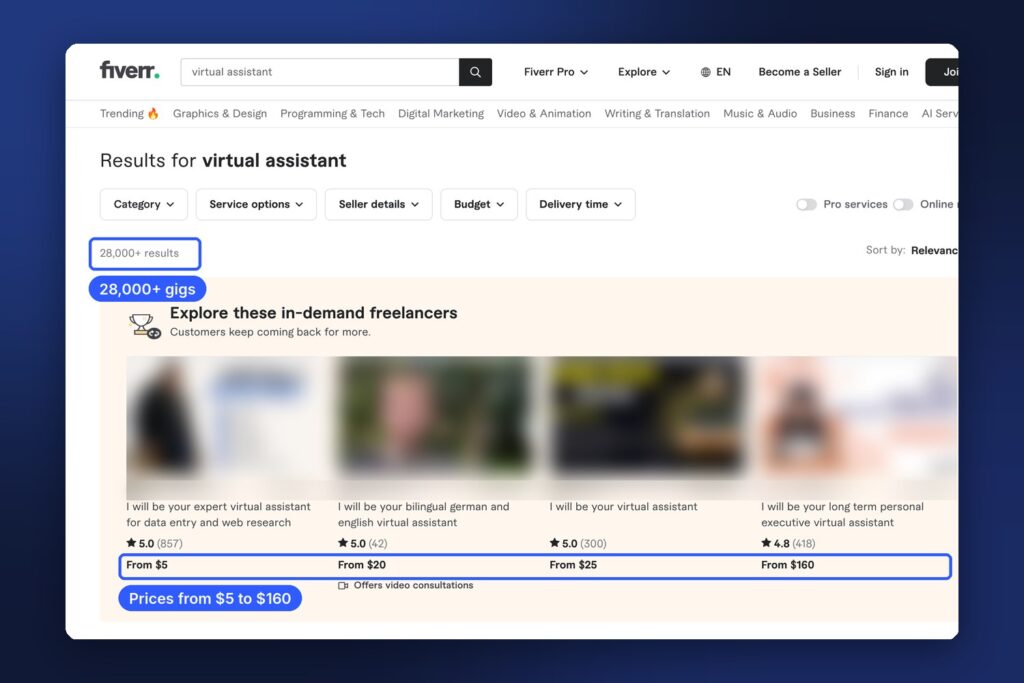
A word on freelance marketplaces. Fiverr and Upwork make it easier to find your first clients, but there’s competition. A search for “virtual assistant” on Fiverr shows more than 28,000 gigs, with starting prices from $5 to $160. The way to stand out is to be specific: who you help, with what, and how fast. “Pinterest management for Etsy sellers” beats “virtual assistant.”
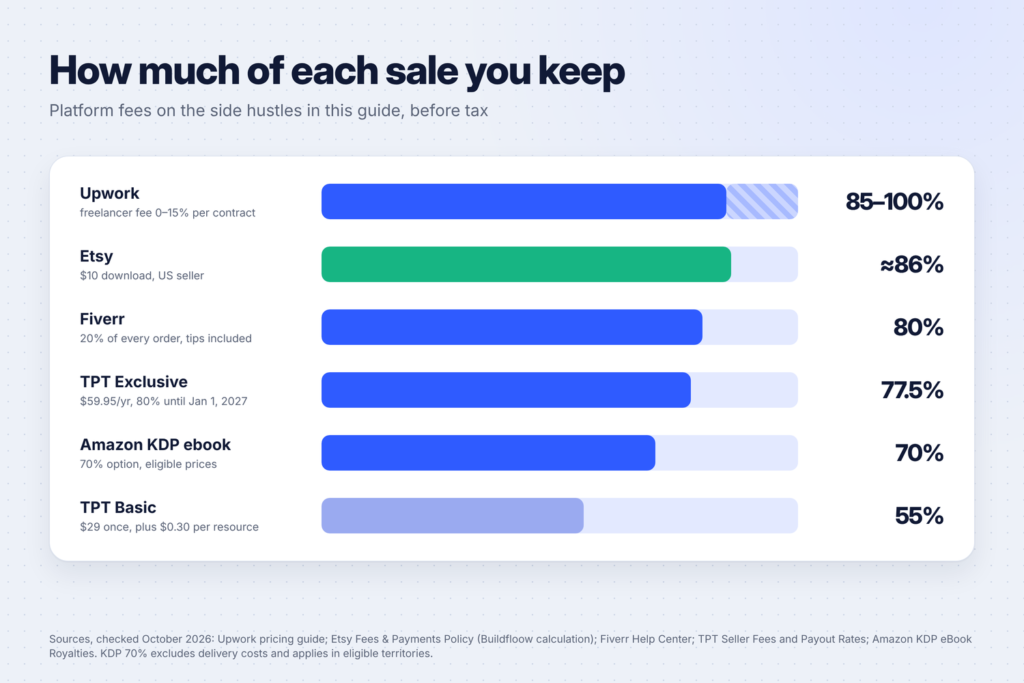
Fees matter too. Fiverr’s Help Center says sellers earn 80% of each order, including extras and tips. Upwork’s pricing guide says its freelancer fee varies from 0% to 15% per contract and is only charged when you’re paid. Once you have regular clients, moving them to direct invoicing (where the platform’s terms allow it) lets you keep more.
Digital products: make it once, sell it again and again
13. Printables on Etsy
Planners, chore charts, meal planners, kids’ activity sheets and party printables sell well on Etsy, and you only make each file once. Our Etsy digital download shop guide covers fees, rules and listings, and our list of 15 Christmas printables to make and sell has seasonal ideas.
How AI helps: plan the pages, write the content and draft listings. Design in Canva. If AI created any part of the product, Etsy requires you to say so in the listing.
14. Canva templates
Small businesses and creators buy editable templates for social posts, menus, price lists and presentations. You design them once and sell them as Canva template links. See our list of Notion and Canva templates you can make with AI and sell online.
15. Notion templates
Busy people love systems: family planners, meal planners, budget trackers, homeschool planners. If you already organize your household in Notion, you’re halfway there.
How AI helps: plan the structure, write formulas and fill in example content.
16. Teaching resources on Teachers Pay Teachers
Former teachers and homeschooling parents can sell lesson plans, worksheets and activity packs on Teachers Pay Teachers (TPT). Fees depend on your membership. According to TPT’s seller fees and payout rates:
- Basic Seller: a one-time $29 fee, a 55% payout rate and a $0.30 transaction fee per resource.
- Exclusive Seller: $59.95 a year and a 77.5% payout rate, if you sell your educational resources only on TPT. TPT is paying Exclusive sellers 80% until January 1, 2027.
How AI helps: draft worksheets and activities quickly. Always check for accuracy and grade level.
17. Journals and planners on Amazon KDP
Amazon’s Kindle Direct Publishing (KDP) lets you publish printed journals, planners and notebooks that Amazon prints when someone orders. There’s no stock to hold.
The money works like this, according to KDP’s paperback royalty page: you earn a 50% or 60% royalty rate depending on the list price, minus the printing cost. Amazon’s own example is a $15 book at 60% with $5 printing costs, which leaves a $4 royalty.
AI rule to know: KDP’s content guidelines require you to tell Amazon when a book contains AI-generated text, images or translations. You don’t have to disclose AI-assisted work, such as using AI to brainstorm or edit content you created yourself.
18. Kids’ activity books and coloring books
Coloring books, puzzle books and activity books for kids sell as printables on Etsy and as paperbacks on KDP. Parents are a big audience, and you know exactly what keeps kids busy.
How AI helps: generate line-art ideas and puzzle content. Then clean everything up by hand, check the details carefully, and disclose AI-generated images where the platform requires it.
19. Ebooks and mini guides
Do you have a skill people ask you about? Sleep schedules that worked for your family, budgeting on one income, homeschool planning, meal prep for picky eaters? A short, practical guide can sell as an ebook or PDF.
The KDP ebook royalty page offers a 35% or 70% royalty option. The 70% option applies to eligible prices and territories, minus a small delivery cost.

Content: build something that grows over time
20. A blog
A blog earns from affiliate links, ads and your own products. It’s slow at first, but every helpful post can keep bringing readers for years. Pinterest is one of the best ways to get early traffic for parenting, home and lifestyle topics.
How AI helps: outlines, research summaries and editing. Your own experience is what makes a blog worth reading, so keep your stories and opinions in it.
21. A faceless YouTube channel
You can run a channel without showing your face, using voiceovers, screen recordings or footage of your hands at work. Think tutorials, cleaning routines, recipes or study music.
To earn ad revenue, you’ll need to join the YouTube Partner Program. YouTube’s eligibility page lists two routes: 1,000 subscribers with 4,000 qualified watch hours in the last 12 months, or 1,000 subscribers with 10 million qualified Shorts views in the last 90 days. For a full workflow, see our guide to making money with Claude and YouTube Shorts.
22. A newsletter
A focused email newsletter (for example local family events, budget meal plans or homeschool resources) can earn from sponsors and affiliate links once it grows. It’s also one of the best things to build alongside a blog or shop.
23. Voiceovers and audiobook narration
If you have a clear, warm voice, you can record voiceovers for videos, explainer clips and audiobooks from a quiet corner of your home. A good USB microphone and some soft furnishings to cut echo are enough to start.
How AI helps: clean up audio and remove background noise. There are also ways to earn from AI voice tools themselves. See our guide to making money with ElevenLabs.
24. UGC creator
User-generated content (UGC) creators make short, natural videos showing products in use, which brands use in their ads and on social media. Parents are in demand because so many products are made for families. You don’t need a big following: brands pay for the video, not your audience.
How AI helps: script ideas, hooks and shot lists, so each video is planned before you pick up your phone.

25. Reselling with AI-written listings
Selling things your family has outgrown (clothes, toys, baby gear) on marketplaces like eBay, Poshmark or Facebook Marketplace is a simple way to start. Some parents grow it into a reselling business by sourcing items from thrift stores and garage sales.
How AI helps: write clear, keyword-rich listing descriptions, suggest prices from comparable listings and answer buyer questions faster.
Making it work with kids at home
- Protect two or three fixed blocks a week. Nap time, early mornings or one evening when your partner takes bedtime. Consistency beats long hours.
- Batch similar tasks. Write all captions in one session and design all graphics in another. Switching tasks wastes the little time you have.
- Use your phone for small jobs. Reply to clients, answer buyer messages and capture ideas while you wait at school pickup.
- Keep a “next step” list. When you sit down with 30 minutes, you start immediately instead of deciding what to do.
- Set expectations with clients. Tell them your working hours and reply times up front. Most clients care about reliability, not instant replies.
A simple 30-day starting plan
- Week 1: pick one side hustle from this list based on your time and experience. Write down who you’ll serve and what you’ll offer.
- Week 2: create your samples or first product. Three great examples beat a long list of services.
- Week 3: set up where people will find you (a Fiverr gig, an Etsy shop, a Pinterest account) and tell your own network.
- Week 4: reach out or list consistently, ask your first buyers for honest feedback, and adjust.
FAQ
Which side hustle is fastest for a stay-at-home mom?
Services usually pay first, because clients pay for work as soon as it’s done. Virtual assistance, social media help, Canva design and proofreading need no inventory and little setup.
How much can I earn?
It depends on your skills, your hours and your niche. Some people earn a little extra each month, others build a full-time income over a couple of years. Be wary of anyone promising a specific amount.
Do I need to tell clients I use AI?
There’s no single rule for freelancing, so be honest if a client asks and follow any client policy. Platforms like Etsy and Amazon KDP do have AI disclosure rules for products, as explained above.
Do I have to pay tax on side hustle income?
In most countries, yes. Keep simple records of what you earn and spend from the start, and check your local tax rules or speak to an accountant.
What do I need to get started?
A computer or a good smartphone, an internet connection, a free Canva account and a free AI assistant like ChatGPT or Claude are enough for most of these ideas.
Keep going
For more ideas built around specific tools, see 15 side hustles you can do with ChatGPT and 15 side hustles you can do with Claude. If you’d like to teach what you know, read 10 platforms to sell your skills as video courses.