Digital downloads are the easiest way to start selling on Etsy. There’s no stock to buy, nothing to pack, and no trip to the post office. You make a file once, a planner, a set of worksheets or a piece of wall art, and Etsy delivers it automatically every time someone buys it.
AI makes the making part much faster. ChatGPT or Claude can plan the pages, write the prompts and instructions, and draft your listing. Canva turns that plan into a clean, printable design. Your job is the part AI can’t do well on its own: choosing who you’re selling to, making the product genuinely useful, and checking every page before it goes live.
This guide walks through the whole setup, from picking a niche to your first sale. It covers what Etsy charges, what its rules say about AI, and a 30-day launch plan you can follow.
Who this is for: complete beginners who want a low-cost shop they can run from a laptop. You don’t need design training. If you’d rather sell templates than printables, see our list of 15 Notion and Canva templates you can make with AI and sell online.
Why Etsy is still worth it for digital downloads
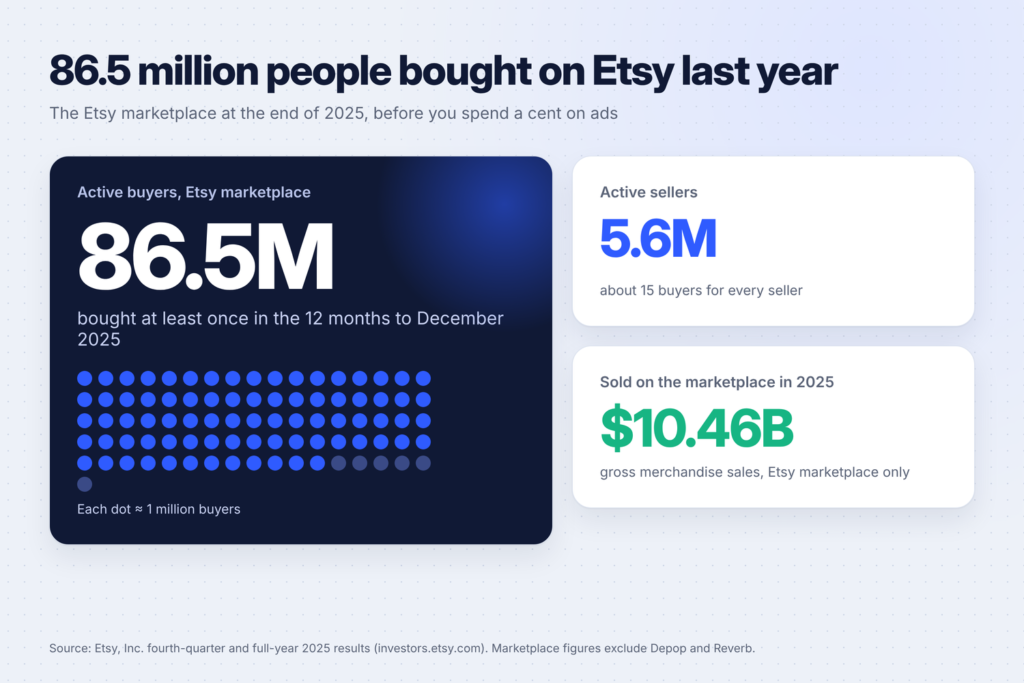
Plenty of platforms let you sell a PDF. Etsy’s advantage is that the buyers are already there and already searching. According to Etsy’s fourth-quarter and full-year 2025 results, the Etsy marketplace had 86.5 million active buyers and 5.6 million active sellers at the end of 2025, and sold $10.46 billion worth of goods during the year.
That doesn’t mean sales come automatically. 5.6 million sellers is a lot of competition, and most new shops sell nothing in their first weeks. But it does mean you don’t have to build an audience from zero before your first sale. If you list the right product with the right words, people searching for it can find you.
Digital products also fit Etsy’s buyers well. People come to Etsy for things that feel personal and made by someone, not mass-produced. A wedding seating chart template, a homeschool worksheet pack or a budget planner for nurses on shift work all fit that.
What Etsy allows, including the AI rules
Before you make anything, know the rules. Breaking them can get listings removed or a shop suspended.
Digital items must be made or designed by you. Etsy’s help center on what you can sell says digital items in your shop must be made and/or designed by you, the seller. Reselling someone else’s files, or a Canva template you didn’t design, isn’t allowed.
AI is allowed, but you must say so. Etsy’s Seller Handbook article on its stance on AI creations says sellers can use their own prompts with AI tools, but must disclose in the listing description if an item was created with the use of AI. Etsy’s Seller Policy says the same.
Some AI uses are banned outright. Etsy prohibits selling bundles of AI prompts, and it bans mass-producing listings or products with scripts or automation without real human oversight. In practice: use AI as a tool, put your own judgment into every product, and never flood your shop with dozens of near-identical listings.
Respect other people’s rights. No characters, logos, song lyrics, celebrity faces or other brands’ designs. “Inspired by” a TV show or sports team is still infringement.
If you design in Canva, also read Canva’s guide to creating products for sale. It explains which Canva elements you can include in products you sell and how.
What it costs to sell a download on Etsy
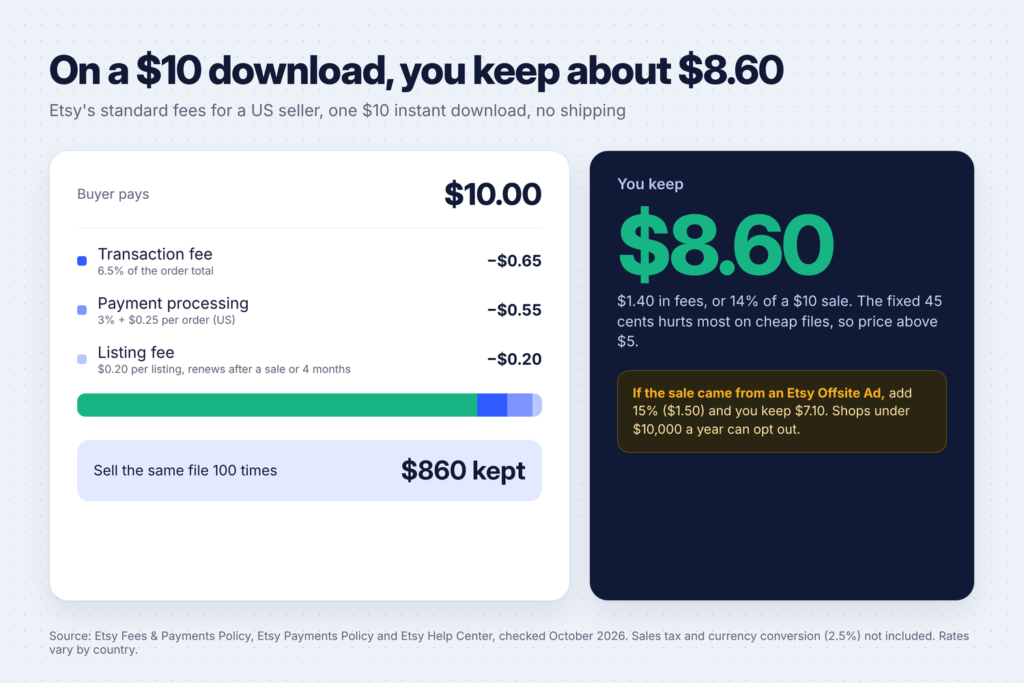
Etsy has no monthly fee on its standard plan. You pay small fees per listing and per sale. Here are the main ones for a US seller, from Etsy’s Fees & Payments Policy, its Etsy Payments Policy and the help center article on fees for selling on Etsy:
| Fee | Amount (US) | When you pay it |
|---|---|---|
| Listing fee | $0.20 | Each time you publish or renew a listing. A listing lasts four months or until it sells. |
| Transaction fee | 6.5% | On the total order amount (for a download, that’s the price). |
| Payment processing | 3% + $0.25 | On each order paid through Etsy Payments. Rates differ by country. |
| Offsite Ads | 15% (12% once you pass $10,000 in sales a year) | Only when a sale comes from an Etsy ad on another site, capped at $100 per order. |
| Shop set-up fee | One-time, varies by location | Some new shops pay it before they can open. |
So on a $10 download, you’ll keep about $8.60 after the standard fees. If the sale came through an Offsite Ad, you’ll keep about $7.10. Shops that have stayed under $10,000 in sales can opt out of Offsite Ads in their settings.
About the set-up fee: Etsy introduced it in 2024 for some new shops, as explained in its post on strengthening new-shop onboarding. At launch it was $15, but the amount depends on where you are, so check the figure Etsy shows you during setup. It’s non-refundable once paid.
The fixed parts of those fees (25 cents for processing and 20 cents for the listing) hurt most on cheap products. A $2 printable loses almost a quarter of its price to fees. That’s one reason to price most products above $5, which we’ll come back to.

Step 1: Pick a niche you can serve for a year
The most common reason new shops fail is that they sell “printables” to “everyone.” Etsy search rewards specific products for specific people, and buyers trust shops that clearly know who they’re for.
Use this formula: a specific buyer + a moment or problem + a format.
- Nurses + 12-hour shifts + a printable shift planner
- New homeschool parents + the first term + a weekly lesson planner and checklist pack
- Couples planning a small wedding + the reception + editable seating chart and welcome sign templates
- Small Etsy sellers themselves + tax time + a sales and expenses tracker spreadsheet
- Parents of toddlers + potty training + a reward chart and sticker sheet
To check demand, type your idea into Etsy’s search bar and look at the suggestions that drop down. Those come from real searches. Then look at the results:
- If you see listings with hundreds of reviews, people buy this. That’s a good sign, not a reason to give up.
- Look at what the top listings do badly. Are the designs dated? Is the planner US Letter only, with no A4 version for UK and Australian buyers? Are the instructions unclear? Each weakness is your opening.
- If the results are full of near-identical products, go narrower. “Budget planner” is crowded. “Budget planner for freelancers with irregular income” is a different search with different buyers.
Pick one niche and commit to making at least 10 products for it. A shop with 10 related products looks like a real brand, and buyers who like one will buy another.
Step 2: Choose your first product format
Some formats are much easier to start with than others. Here’s how the common ones compare:
| Format | What you deliver | Difficulty | Good for |
|---|---|---|---|
| Printable planner or tracker | PDF in US Letter and A4 | Easy | Your first product |
| Worksheets and activity packs | Easy | Teachers, homeschoolers, therapists | |
| Wall art | High-resolution JPG or PDF in several frame sizes | Easy to medium | Home decor buyers |
| Editable templates | A Canva template link plus a PDF guide | Medium | Weddings, events, small businesses |
| Spreadsheet templates | Google Sheets or Excel file | Medium | Budgets, small business tracking |
| Digital planners and stickers | Hyperlinked PDF or PNG sticker sets | Harder | iPad and GoodNotes users |
Start with a printable planner or worksheet pack. They’re the quickest to make, easy to test, and teach you everything you need for the harder formats later.
Step 3: Make the product, with AI doing the heavy lifting
Here’s a simple workflow that uses AI for the slow parts and keeps you in charge of the result.
1. Plan the product with ChatGPT or Claude. Describe the buyer and ask for a page plan. For example:
I'm making a printable planner for nurses who work 12-hour shifts. Suggest 10 pages that would genuinely help them, with a one-line purpose for each page and the sections each page should contain. Keep it practical, not decorative.Then push back on the answer. Cut pages that are filler, merge ones that overlap, and add anything a real nurse would want. If you know someone in your niche, show them the plan. Ten minutes of feedback from a real buyer beats an hour of AI ideas.
2. Write the content with AI. Ask for the text that goes on each page: headings, prompts, checklist items, short instructions. Edit everything. AI writing tends to be generic, and buyers notice.
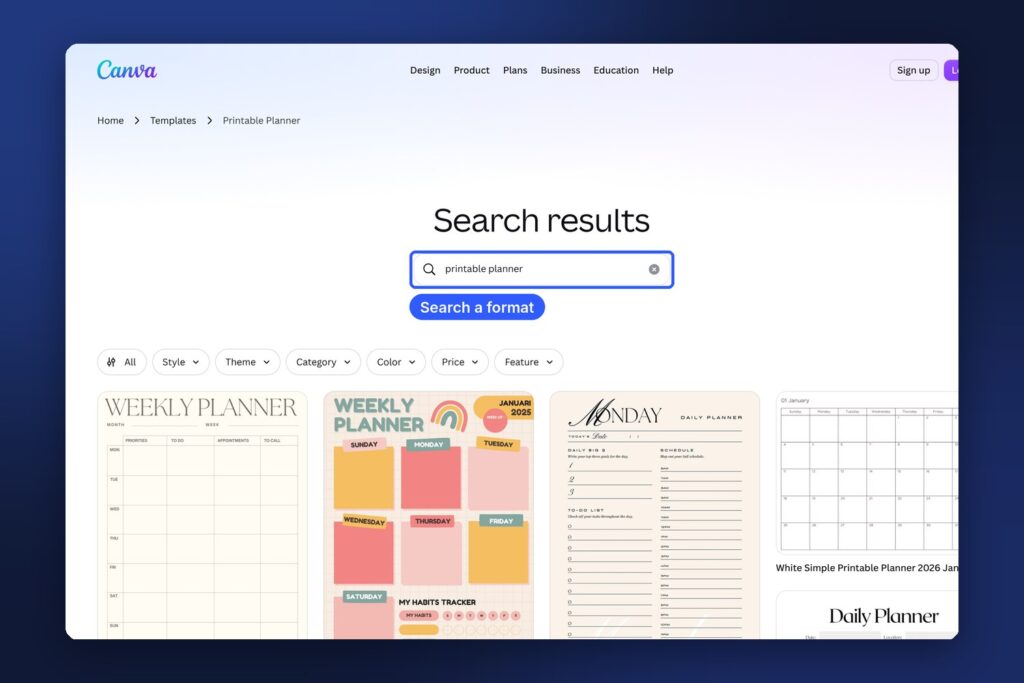
3. Design it in Canva. Start a new design at US Letter (8.5 × 11 in), then make an A4 copy (210 × 297 mm). You can browse Canva’s template library for layout ideas, but build your own design. You can’t resell a Canva template as your own product. Keep the style simple: one or two fonts, a small color palette, plenty of white space and lines that are easy to write on.
4. Add artwork carefully. For wall art or illustrations, AI image tools like Midjourney or ChatGPT can create original images from your prompts. Check every image closely for odd hands, warped text and messy details before you use it. Remember to disclose AI use in the listing.
5. Check everything twice. Spelling, dates, page numbers, margins, and whether each page actually prints well. One typo in a $12 planner earns a three-star review.
For more ideas on what else to build with these tools, see 15 side hustles you can do with Canva and 15 side hustles you can do with ChatGPT.
Step 4: Test print and package your files
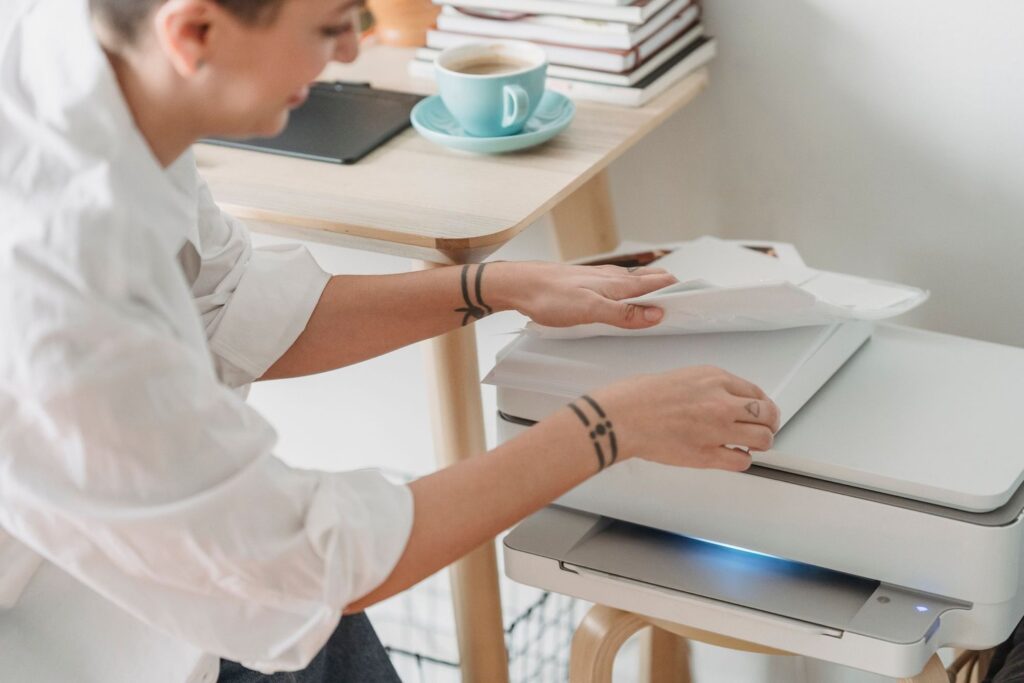
Print your product at home before you list it. Screens hide problems that paper shows straight away: text too small to write in, colors that come out muddy, margins that a home printer cuts off.
Then package the files for delivery:
- Export print files as “PDF Print” in Canva, which gives higher quality than the standard PDF.
- Include both paper sizes. US Letter for US and Canadian buyers, A4 for most other countries. Missing A4 is one of the most common complaints in reviews.
- Add a short “how to use” PDF. Explain how to print (actual size, not “fit to page”), which paper to use and how to get help. It cuts down on messages and refund requests.
- Watch the limits. Etsy’s help center on managing digital listings says you can attach up to five files to an instant-download listing, each up to 20MB. Bigger products can be split across several ZIP files.
Step 5: Open your Etsy shop
Go to etsy.com/sell and follow the setup. It takes about an hour. Etsy’s help article on how to open an Etsy shop covers each screen. A few choices matter more than the rest:
- Shop name. Pick something short and brandable that could grow beyond your first product. “MaplePlanner” boxes you in if you later add wall art. “Maple & Page Studio” doesn’t.
- Shop language, country and currency. Set these carefully. Listing in a currency other than your bank’s adds a 2.5% conversion fee on each sale, according to the Etsy Payments Policy.
- Payment and billing. Add your bank account for payouts and a card for fees. If your location has a set-up fee, Etsy shows it here.
- Security. Turn on two-factor authentication. Etsy may also ask you to verify your identity.
- Shop policies and About section. Write a short About section about who you make products for and why. State clearly that files are digital, nothing physical is shipped, and how you handle problems with downloads.
Your first listing is part of setup, so have one product finished before you start.
Step 6: Write a listing that gets found
Etsy search reads your title, tags, categories and attributes to decide when to show your listing. Your photos and description then decide whether people buy.
Title. Etsy allows up to 140 characters, but clear beats long. Lead with what the item is in the words buyers type: “Nurse Shift Planner Printable, 12 Hour Shift Tracker, Nursing Student Planner, Letter and A4 PDF.” Avoid stuffing in every keyword you can think of.
Tags. You get 13 tags of up to 20 characters each. Use them all, and use phrases, not single words: “nurse planner,” “shift tracker,” “nursing gift,” “printable planner.” Don’t just repeat your title word for word. Each tag is another way to be found.
Category and attributes. Choose the most specific category and fill in every attribute that applies. Attributes work like extra free tags.
Photos. Your first photo does most of the selling. Use clean mockups that show the product in use: printed on a desk, framed on a wall, open on a tablet. Then add photos that show every page, the sizes included and what the buyer receives. Canva has mockup tools, and our post on Notion and Canva templates covers how to present templates.
Description. Open with one sentence on who it’s for and what problem it solves. Then list exactly what’s included, the file types and sizes, and how to download. End with your AI disclosure if you used AI, for example: “Artwork created with AI image tools from my own prompts, then edited and arranged by me.”
Mark it as an instant download. In the listing editor, choose digital as the item type and upload your files, so buyers get them as soon as payment clears.
Step 7: Price it so the fees don’t eat you
Look at what the top listings in your niche charge, then price where your product honestly sits. A few rules of thumb:
- Simple one-page printables often sell for $2 to $5. Because of the fixed fees, they work best bundled.
- Multi-page planners and worksheet packs usually sell for $6 to $15.
- Editable templates for weddings, events or businesses can sell for $10 to $30, because they save the buyer real time.
- Bundles let you charge more and stand out. “The Complete Nurse Planner Bundle, 40 pages” beats four separate $3 listings.
Don’t start with rock-bottom prices to “get the first sale.” Cheap pricing attracts buyers who leave more complaints, and it’s hard to raise later. Run an occasional sale from Etsy’s Marketing tab instead.
Step 8: Get your first sales
List consistently. Aim for 10 listings in your first month, all in your niche. Each listing is another chance to come up in search, and a fuller shop converts better.
Bring your own traffic. Pinterest works well for digital downloads because people search it for planners, printables and decor ideas, and pins keep working for months. Make two or three pins for each listing that link straight to it.
Get early reviews honestly. Reviews from real buyers build trust. Ask friends who genuinely need the product to buy it at full price, and make sure your files and instructions are good enough to earn five stars. Never pay for or swap reviews: it’s against Etsy’s rules.
Answer messages fast. Quick, kind replies turn download problems into good reviews.
Be careful with Etsy Ads. Paid ads can help once you know a listing converts. Starting them on day one usually spends money on listings that aren’t ready.
A 30-day launch plan
- Days 1–3: Pick your niche with the formula above. Study the top 20 listings and note what they do badly.
- Days 4–7: Make your first product with AI and Canva. Test print it. Create US Letter and A4 versions.
- Days 8–9: Make five listing images and a “how to use” PDF. Open your shop and publish listing one.
- Days 10–20: Make and list four more products in the same niche. Pin each one on Pinterest.
- Days 21–27: Make five more, including one bundle of your earlier products.
- Days 28–30: Check your shop stats. See which listings get views but no sales (fix photos and price) and which get no views (fix titles and tags).
Mistakes that keep new shops stuck
- Selling to everyone. Generic “productivity planners” compete with thousands of shops. Specific products for specific people win.
- Skipping A4. You lose most buyers outside the US and Canada.
- Not disclosing AI. It’s against Etsy’s rules and can get listings removed.
- Copying top sellers. Take inspiration from what works, then make something different and better. Copying gets reported.
- Giving up after two weeks. Many shops make their first sale after 15 or 20 listings, not two. Keep listing and keep improving.
FAQ
How much does it cost to start an Etsy digital download shop?
You can start for a few dollars: $0.20 per listing, plus the one-time set-up fee if your location has one. Canva’s free plan and the free versions of ChatGPT or Claude are enough for your first products. Fees on each sale come out of the sale itself.
Do I have to tell buyers I used AI?
Yes. Etsy requires sellers to disclose in the listing description if an item was created with the use of AI. Add one honest sentence about how you used it.
Can I sell Canva templates on Etsy?
You can sell templates you designed yourself, usually as a Canva template link with a PDF guide. You can’t resell Canva’s own templates as they are. Read Canva’s guide to creating products for sale before you list.
Do I need a business license?
It depends on where you live. In many places you can start as an individual and register later, but you’ll still need to report your income. Check with your local tax office.
How long until my first sale?
There’s no fixed answer. Some shops sell in their first week, others take a couple of months. Specific products, good photos and steady listing, plus your own traffic from Pinterest, speed it up the most.
Keep going
Once your first products are selling, add new formats in the same niche. If you’d like to teach what you’ve learned, see 10 platforms to sell your skills as video courses. For more AI-powered ideas, read 15 side hustles you can do with Claude.