Claude finds the idea, writes the script and builds the video in code. You record your voice and post one Short a day. If you saw the build_floow Reel, this is the full setup behind those 27 seconds. If you didn’t, you can still follow it tonight with no camera, no editing app and no design skills.
By the end you will have:
- A YouTube channel set up for Shorts in a niche you picked on purpose.
- A Claude workflow that turns “what is already working in my niche” into a 30-second script.
- Claude Code plus an open-source tool called HyperFrames building each Short as a real MP4, with captions timed to your voice.
- A daily posting routine and a clear picture of what it takes to get paid.
One honest note before we start: nobody can promise you income. YouTube pays from ads once your channel qualifies, and qualifying takes consistent posting over months. What this setup does is cut the time per Short from hours to minutes, so posting daily becomes realistic. If you’d rather start with a simpler, no-code version first, you can follow the same steps with an editing app like CapCut instead of code.
What you need
| Tool | What it does here | Cost |
|---|---|---|
| A Google account and YouTube channel | Where your Shorts live | Free |
| Claude (Pro plan or higher) | Research, scripts, and Claude Code to build the videos | Pro is $20 a month ($17 a month billed yearly). Claude Code isn’t included in the Free plan. |
| Node.js 22+ | Runs HyperFrames | Free |
| FFmpeg | Encodes the final MP4 | Free |
| HyperFrames by HeyGen | Turns HTML into video; Claude writes the HTML | Free, open source (Apache 2.0) |
| A voice | Your own recording, or a text-to-speech tool | Free to a few dollars a month |
A laptop from the last five or so years is enough. You don’t need a graphics card. A 30-second Short renders in a few minutes on an ordinary machine.
First, how the money actually works
Know the target before you build anything.
YouTube Partner Program (YPP), the Shorts route. To earn ad revenue today you need:
- 1,000 subscribers, and
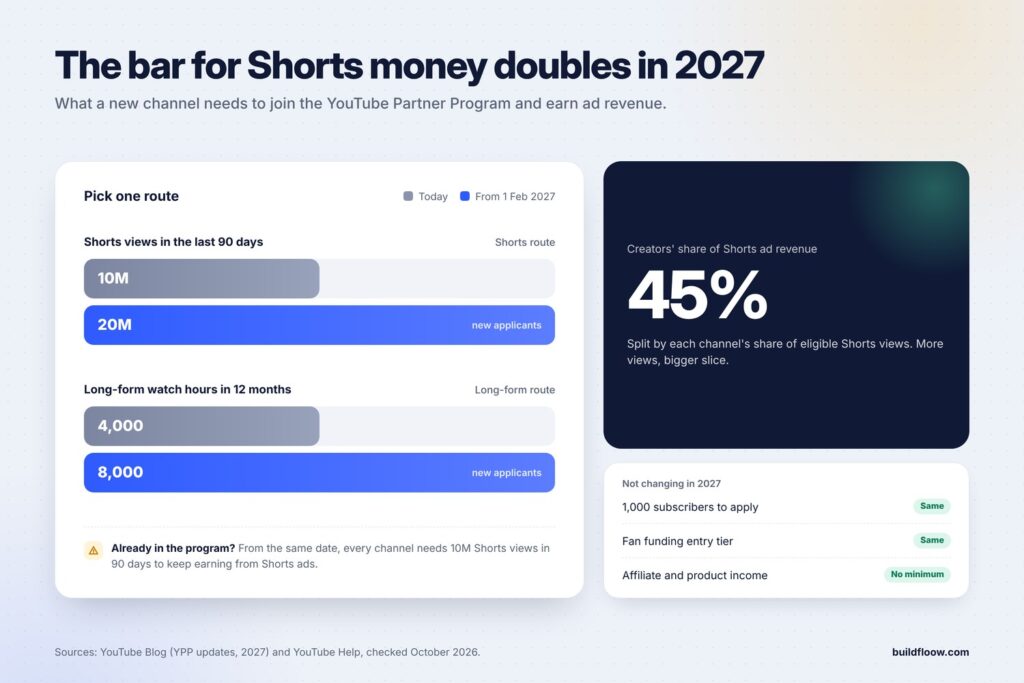
- 10 million valid public Shorts views in the last 90 days (or, on the long-form route, 4,000 watch hours in 12 months; you only need one of the two),
- plus no active Community Guidelines strikes, 2-Step Verification on your Google account, an AdSense account, and YPP availability in your country.
How Shorts pay. Ad revenue from the Shorts feed goes into a shared pool. After music licensing costs, creators keep 45% of the revenue allocated to them, split by each channel’s share of eligible Shorts views. More views means a bigger slice.
The bar is going up in 2027. YouTube announced that from 1 February 2027, new applicants will need 1,000 subscribers plus 20 million Shorts views in 90 days (or 8,000 watch hours in 12 months). From the same date, every channel, including ones already in YPP, needs 10 million qualified Shorts views in 90 days to share in Shorts ad revenue. A brand-new channel is unlikely to reach 10 million views before February, so plan around the 20 million bar and treat anything sooner as a bonus.
There’s an earlier milestone too. At 500 subscribers, 3 public uploads in 90 days and 3 million Shorts views in 90 days, you can join YPP’s lower tier. It opens up fan funding, such as channel memberships and Super Thanks, but not ad revenue. YouTube says those entry thresholds aren’t changing in 2027.
Don’t rely on ads alone. With the higher bar, the money that arrives first usually comes from:
- affiliate links to the tools you show (in the description or pinned comment),
- sponsorships once the channel has a clear audience,
- your own product: a template pack, a guide, a newsletter.
A simple product to sell to viewers, like a template or a printable, is another route. See 15 Notion and Canva templates you can make with AI and sell online.
Thresholds and policies change, so check YouTube’s official YPP page before you plan around any number above.
The rule that matters most: YouTube doesn’t monetize mass-produced, repetitive content. AI-assisted Shorts are fine; 300 near-identical videos are not. Every Short needs a real idea, real information and your own angle. The workflow below is built around that.
Step 0: Set up your machine (one time, about 20 minutes)
1. Install Node.js and FFmpeg
- Node.js 22 or newer: download the LTS installer from nodejs.org. Check it in a terminal with
node -v. - FFmpeg: on Mac,
brew install ffmpeg; on Windows,winget install ffmpeg; on Ubuntu,sudo apt install ffmpeg. Check it withffmpeg -version.
2. Install Claude Code
Claude Code is Claude running in your terminal. It can create files, run commands and fix its own mistakes. Follow the official install steps at docs.claude.com (on most machines it’s one command), then run claude and sign in with your Claude account. If you’re new to it, these 15 side hustles you can do with Claude give a feel for what it can do.
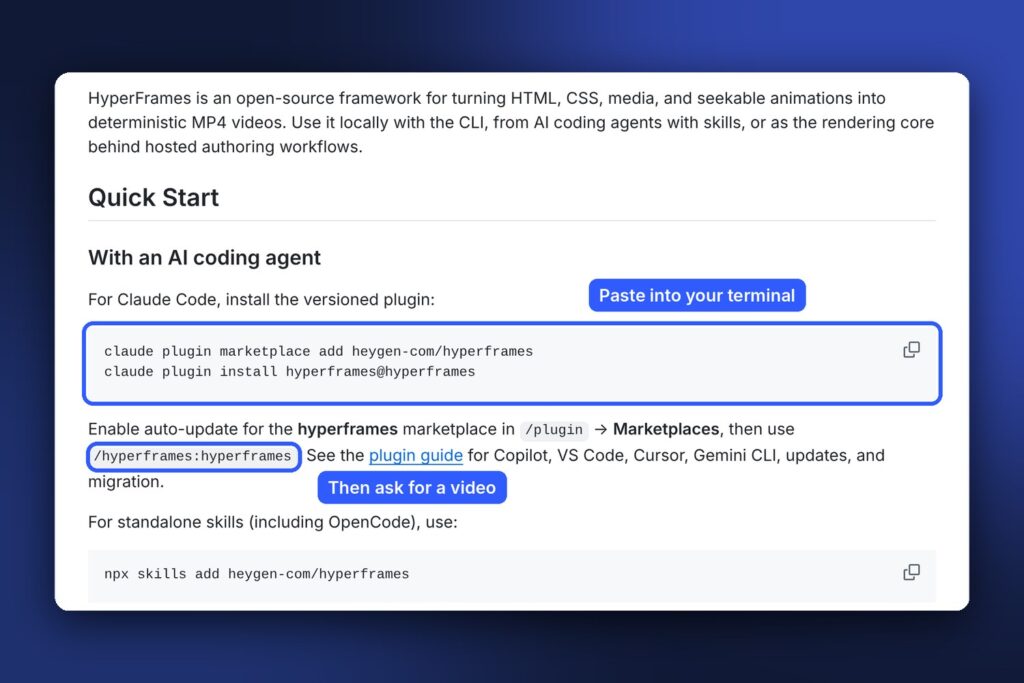
3. Add the HyperFrames skills to Claude Code
HyperFrames ships “skills”: instruction packs that teach Claude how to build valid video compositions. Inside your terminal:
bash
claude plugin marketplace add heygen-com/hyperframes
claude plugin install hyperframes@hyperframes
Restart Claude Code. You can now ask it for videos and it will use HyperFrames correctly: timing, captions and rendering.
4. Create a working folder
bash
mkdir shorts && cd shorts
claude
Everything for your channel lives here, with one subfolder per Short.
5. Set up the channel
- Create the channel from your Google account and turn on 2-Step Verification now (YPP requires it).
- Pick a name you can say out loud, a clean profile image, and a one-line description of what viewers get (“One AI tool explained in 30 seconds, every day”).
- Upload a channel banner later. For Shorts it barely matters.
6. Pick a niche, on purpose
A niche is the reason a stranger subscribes after one Short. Good Shorts niches for this workflow have three things:
- Endless topics (you need 30+ ideas a month).
- Visual explanations work (steps, numbers, comparisons, app screens).
- An audience that spends money (so affiliates and sponsors pay later).
Examples: AI tools for work, personal finance basics, study techniques, coding tips, productivity apps, history facts, science explained.
If you’re unsure, ask Claude:
text
I want to start a faceless YouTube Shorts channel I can run 30 minutes a day.
My interests: [list 3-5]. My skills: [list]. Suggest 5 niches. For each: why it works on Shorts,
10 example video ideas, and how the channel could earn beyond ads (affiliates, products).
Rank them by how easy it is to make 30 videos a month without repeating myself.
Step 1: Find the idea (let what already works pick your topic)
Don’t guess. In every niche, some formats are already pulling millions of views. Your job is to spot the pattern and bring your own version.
1. Collect the data (10 minutes)
On YouTube, search your niche keyword (for example ai tools), tap the Shorts filter, and scroll. For the top 15 to 20 Shorts, note the title or on-screen hook, the view count, the channel size and the length. A Short with 3 million views on a 2,000-subscriber channel matters more than one from a huge channel, because the idea did the work, not the audience.
Paste the list into Claude, or turn on web search in Claude and ask it to look these up for you.
2. Ask Claude for the patterns
text
Here are the top 20 Shorts in my niche "[niche]" with title/hook, views, channel subscribers and length:[paste list]
1. Which 3 formats appear most among the highest view-to-subscriber ratios? 2. What do the first 2 seconds have in common (number, command, question, bold claim)? 3. Give me 10 new video ideas that use those formats but cover topics none of these videos covered. For each: a hook line, the promise to the viewer, and why it should work.
3. Pick ideas with a filter
Keep an idea only if it passes all three:
- Practical: the viewer can do something with it right after watching.
- Visual: you can show it (an app screen, steps, a number changing).
- Yours: you can add a detail, opinion or example the top videos didn’t have.
Save the keepers in an ideas.md file in your shorts folder. Aim for a backlog of 30.
Step 2: Write a 30-second script, hook first
Shorts are judged in the first two seconds. Write the hook before anything else.
Script rules that work
- Length: 25 to 45 seconds. At a normal fast pace that’s 70 to 120 words (about 2.7 words per second).
- Hook (0 to 3 seconds): a number or a command, not a greeting. “5 free AI tools that replace your editor.” “Stop paying for templates.” Never “Hey guys, today we’re going to…”
- Body: numbered steps. Numbers tell viewers how long they have left and keep them watching.
- One idea per Short. If you have two, make two Shorts.
- End with an action: “Comment X and I’ll send you the link”, “Follow for part 2”, or “Save this.”
The prompt
text
Write a YouTube Short script about: [idea from ideas.md]
Audience: [who they are]. Goal: they can [do the thing] right after watching.

Rules:
- 80-110 words total, read aloud in about 30-40 seconds.
- Line 1 is the hook: a number or a command, max 10 words. No greeting.
- Then 3-5 numbered steps, each one sentence, each something the viewer can actually do.
- Last line: a call to action: "Comment [WORD] and I'll send you [the resource]."
- Plain spoken English, short sentences, no hype words, no claims I can't back up.
Give me 3 versions with different hooks, then tell me which hook is strongest and why.
Read all three out loud. Pick the one that sounds like a person talking, not an essay. Edit freely, because your own phrasing beats Claude’s. It’s worth keeping a library of prompts like this one.
Fact-check every number. If the script says “10 million views in 90 days”, be sure it’s true. One wrong fact in the comments costs you trust.
Step 3: Record the voice and build the video in code
This is the part that used to need an editor. Now Claude Code writes the video as HTML and HyperFrames renders it to MP4.
1. Record the voice
You have two options:
- Your own voice: most phones are good enough. Record in a small room with soft furnishings (a closet works), in one take, at a steady fast pace. Your own voice builds the most trust.
- Text-to-speech: paste the script into a TTS tool and pick one voice for the whole channel, so viewers recognize it. HyperFrames can generate narration locally with
npx hyperframes tts. For more natural voices, ElevenLabs is the usual pick, and it works well when you pair Claude with ElevenLabs for scripts and voice together. If the price puts you off, there are cheaper text-to-speech tools, though quality and voice choice vary.
Save it as voice.mp3 in a new folder, for example shorts/001-claude-shorts/.
2. Create the project with your audio
bash
cd shorts/001-claude-shorts
npx hyperframes init video --audio voice.mp3
When you pass --audio, HyperFrames transcribes your voice with Whisper, so every word gets an exact timestamp. That’s what lets captions and animations land on the right word.
3. Ask Claude Code to build it
Open Claude Code in that folder (claude) and give it a clear brief. This is close to the one used for the Reel:
text
Use /hyperframes:hyperframes to make a vertical 1080x1920 YouTube Short from video/ (my voice and its transcript are in there).
Script: [paste script]

Style:
- Warm cream background with soft moving color blobs, subtle grain. Not flat.
- Big serif headline per step with one accent word in orange; a step counter and a 4-segment progress bar at the top.
- Word-by-word captions in a dark rounded box near the bottom; the spoken word highlights in orange.
- Show the real apps the script mentions inside one realistic iPhone that stays on screen and changes apps:
  YouTube search results, the Claude app, a terminal, YouTube Studio, Instagram comments.
- Every element appears on the exact word it belongs to. Something moves every 1-2 seconds; no hard cuts.
- First frame must show the hook headline already on screen.
Then run `npx hyperframes check`, fix every error, take snapshots at the middle of each step and show me.
Claude Code will write the composition, run the checks, fix what fails and show you still frames. Ask for changes in plain language: “the phone is too small”, “move the captions up”, “make step 3 show a terminal typing”. When you’re happy, render it:
bash
npx hyperframes render -o renders/short.mp44. Add sound
A voice alone feels empty. Add:
- A music bed at low volume that dips under your voice. Use music you have the rights to. The YouTube Audio Library is free for YouTube, or you can use CC0 or CC BY tracks and credit the artist in the description. You can also make your own tracks with an AI music tool like Suno. Check its terms for commercial use first.
- Small sound effects on visual beats: a soft whoosh when the screen changes, a pop when a card appears, typing ticks. Keep them quiet, roughly a third of your voice’s volume.
Ask Claude Code to mix them into the composition (“add music.mp3 at -20 dB ducked under the voice, and a whoosh on each scene change”), then render again.
5. Watch it once before posting
Watch it full screen on your phone, with sound. Check that:
- The hook is readable in the first frame.
- Every caption is in sync with your voice.
- Nothing important sits in the bottom 20% or the right edge, where YouTube puts its buttons and title.
- Every number on screen is correct.
Time per Short once you’re set up: 5 minutes for the idea, 10 for the script, 5 to record, 10 to 15 with Claude Code, and 5 to render and check. That’s about 40 minutes, and it gets faster as your style becomes a reusable template.
Make a template. After your first good Short, tell Claude Code: “Turn this project into a reusable template where I only change the script, the voice and the per-step visuals.” Every Short after that starts from it.
Step 4: Post one a day
Upload settings that matter
- Title: the hook, under 60 characters. Add
#Shortsat the end. - Description: two lines on what the viewer gets, the link or resource you promised, a music credit if required, and 2 or 3 hashtags.
- Altered or synthetic content: YouTube asks whether your video contains realistic AI-generated people, places or events. Answer honestly. Motion graphics and app mockups usually don’t need the label; realistic AI footage of people does.
- Pinned comment: repeat the call to action (“Comment SHORTS and I’ll send the setup”) or link to the resource.
The weekly routine
| Day | What you do | Time |
|---|---|---|
| Sunday | Find ideas (Step 1), write 7 scripts (Step 2), record 7 voices | 90 min |
| Monday to Saturday | Build and render one or two Shorts, upload, reply to comments | 30 to 45 min |
| Every day | Post one Short at the same time | 2 min |
Batching the thinking on Sunday is what makes daily posting stick. Once the routine feels easy, you can batch create 30 Shorts in one day and fill a whole month in one sitting.
Review every week with Claude
In YouTube Studio, go to Analytics and note, for each Short: views, average percentage viewed, viewed vs. swiped away, subscribers gained and likes. Then ask Claude:
text
Here are this week's 7 Shorts with views, % viewed, viewed-vs-swiped, subs gained and the hook of each:[paste]
Which hooks and formats are working? Which should I drop? Give me 7 ideas for next week that double down on the winners.
Watch two numbers above all: viewed vs. swiped away (is the hook working?) and average percentage viewed (is the body worth staying for?).
Your first 30 days
| Week | Goal |
|---|---|
| 1 | Set up (Step 0), find 30 ideas, make your template, post 7 Shorts. Don’t judge the numbers yet. |
| 2 | Post daily. Start the weekly review. Rewrite the hooks of anything under 50% “viewed”. |
| 3 | Double down on your 2 best formats. Add one affiliate link or free resource to every description. |
| 4 | Post daily. Turn your best-performing Short into a series (“Part 2”, “Part 3”). |
Most channels don’t take off in the first month. The ones that grow are the ones still posting in month three, with each week a little better than the last.
Mistakes that kill Shorts channels
- Greeting instead of a hook. The first two seconds decide everything.
- Same video, new title. YouTube’s inauthentic-content rule demonetizes mass-produced repetition. Change the idea, as well as the words.
- Inventing facts or income claims. Viewers check, and so does YouTube.
- Changing niche every week. The algorithm needs to learn who your viewers are.
- No call to action. If you don’t ask, viewers don’t comment, follow or click.
- Quitting at day 20. Many channels that grew went through weeks of low views first.
FAQ
Do I need to show my face?
No. Everything in this guide is faceless. Your voice, or a consistent TTS voice, is enough. If you’d like an on-screen presenter without filming yourself, look at AI avatar tools like HeyGen.
Is AI content allowed on YouTube?
Yes, if it’s original and adds value. What isn’t monetized is mass-produced, repetitive content. Disclose realistic synthetic media when YouTube asks.
Can I do this on the free Claude plan?
You can research ideas and write scripts on the free plan. Building the videos needs Claude Code, which requires Pro or higher.
How long do Shorts have to be?
Shorts can now be up to 3 minutes, but 25 to 45 seconds is the sweet spot for this format: long enough to teach one thing, short enough that people finish it.
Can I post the same videos on Instagram Reels and TikTok?
Yes. Export once at 1080×1920 and upload natively to each platform, without watermarks. You get three chances at a hit from the same work.
When will I get paid?
Ad revenue starts once you meet the YPP thresholds and your application is approved. From 1 February 2027, that means 1,000 subscribers and 20 million Shorts views in 90 days for new applicants. Affiliate and product income can start much earlier, as soon as viewers start clicking your links.
Start tonight
- Install Node, FFmpeg and Claude Code, and add the HyperFrames skills (20 minutes).
- Search your niche on YouTube Shorts and paste the top 20 into Claude (15 minutes).
- Write and record your first script (15 minutes).
- Ask Claude Code to build it, render it, and post it.
Then do it again tomorrow.