Most budgets fail for a simple reason: they’re built once, on a good day, from guesses. ChatGPT can’t earn or save money for you, but it can do the slow parts of budgeting: sorting a month of transactions into categories, spotting where money leaks, doing the maths for different plans and turning it all into a simple monthly routine.
This guide shows you how to use ChatGPT to build a budget that holds up, step by step, with prompts you can copy. It also covers what not to share with an AI tool, and where the numbers in your budget should come from.
Who this is for: anyone who has tried budgeting and given up, or never started. If you’re also looking for ways to earn more, see our list of 15 side hustles you can do with ChatGPT.
Important: this guide is general information, not financial advice. For debt, tax or investment decisions, talk to a qualified professional.
Why use ChatGPT for budgeting?
A budget is simple maths: money in, minus money out. The hard part is everything around the maths: collecting your numbers, putting spending into categories, and deciding what to change. ChatGPT is good at exactly those jobs:
- Sorting: paste a list of transactions and it groups them into categories in seconds.
- Spotting patterns: it can point out subscriptions you forgot about and categories that keep growing.
- Planning: it can build several versions of a budget so you can compare them.
- Explaining: you can ask “why does this matter?” as many times as you need.
What it can’t do is know your real numbers unless you give them, or guarantee its maths is right. Always check totals yourself.
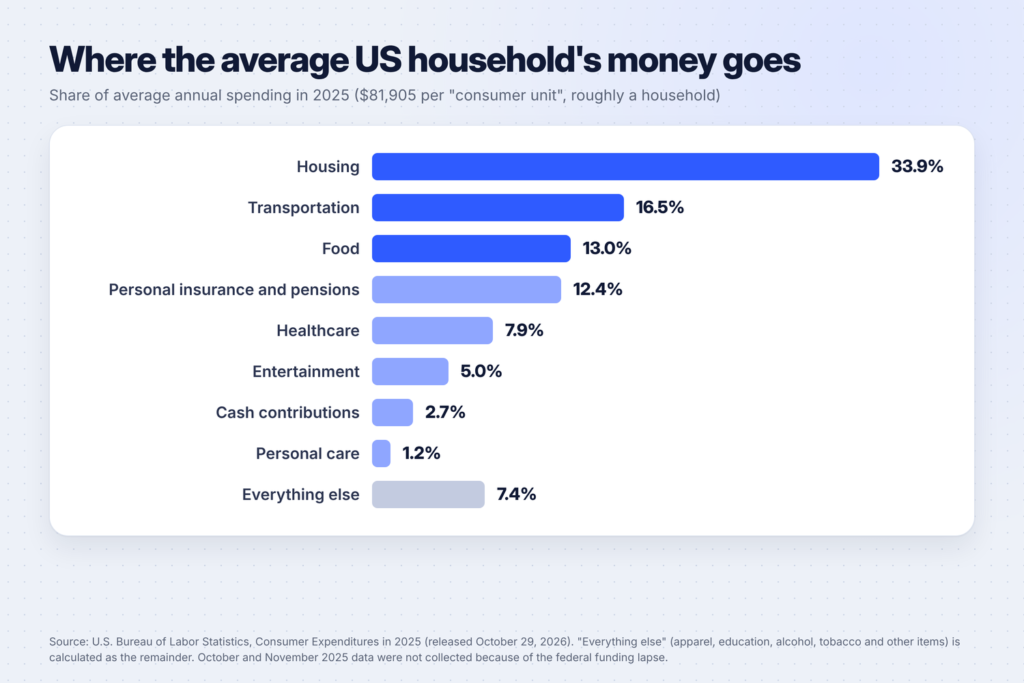
Where the average household’s money goes
To see why a budget matters, look at where money goes. The U.S. Bureau of Labor Statistics’ Consumer Expenditure Survey found that in 2025 the average US household (what BLS calls a “consumer unit”) spent $81,905. Housing took 33.9%, transportation 16.5% and food 13.0%. Together, those three make up almost two-thirds of spending, so they’re where small changes make the biggest difference.
Before you start: what not to share with ChatGPT
Budgeting with AI means handling personal financial information, so set some rules first:
- Never share account numbers, card numbers, passwords, PINs, your Social Security number or login details.
- Do share amounts, dates, merchant names and categories. That’s all ChatGPT needs.
- Remove names of other people from transactions (for example, “transfer to [name]”).
- Check your data settings. OpenAI’s data controls article explains that you can turn off “Improve the model for everyone” in Settings under Data controls, which stops your new conversations from being used to train its models. It also describes Temporary Chats, which don’t appear in your history and aren’t used to train models.
A simple way to stay safe: export your transactions, delete the columns with account details, and only then paste the rest in.
Step 1: Gather your numbers (30 minutes)
You need two things: your income and your spending for the last one to three months.
- Income: take-home pay from your payslips, plus any side income, benefits or support.
- Spending: download your bank and credit card statements as CSV or spreadsheet files. Many banks let you export transactions from online banking.
- Bills that don’t come every month: car insurance, annual subscriptions, school fees, gifts. Write down how much each costs per year.
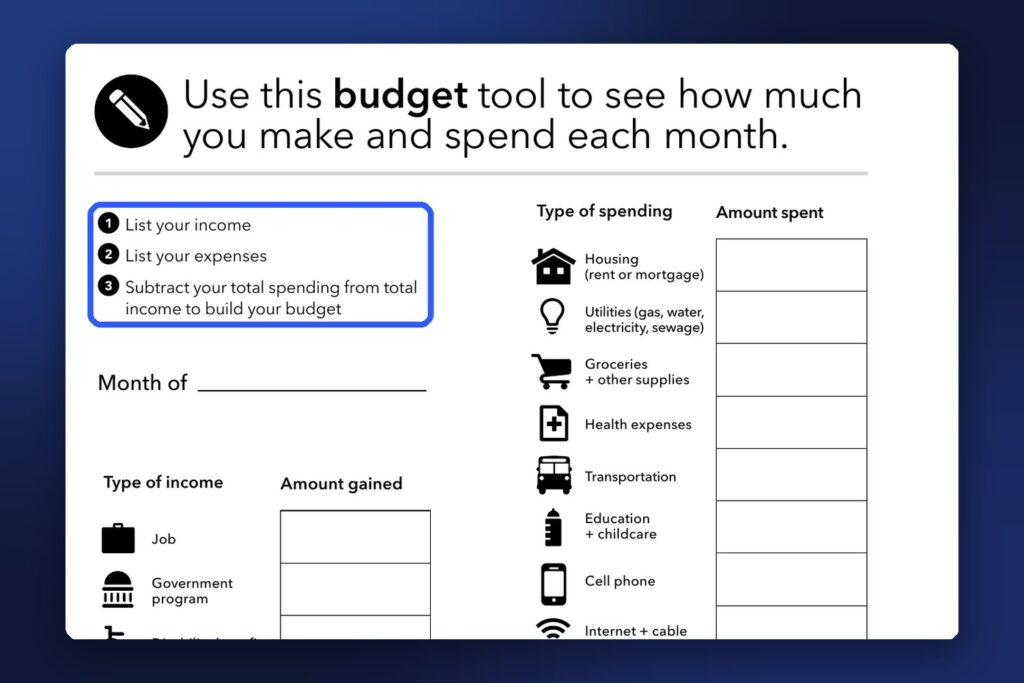
If you’d rather do this on paper first, the Consumer Financial Protection Bureau’s free monthly budget tool walks you through it in three steps: list your income, list your expenses, and subtract your total spending from your total income.
Step 2: Let ChatGPT sort your spending
Paste your cleaned-up transactions (date, merchant, amount) into ChatGPT with this prompt:
Here are my transactions for the last month (date, merchant, amount).
Sort them into these categories: Housing, Utilities, Groceries, Eating out,
Transportation, Health, Debt payments, Subscriptions, Shopping, Gifts and
donations, Other.
Show a table with the total for each category and its share of my total spending.
Then list:
- every recurring charge you can find (likely subscriptions)
- any merchant I spent more than $100 at
- anything you weren't sure how to categorize
You can also upload the file instead of pasting text. OpenAI’s pricing page lists “Limited messages with uploads” on Free and more uploads on Go and Plus.
Check the result. Add up two or three categories yourself. If a total looks wrong, ask ChatGPT to show which transactions it put in that category.
The CFPB’s spending tracker is a good reference for categories: it includes cell phone, debt payments, eating out, education and childcare, entertainment, groceries, health expenses, helping others, housing and utilities, pets, transport and other.
Step 3: Find your real monthly picture
Once your spending is sorted, ask ChatGPT to put it next to your income:
My monthly take-home income is $[amount].
My non-monthly bills are: [list each with its yearly cost].
Using the category totals above:
1. Convert my non-monthly bills into a monthly amount to set aside.
2. Show income minus spending, including the set-asides.
3. Tell me if I'm spending more than I earn, and by how much.
Keep the maths visible so I can check it.
The answer gives you the number that matters most: whether you have money left over each month, or a gap to close.
Step 4: Choose a budgeting method
There’s no single right method. Ask ChatGPT to show your numbers in two or three of these and pick the one you can stick to:
| Method | How it works | Good for |
|---|---|---|
| 50/30/20 | About 50% of take-home pay to needs, 30% to wants, 20% to savings and debt | A simple starting point |
| Zero-based | Every dollar gets a job until income minus spending equals zero | People who like detail |
| Pay yourself first | Savings come out on payday; you spend what’s left | People who struggle to save |
| Envelope (digital or cash) | A fixed amount per category; when it’s gone, it’s gone | Overspending on food or shopping |
The percentages in the 50/30/20 rule are a rule of thumb, not an official standard. If your housing costs alone take half your income, adjust it. ChatGPT is useful here because it can rebalance the numbers instantly.
Prompt:
Using my income and spending above, build three budget options:
a 50/30/20 budget, a zero-based budget and a pay-yourself-first budget.
For each one, show the amount per category and what I would need to cut
compared with my current spending. Then tell me which looks easiest to stick
to based on my current habits, and why.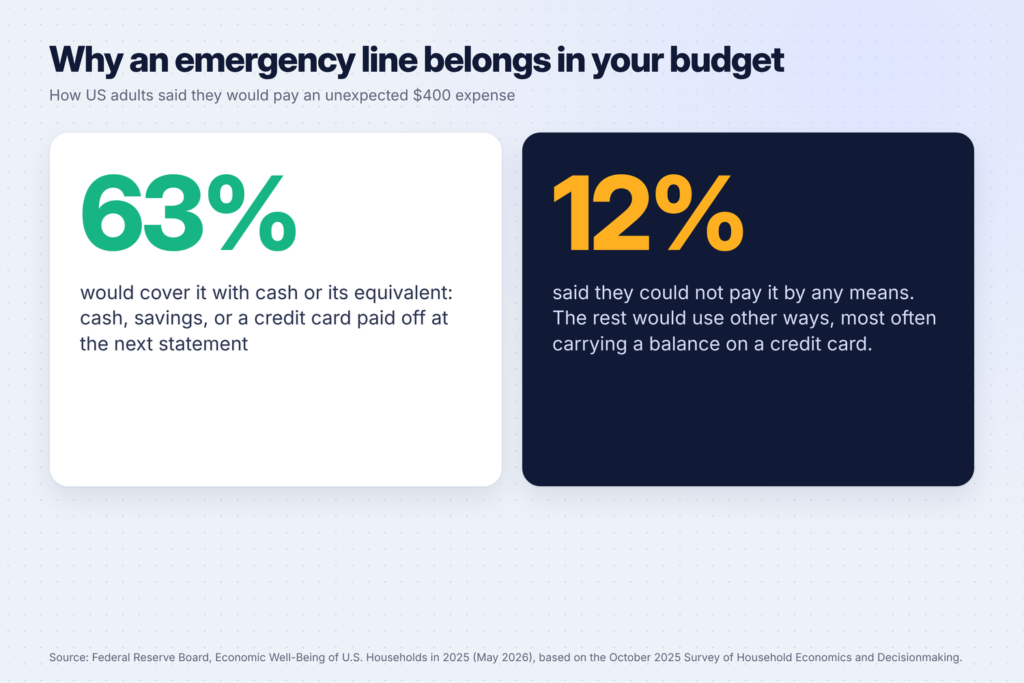
Step 5: Add an emergency line
Unexpected costs break budgets. In the Federal Reserve’s Economic Well-Being of U.S. Households in 2025 report, 63% of adults said they would cover a $400 emergency expense with cash or its equivalent, and 12% said they could not pay it by any means, according to the report’s section on unexpected expenses.
Even a small monthly amount set aside for emergencies helps. Ask ChatGPT:
I want to build an emergency fund of $[target].
I can save $[amount] a month right now.
How many months will it take? Show me two faster options by cutting
from my lowest-priority categories, and what each cut would mean in practice.
Step 6: Cut costs without making life miserable
Ask ChatGPT for specific, realistic cuts based on your own spending, not generic tips:
Look at my spending by category. Suggest 5 specific changes that could
save at least $[amount] a month without cutting [things that matter to me].
For each one, show the estimated monthly saving and how hard it would be
(easy, medium, hard). Don't suggest anything that needs me to earn more.
Common wins it may find: subscriptions you forgot about, eating out that could be planned meals, and bank or card fees. If food is a big category, our 50 ChatGPT prompts for meal planning include prompts for budget weekly meal plans and grocery lists.
Step 7: Turn it into a monthly routine
A budget works when you check it regularly. Make it a 20-minute habit:
- Once a month, export last month’s transactions and paste them in with the same sorting prompt.
- Compare with your budget: “Here’s my budget and here’s what I actually spent. Show me where I went over and by how much.”
- Adjust one or two categories for next month.
- Celebrate what went well. Ask ChatGPT to tell you how much you saved compared with the month before.
If you use ChatGPT Plus, its pricing page lists Projects. Keep your budget, your categories and your past months in one project so every check-in starts with your history. You can also keep your budget in a spreadsheet or a Notion page and paste the summary in each month.

A worked example
Here’s how the steps fit together for a made-up person. Maya takes home $3,200 a month. After sorting one month of transactions, ChatGPT shows she spent $3,050, which looks fine until she adds her non-monthly bills: $600 a year for car insurance and $240 a year for two annual subscriptions. That’s $70 a month she should be setting aside, which takes her to $3,120, leaving just $80.
ChatGPT then flags three things: $46 a month in subscriptions she rarely uses, $310 on eating out, and no emergency line at all. Maya cancels two subscriptions, plans four more meals at home each week, and sets up a $100 monthly transfer to savings on payday. She checks her numbers on the first Sunday of each month using the same prompts.
None of this needed special software: just exported transactions, a few prompts and 20 minutes a month.
A ready-to-use budget prompt (all in one)
If you want to do everything in one go, use this prompt after you’ve removed private details from your transactions:
Act as a patient budgeting coach. I'm going to give you my monthly take-home
income, my non-monthly bills and last month's transactions.
1. Sort my transactions into categories and total each one.
2. Turn my non-monthly bills into monthly set-asides.
3. Show income minus spending.
4. Build a simple budget for next month that includes an emergency savings line.
5. Suggest 3 realistic changes, with the monthly saving for each.
Show all maths so I can check it, ask me questions if anything is unclear,
and don't give investment or tax advice.
Income: $[amount]
Non-monthly bills: [list]
Transactions: [paste]
Common mistakes when budgeting with ChatGPT
- Trusting the maths blindly. AI tools can add up wrong. Check the totals that matter.
- Sharing too much. Account numbers and logins never belong in a chat.
- Forgetting irregular bills. Annual and quarterly costs are where most budgets break.
- Making the budget too strict. A budget with no fun money rarely lasts a month.
- Not coming back to it. One budget, set once, goes stale fast. The monthly check-in is what makes it work.
FAQ
Can ChatGPT make a budget for me?
It can build one from the numbers you give it: categorizing transactions, doing the maths and suggesting a plan. It doesn’t have access to your bank account, so the result is only as good as the information you share. Check its maths before relying on it.
Is it safe to put my bank statements into ChatGPT?
Remove account numbers, card numbers, names and anything that could identify you or let someone access your money. Amounts, dates and merchant names are enough. OpenAI’s data controls let you turn off model training on your new chats, and Temporary Chats aren’t used to train its models.
Is the free version of ChatGPT enough for budgeting?
For pasting a month of transactions and asking for categories and a plan, the free plan is usually enough. Paid plans add more uploads, and Plus adds features such as Projects, which make a monthly routine easier. Our comparison of ChatGPT Plus, Claude Pro and Gemini covers what each plan includes.
What is the 50/30/20 rule?
It’s a rule of thumb that splits take-home pay into about 50% for needs, 30% for wants and 20% for savings and debt repayment. It’s a starting point, not a requirement: adjust it to your real costs.
How much should I keep for emergencies?
There’s no single right amount. Start with a small target you can reach in a few months, then build from there. The Federal Reserve’s household survey found that 63% of adults would cover a $400 emergency expense with cash or its equivalent.
Keep going
Once your budget is working, put the money you free up to use. Find ways to earn more in 25 AI side hustles for stay-at-home moms and 20 AI side hustles for college students, or turn your new skills into a product with 50 digital product ideas for beginners.